Vigor3900 Series User’s Guide
206
Item Description
Clear Counter
Click the icon to delete the selected profile.
H
H
o
o
w
w
t
t
o
o
c
c
r
r
e
e
a
a
t
t
e
e
a
a
n
n
A
A
p
p
p
p
l
l
i
i
c
c
a
a
t
t
i
i
o
o
n
n
F
F
i
i
l
l
t
t
e
e
r
r
p
p
r
r
o
o
f
f
i
i
l
l
e
e
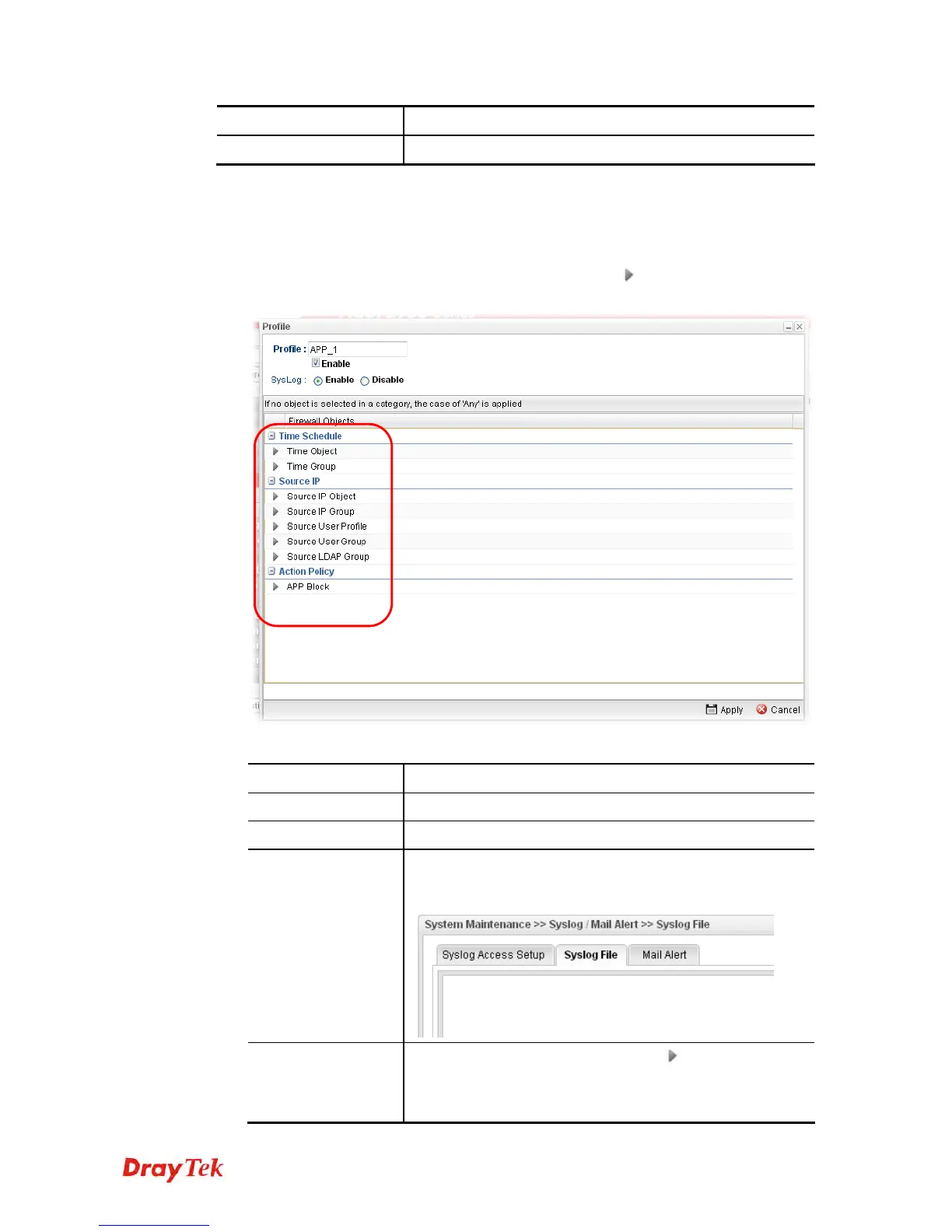
1. Open Firewall>>Filter Setup and click the Application Filter tab.
2. Simply click the Add button.
3. The following dialog will appear. Click the triangle icon
to display the profile
selection box (red rectangle).
Available parameters are listed as follows:
Item Description
Profile
Type the name of the application filter profile.
Enable
Check the box to enable this profile.
Syslog
Click Enable to make the history of firewall actions
appearing on the System Maintenance >> Syslog/Mail
Alert >> Syslog File.
Time Schedule
Time Object - Click the triangle icon
to display the
profile selection box. Choose a schedule profile to be
applied on such application filter profile. The router will
perform the filtering job based on the time object selected.














 To Next Page