Vigor3900 Series User’s Guide
248
Item Description
and click the Delete button.
Refresh
Renew current web page.
Profile Number Limit
Display the total number (16) of the object profiles to be
created.
Profile
Display the name of the object profile.
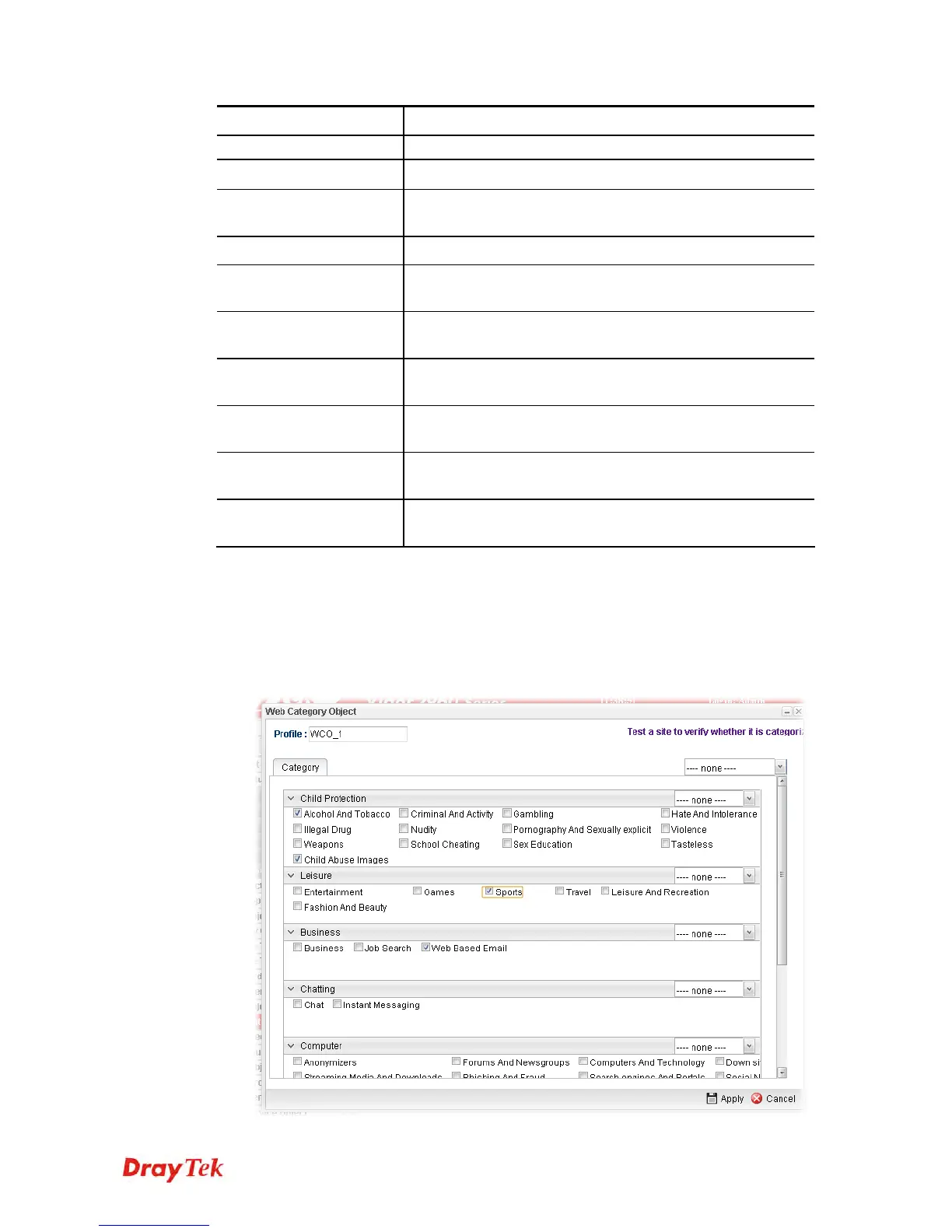
Child Protection
Display the items under certain category that you choose to
block for protecting the children.
Leisure
Display the items under certain category that you choose to
block.
Business
Display the items under certain category that you choose to
block.
Chatting
Display the items under certain category that you choose to
block.
Computer
Display the items under certain category that you choose to
block.
Other
Display the items under certain category that you choose to
block.
H
H
o
o
w
w
t
t
o
o
c
c
r
r
e
e
a
a
t
t
e
e
a
a
n
n
e
e
w
w
w
w
e
e
b
b
c
c
a
a
t
t
e
e
g
g
o
o
r
r
y
y
o
o
b
b
j
j
e
e
c
c
t
t
p
p
r
r
o
o
f
f
i
i
l
l
e
e
1. Open Objects Setting>> Web Category Object and click the Web Category Object
tab.
2. Simply click the Add button.
3. The following dialog will appear.














 To Next Page