Vigor3900 Series User’s Guide
276
Item Description
not.
Use mOTP
Display if mOTP is activated (enable or disable) or not.
Allow PPPoE Server
Login
Display the status of PPPoE connection for such user
profile.
(enable or disable)
PPPoE Time
Quota(min)
Display the current PPPoE time quota usage portion for
such user.
PPPoE Traffic
Quota(MB)
Display the current PPPoE traffic quota usage portion for
such user.
Allow FTP Server
Login
Display if FTP Server Login is activated (enable or disable)
or not.
Allow SMABA Server
Login
Display if SMABA Server Login is activated (enable or
disable) or not.
Allow Radius Server
Login
Display if Radius Server Login is activated (enable or
disable) or not.
H
H
o
o
w
w
t
t
o
o
c
c
r
r
e
e
a
a
t
t
e
e
a
a
n
n
e
e
w
w
U
U
s
s
e
e
r
r
P
P
r
r
o
o
f
f
i
i
l
l
e
e
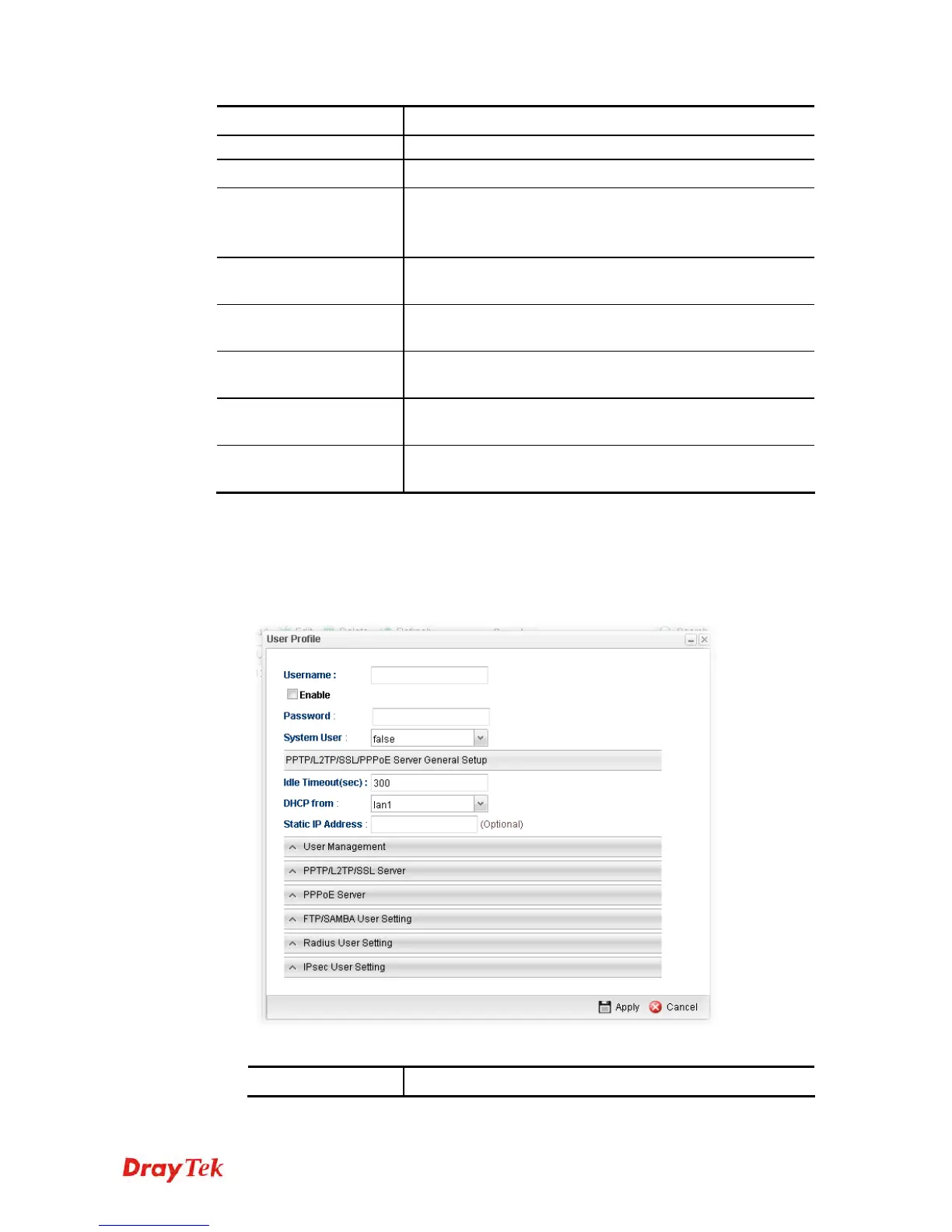
1. Open User Management>>User Profile.
2. Simply click the Add button.
3. The following dialog will appear.
Available parameters are listed as follows:
Item Description














 To Next Page