Vigor3900 Series User’s Guide
299
Item Description
Port
Display the port number set for such profile.
Common Name
Identifier
Display the name for identification.
Base DN
Display the configured Base DN if Bind Type is set with
Simple Mode.
Group DN
Display the configured Group DN if Bind Type is set with
Simple Mode.
Regular DN
Display the configured regular DN if Bind Type is set with
Regular Mode.
Logout After(min)
Display the maximum usage duration for RADIUS
authentication.
H
H
o
o
w
w
t
t
o
o
c
c
r
r
e
e
a
a
t
t
e
e
a
a
n
n
e
e
w
w
L
L
D
D
A
A
P
P
/
/
A
A
c
c
t
t
i
i
v
v
e
e
D
D
i
i
r
r
e
e
c
c
t
t
o
o
r
r
y
y
P
P
r
r
o
o
f
f
i
i
l
l
e
e
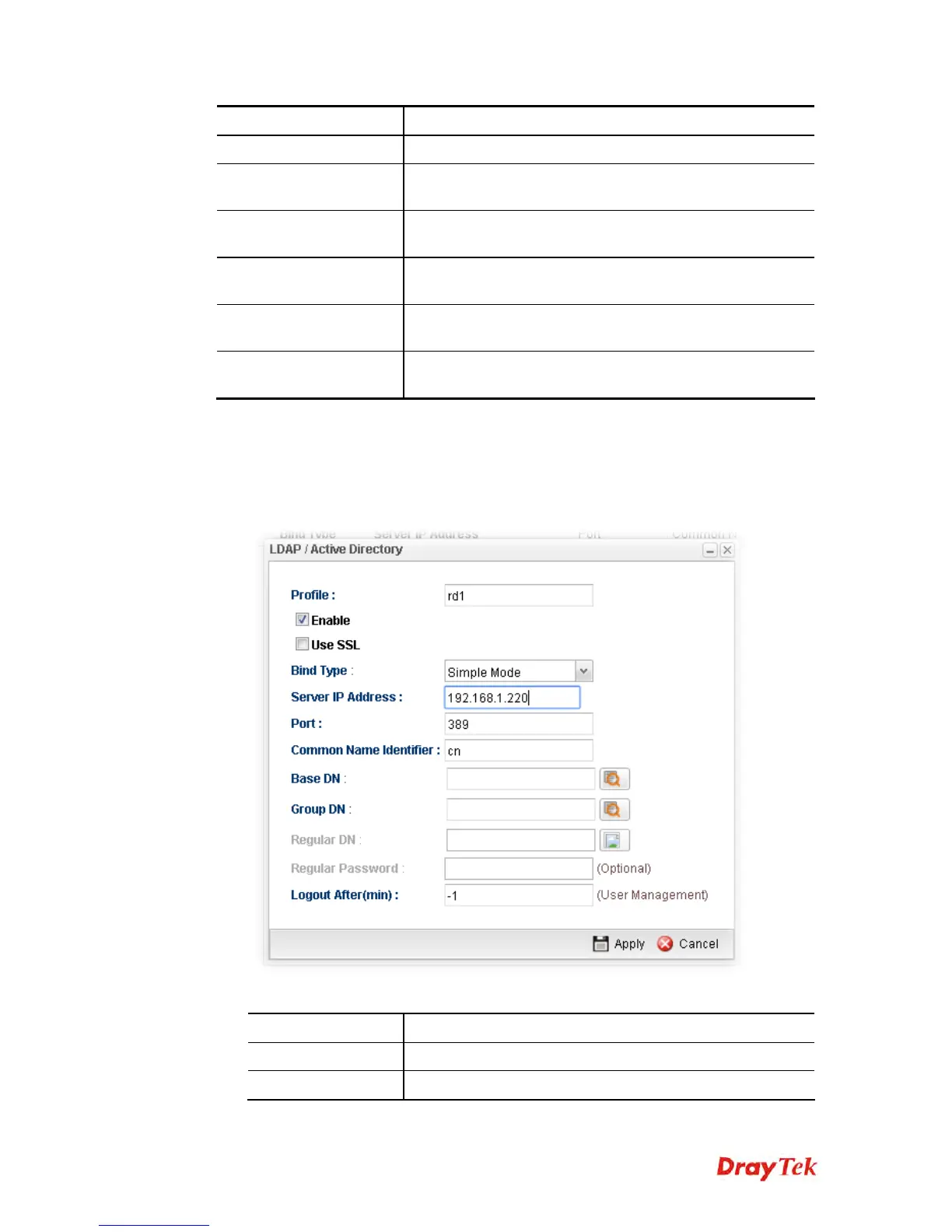
1. Open User Management>>LDAP/Active Directory.
2. Simply click the Add button.
3. The following dialog will appear.
Available parameters are listed as follows:
Item Description
Profile
Type a name for such profile.
Enable
Check this box to enable such profile.














 To Next Page