Vigor3900 Series User’s Guide
336
RIP via VPN
Enable – Click it to exchange routing information
packets via VPN connection.
Disable – Disable such function. This is default setting.
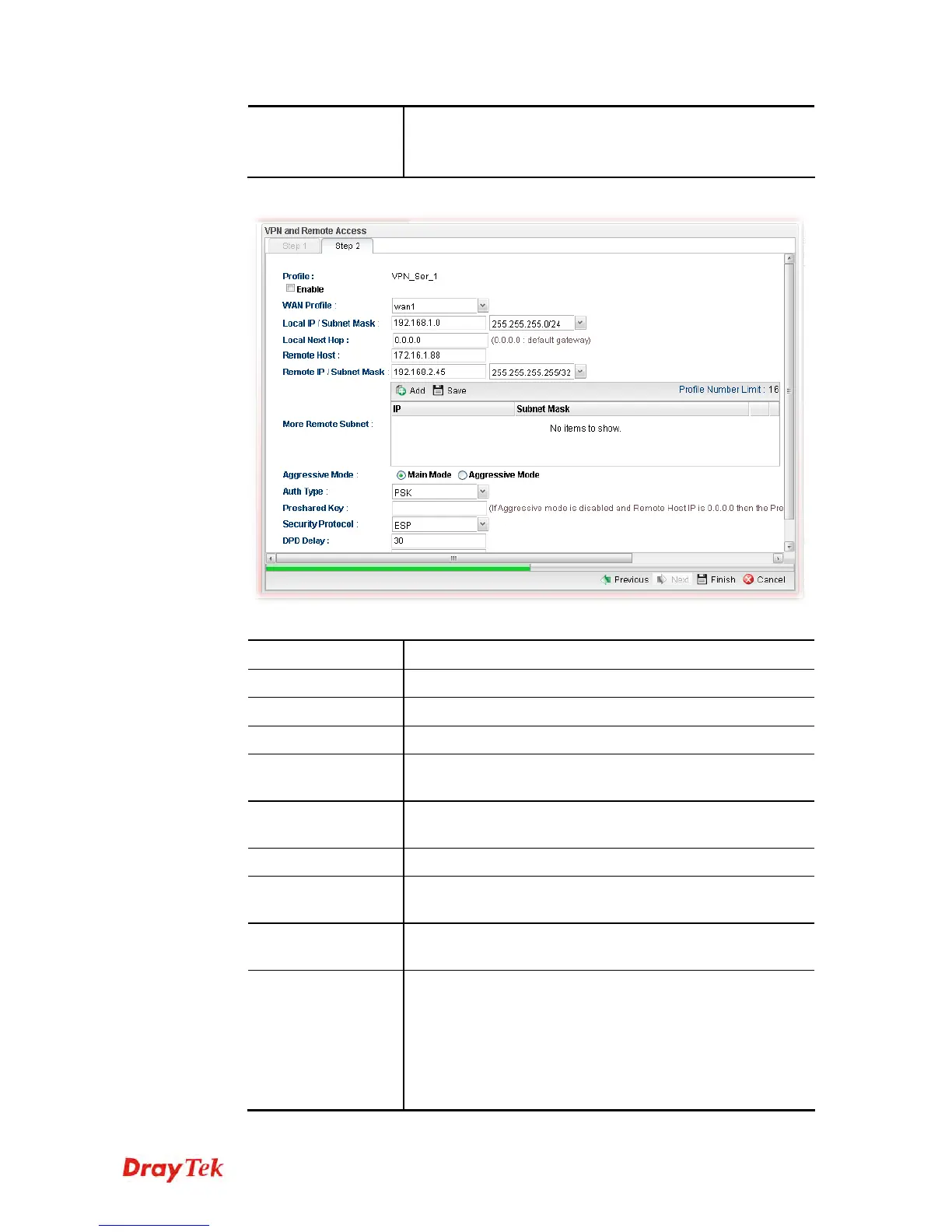
If you choose IPSec as the Type in Step 1, you will get the following page:
Available parameters are listed as follows:
Item Description
Profile
Display the name of the VPN profile.
Enable
Check this box to enable such profile.
WAN Profile
Choose a WAN profile to be used by such profile.
Local IP/Subnet
Mask
Type the IP address and subnet mask of local host.
Local Next Hop
Specify the gateway for WAN interface. Usually, use the
default setting (leave it in blank).
Remote Host
Type the WAN IP address for the remote host.
Remote IP / Subnet
Mask
Type the LAN IP address and LAN subnet mask for the
remote host.
More Remote
Subnet
Add more remote subnet in this field if required.
IKE Phase 1
The ultimate outcome is to exchange security proposals to
create a protected secure channel. Main mode is more
secure than Aggressive mode since more exchanges are
done in a secure channel to set up the IPSec session.
However, the Aggressive mode is faster. The default value
in Vigor router is Main mode.
Local ID – Type the ID for Vigor router which can be














 To Next Page