Vigor3900 Series User’s Guide
348
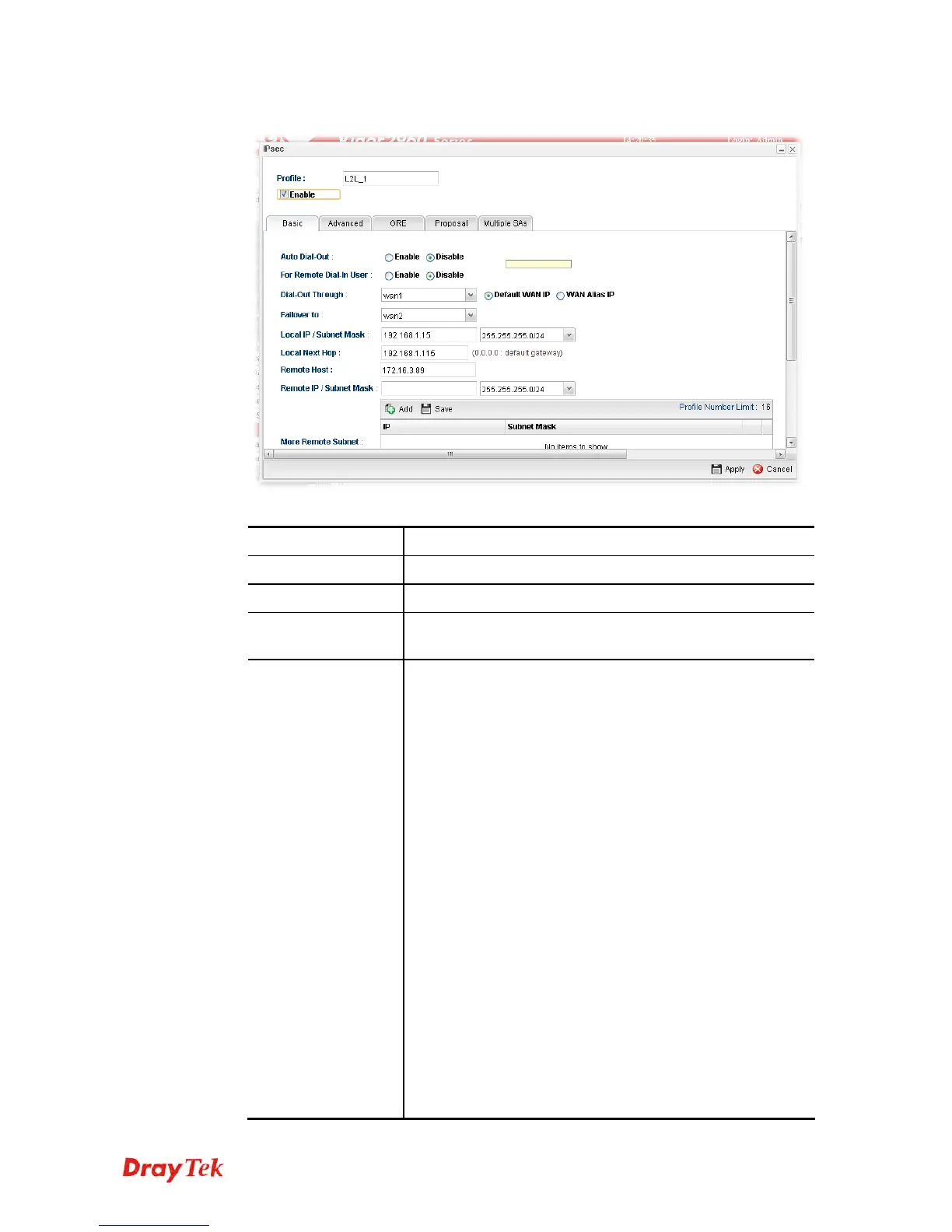
3. The following dialog will appear. Click the Basic tab to configure the settings.
Available parameters are listed as follows:
Item Description
Profile
Type the name of the profile.
Enable
Check this box to enable this profile.
Type
There are three types offered here for you to choose. Please
choose IPSec for this case.
Basic
Always On – Click Enable to make router always keeping
connection.
For Remote Dial-In User- Click Enable to allow the
connection via IPSec remote dial-in host.
Dial-Out Through- Choose a wan profile to be used by
such profile.
Failover to – Choose a wan profile which will lead the data
passing through other WAN automatically when the
selected WAN interface (in Dial-Out Through) is failover.
Local IP/Subnet - Type the IP address and subnet mask of
local host.
Local Next Hop - Specify the gateway for WAN interface.
Usually, use the default setting (leave it in blank).
Remote Host - Type the WAN IP address for the remote
host.
Remote IP / Subnet Mask - Type the LAN IP address and
LAN subnet mask for the remote host.
More Remote Subnet – Add more remote subnet in this
field if required.
IKE Protocol – Choose IKEv1 or IKEv2.














 To Next Page