Vigor3900 Series User’s Guide
61
3
3
.
.
1
1
0
0
.
.
4
4
E
E
n
n
a
a
b
b
l
l
e
e
W
W
A
A
N
N
C
C
o
o
n
n
n
n
e
e
c
c
t
t
i
i
o
o
n
n
o
o
n
n
C
C
P
P
E
E
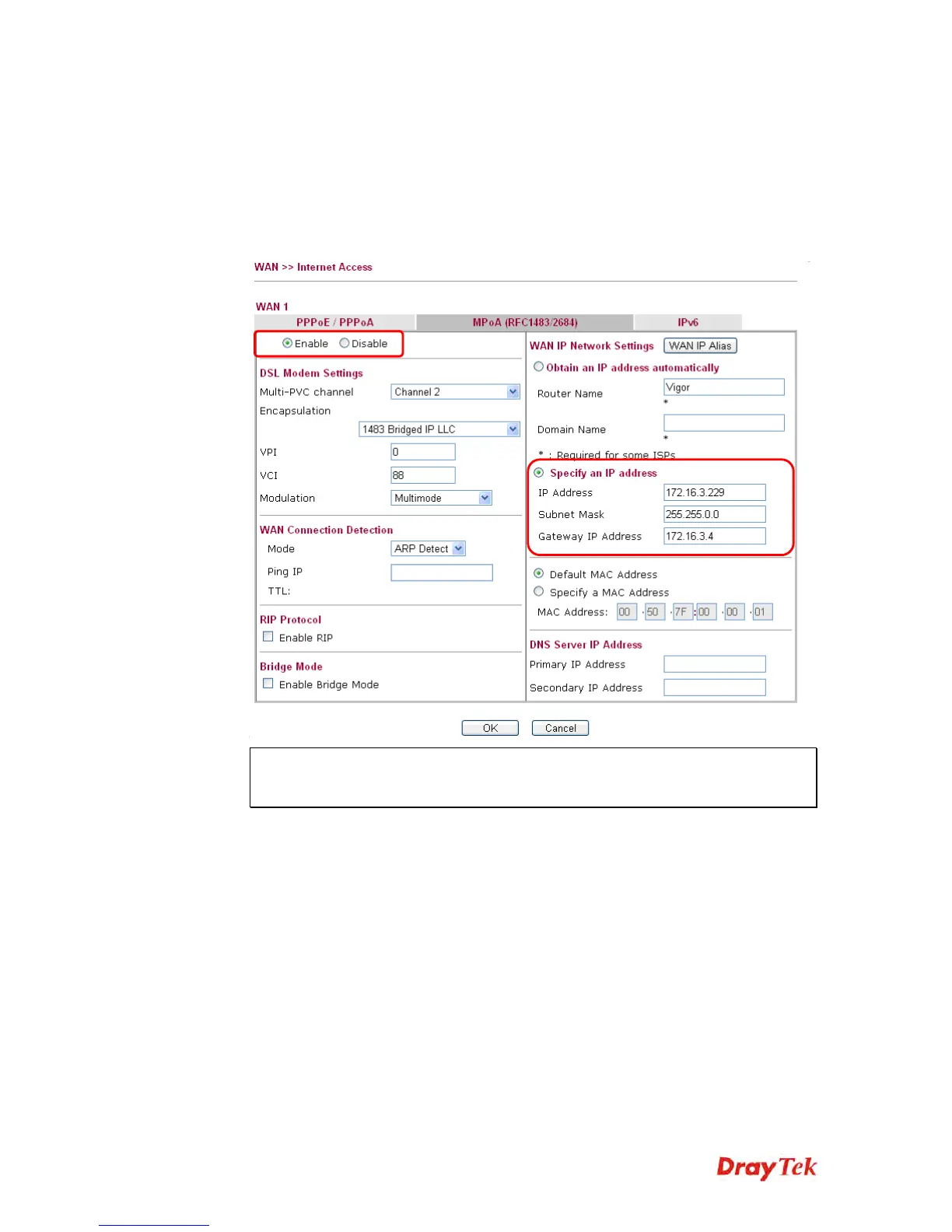
1. Login the web user interface of the CPE.
2. Open WAN>>Internet Access. Use the drop down list of Access Mode on WAN1 to
select MPoA (RFC1483/2684). Then, click Details Page.
3. Click Specify an IP address. Type correct WAN IP address, subnet mask and gateway
IP address for your CPE. Then click OK.
Note: Reboot the CPE device and re-log into Vigor3900. CPE which has registered
to Vigor3900 will be captured and displayed on the page of Central VPN
Management>>CPE Management.














 To Next Page