Home
Draytek
Firewall
Vigor3900
Page 75
Draytek Vigor3900 - Page 75
516 pages
Manual
Save Page as PDF
To Next Page
To Next Page
To Previous Page
To Previous Page
Loading...
Vigor3900 Series User’s Guide
67
5.
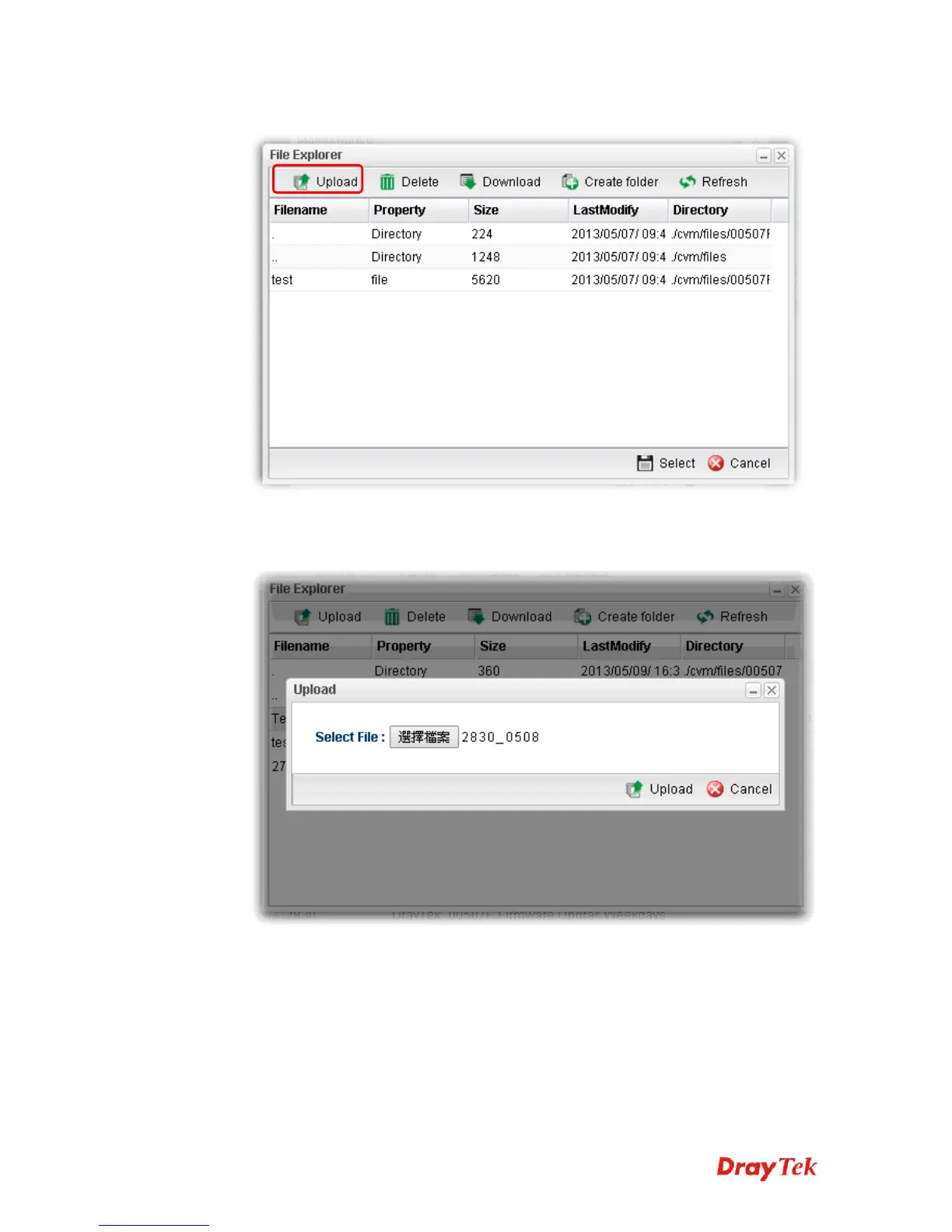
In the File Explorer dialog, click
Upload
.
6.
In the Upload dialog, click the
Browse..
button to find out the firmware (e.g.,
2830_0508 in this case) you want to upload
from PC to Vigor390
0.
Then, click
Upload
.
VoIPon www.voipon.co.uk sales@voipon.co.uk Tel: (0)330 088 0195 Fax: +44 (0)1245 808299
74
76
Table of Contents
Main Page
Default Chapter
4
Regulatory Information
4
Table of Contents
5
Chapter 1: Introduction
9
LED Indicators and Connectors
10
Hardware Installation
12
Network Connection
12
Rack-Mounted Installation
13
Chapter 2: Basic Setup
15
Changing Password
15
Quick Start Wizard
17
Step 1 - Specifying the WAN Profile
17
Step 2 - Configuring the Selected Protocol
19
Register Vigor Router
26
Chapter 3: Application and Tutorial
29
How to Use Bandwidth Limit on Vigor3900
29
How to Use Session Limit on Vigor3900
32
How to Assign Other IP as Gateway IP for LAN DHCP Clients
34
How to Use Port Redirection on Vigor3900
36
How to Configure OSPF
38
How to Configure LAN to LAN Ipsec Tunnel between Vigor3900 and Other Router (Main Mode)
44
How to Run RDP Service in the Browser Via Logging in 3900'S HTTPS Server
47
Troubleshooting
51
How to Configure VPN Load Balance between Vigor3900 and Other Router
52
How to Setup 50 Wans on Vigor3900
61
CVM Application - How to Manage the CPE (Router) through Vigor3900
66
CVM Application - How to Build the VPN between Remote Devices and Vigor3900
71
CVM Application - How to Upgrade CPE Firmware through Vigor3900
74
How to Use High Availability for Vigor Routers
80
How to Configure DNS Inbound Load Balance on Vigor 3900
84
Chapter 4: Advanced Web Configuration
87
WAN Setup
87
General Setup
88
Inbound Load Balance
111
Switch
116
Lan
121
General Setup
121
Pppoe Server
135
Switch
139
Bind IP to MAC
145
Lan Dns
148
Routing
151
Load Balance Pool
151
Static Route
155
Policy Route
161
Default Route
178
RIP Configuration
179
OSPF Configuration
180
BGP Configuration
183
Nat
188
Port Redirection
188
Server Load Balance
192
DMZ Host
194
Alg
198
Connection Timeout
200
Firewall
201
Filter Setup
201
Dos Defense
224
MAC Block
227
Filter Counter
229
Objects Setting
230
IP Object
231
IP Group
233
Ipv6 Object
235
Mac/Vendor Object
237
Country Object
239
Service Type Object
241
Service Type Group
243
Keyword /DNS Object
245
File Extension Object
249
APP Object
251
Web Category Object
255
QQ Object
259
QQ Group
261
Time Object
263
Time Group
265
SMS Service Object
267
Mail Service Object
269
Notification Object
271
User Management
275
Web Portal
276
User Profile
282
Usergroup
296
Guest Profile
298
Radius
304
Ldap/Active Directory
306
Application
309
Dynamic DNS
309
DNS Security
314
Gvrp
316
IGMP Proxy
317
Upnp
318
High Availability
319
Wake on LAN
327
SMS / Mail Alert Service
329
VPN and Remote Access
334
VPN Client Wizard
334
VPN Server Wizard
341
Remote Access Control
348
PPP General Setup
349
Ipsec General Setup
353
VPN Profiles
354
VPN Trunk Management
369
Connection Management
374
Certificate Management
376
Local Certificate
376
Trusted CA Certificate
381
Remote Certificate
384
SSL Proxy
386
SSL Web Proxy
386
SSL Application
387
Online User Status
392
Bandwidth Management
393
Quality of Service
393
Qos Rule
397
Sessions Limit
404
Bandwidth Limit
407
USB Application
411
Disk Status
411
FTP Server
412
SAMBA Server
413
Printer
416
Temperature Sensor
417
Modem Support List
419
System Maintenance
420
412
420
Administrator Password
423
Configuration Backup
424
Syslog / Mail Alert
427
Time and Date
431
Access Control
432
SNMP Setup
437
Reboot System
438
Firmware Upgrade
441
APP Signature Upgrade
445
APP Support List
447
Diagnostics
448
Routing Table
448
ARP Cache Table
451
DNS Cache Table
453
DHCP Table
454
Session Table
456
Traffic Graph
457
Web Console
459
Ping/Trace Route
459
Data Flow Monitor
460
User Status
463
Central Management (VPN)
464
General Setup
464
CPE Management
466
Log/Alert
475
Central Management (AP)
476
General Setup
478
Dashboard
479
Status
479
WLAN Profile
481
Rogue AP
485
Total Traffic
487
Event Log
487
Station Number
488
AP Maintenance
488
Traffic Graph
490
Load Balance
490
AP Map
492
Function Support List
495
Central Management (Switch)
496
Status
496
Profile
499
Group
503
Maintenance
504
Support List
505
External Devices
506
Product Registration
507
Chapter 5: Trouble Shooting
509
Checking if the Hardware Status Is OK or Not
509
Checking if the Network Connection Settings on Your Computer Is OK or Not
509
Pinging the Router from Your Computer
513
Checking if the ISP Settings Are OK or Not
514
Backing to Factory Default Setting if Necessary
515
Contacting Draytek
516
Other manuals for Draytek Vigor3900
Quick Start Guide
22 pages
Related product manuals
Draytek Vigor2860
944 pages
Draytek Vigor2830N
47 pages
Draytek Vigor 2820
217 pages
Draytek Vigor2860 Series
905 pages
Draytek Vigor2865 Series
37 pages
Draytek Vigor2830 Series
472 pages
Draytek Vigor2960 series
446 pages
Draytek Vigor2862 Series
988 pages
Draytek Vigor 2820 Series
41 pages
Draytek Vigor 2862 Series
18 pages
Draytek VigorPro 5500 Series
250 pages
Draytek Vigor3900 Series
311 pages














 To Next Page