Vigor3900 Series User’s Guide
89
Apply
Click it to save the configuration and exit the dialog.
Cancel
Click it to exit the dialog without saving the configuration.
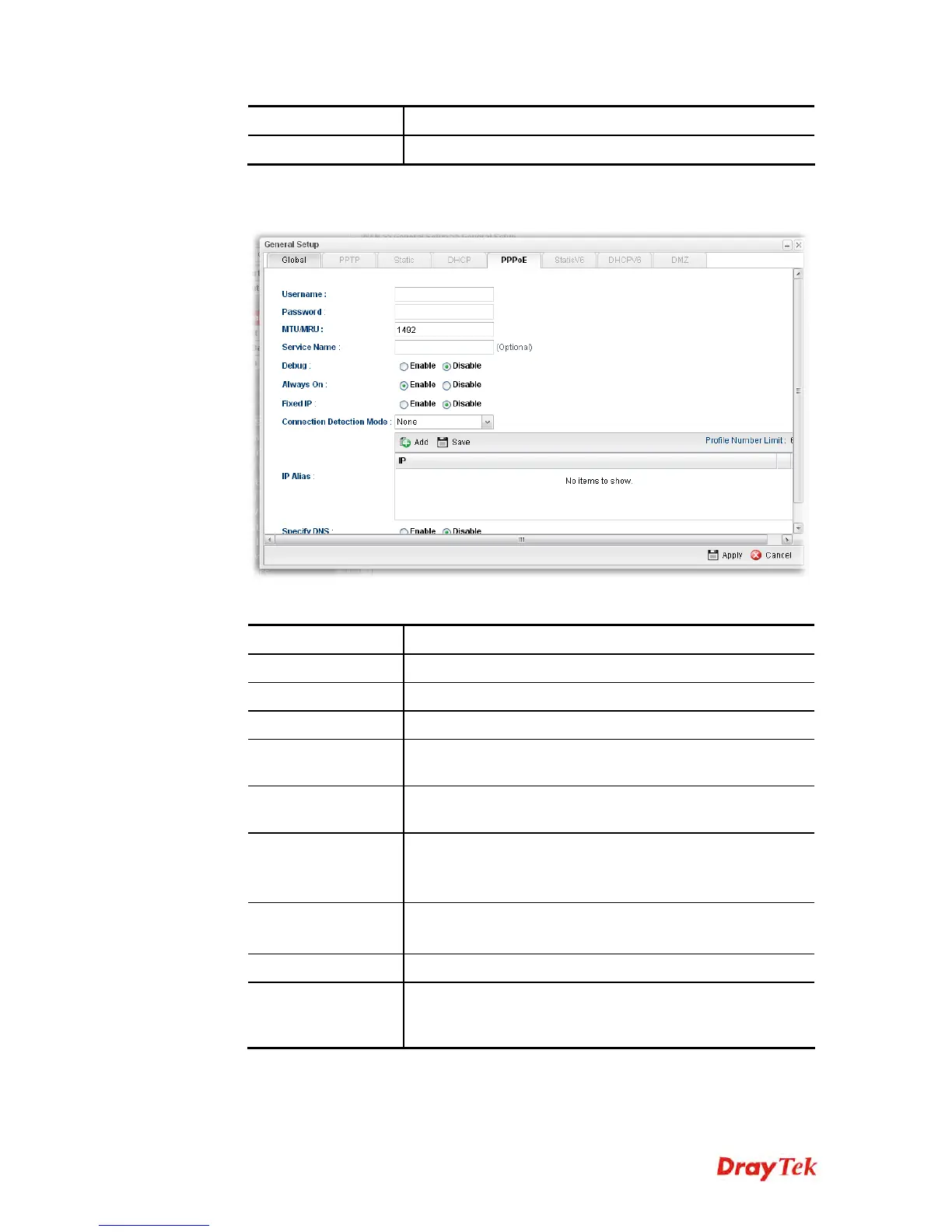
If you choose PPPoE as IPv4 protocol type, click the PPPoE Tab to open the
following page:
Available parameters are listed as follows:
Item Description
Username
Type the user name offered by your ISP.
Password
Type the password offered by your ISP.
MTU/MRU
Type the value of MTU/MRU. The default value is 1492.
Service Name
This is an optional setting. Some ISP will offer such
information and ask you to type the same data on this field.
Debug
Click Enable to display the PPPoE debug message in
Syslog. The default setting is Disable.
Always On
Enable – Click it to enable the function of Always On. The
router will keep network connection all the time.
Disable – Click it to disable the function of Always On.
Fixed IP
Enable – Click it to enable the function of fixed IP.
Disable – Click it to disable the function of fixed IP.
Fixed IP Address
Type the IP address in the boxes.
Connection
Detection Mode
Select a detecting mode for this WAN interface. There are
two ways PING and HTTP supported in Vigor router for
you to choose to send the request out.














 To Next Page