Chapter 8: Preset Menu 121
PRESET MENU
For Velocity End & Key End
FUNC GEN F1S1
CondValue +064
FUNC GEN F1S1
CondValue -064
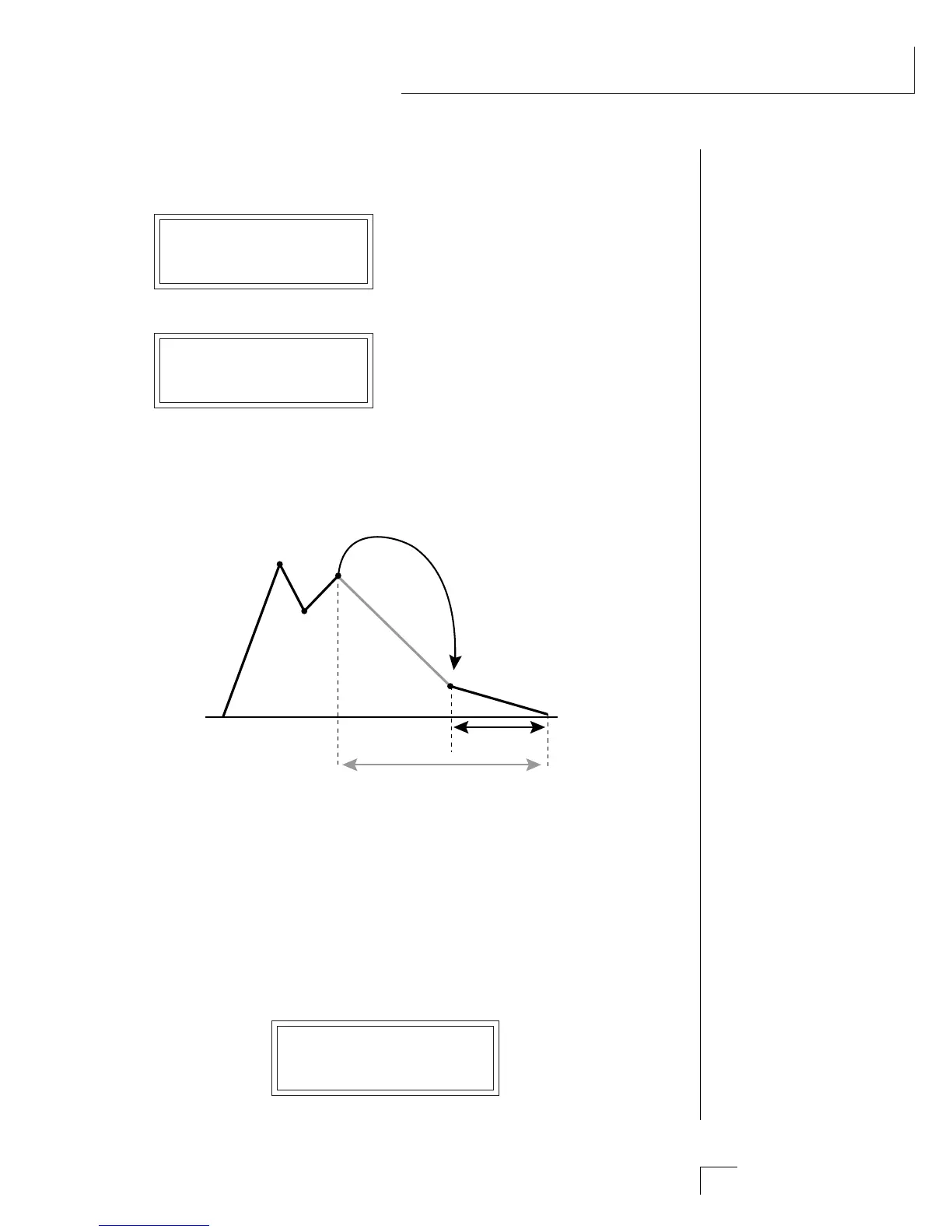
••• When one segment jumps to another at a different level, a smooth
transition is made between the two. The time to the end of the destina-
tion segment remains as specified.
When the value is Negative, a jump
occurs if the velocity or key number
is Less than value shown (ignoring
the sign).
When the value is Positive, a jump
occurs if the velocity or key number
is Greater than value shown.
1
2
3
4
5
Time = .4 sec
J
u
m
p
Time = .4 sec
In the example above, segment 4 has been skipped, but the time to the end of
segment 5 will remain the same (400 milliseconds). This will alter the slope of
segment 5.
• Function Generator Amount
This control scales the output of the function generator before it is
applied to a modulation destination (in the Realtime Control screen).
The amount is like a water faucet. It controls “how much” of the func-
tion generator is output. If a negative value is selected, the function
generator output will be inverted. Function generator 1 or 2 is selected
on the top line of the display (F1 or F2).
FUNC GEN AMT F1
+064
••• Remember that you must
assign the function generator
to a destination in the
Realtime Control screen.
••• The Function Genera-
tor Amount can also be
modulated by a Realtime
Control source.
••• Drawing your function
generator ideas on paper first
will simplify the program-
ming process.


 To Next Page