Getting started
15
1. Getting started
Q
Controls and indicators
•
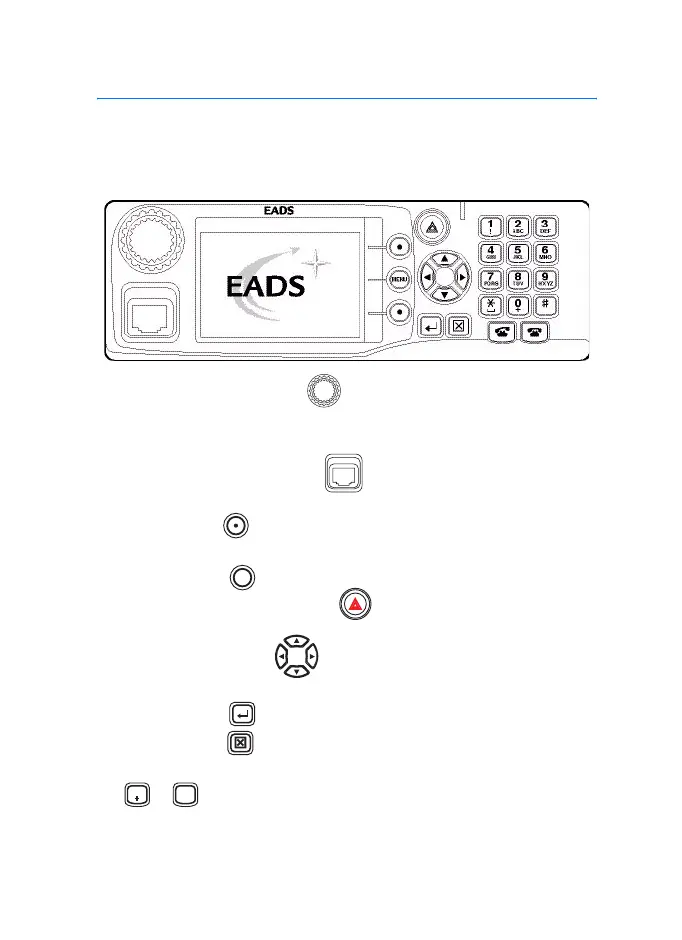
Pressing the rotary knob turns the radio ON/OFF, to adjust
volume level and to scroll through list items. In idle mode, it can
be used to select the call type.
•
The microphone connector provides a connection for a fist
microphone or a handset.
•
The soft keys are used to select the option that is shown on
the display.
•
The menu key is used to enter the
Main menu
.
•
The emergency key (red key) is used to send emergency
alarms.
•
The navigation keys are u
sed for scrolling or text editing.
•
The enter key is used to select the required item.
•
The clear key is used to clear a character or back to the
previous screen.
•
- are used to enter alphanumeric characters for
dialling, contacts entries and text messages.
MENU
0
WXYZ
9
TGR990_features.book Page 15 Thursday, December 3, 2009 9:43 AM



 To Next Page