Direct Mode Operation - DMO
34
Selecting DMO group call MS to MS
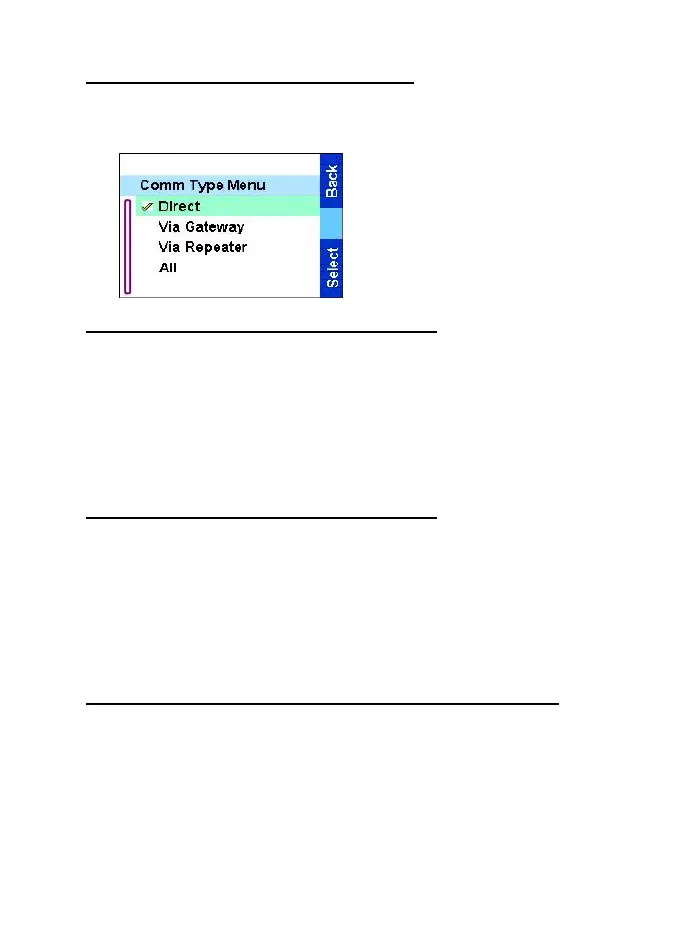
To change from gateway or repeater mode to MS - MS mode (DMO
terminal to terminal call):
1.Press
Optns
, scroll to
Comm type and press
Select
.
2.Scroll to Direct and press
Select
. Your TGR990
communicates directly among
DMO terminals.
Selecting DMO group call via gateway
While in DMO, proceed as follows to choose a gateway to set up a
call via Gateway for the selected talkgroup:
1. Press
Optns
, scroll to Comm type and press
Select
.
2. Scroll to Via Gateway and press
Select
.
Your TGR990 communicates through Gateway only.
Selecting DMO group call via repeater
While in DMO, proceed as follows to choose the Repeater option to
set up a call via Repeater for the selected talkgroup:
1. Press
Optns
, scroll to Comm type and press
Select
.
2. Scroll to Via Repeater
and press
Select
.
Your TGR990 communicates through Repeater only.
Selecting DMO group call via gateway and repeater
While in DMO, proceed as follows to choose the Gateway and
Repeater option to set up a call via Gateway or Repeater for the
selected talkgroup.
1. Press
Optns
, scroll to Comm type and press
Select
.
2. Scroll to All
and press
Select
.
TGR990_features.book Page 34 Thursday, December 3, 2009 9:43 AM



 To Next Page