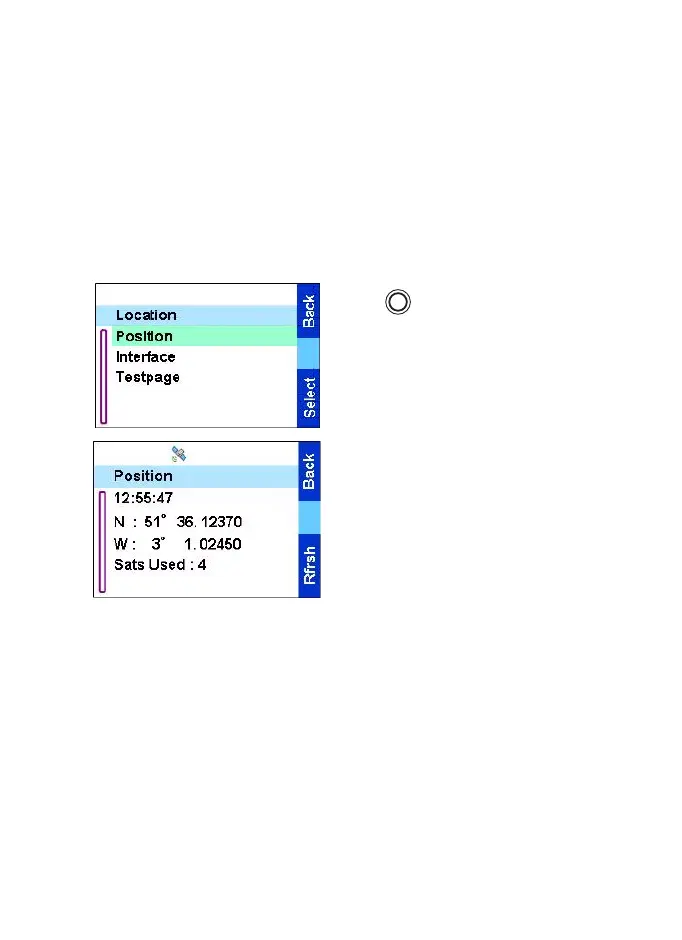
The menu
76
used to set the local time difference from UTC (Coordinated
Universal Time).
•
Date Format
is used to change the format for displaying the date
and time (Day/Month/Year, Month/Day/Year, or Year/Month/
Day).
Q
Location
To enter the location sub-menu,
press and select Location:.
Position
— provides the actual
position information.
This displays the following
information about the last time
your location was calculated (if
available):
•
The
time
the location was last
calculated
•
The
latitude
expressed in degrees, minutes, and seconds
•
The
longitude
expressed in degrees, minutes, and seconds
•
The Sats Used:
(
number of satellites
) used to calculate the
location. In general, more satellites make for better accuracy.
The maximum is twelve satellites.
Interface
— allows you to enable/disable the GPS location service.
Testpage
— provides detailed position information.
This displays the following information (if available):
MENU
TGR990_features.book Page 76 Thursday, December 3, 2009 9:43 AM



 To Next Page