24
support@edgeovens.com Technical Support: +1 (724) 628 3050
INSTALLATION
OVEN ASSEMBLY
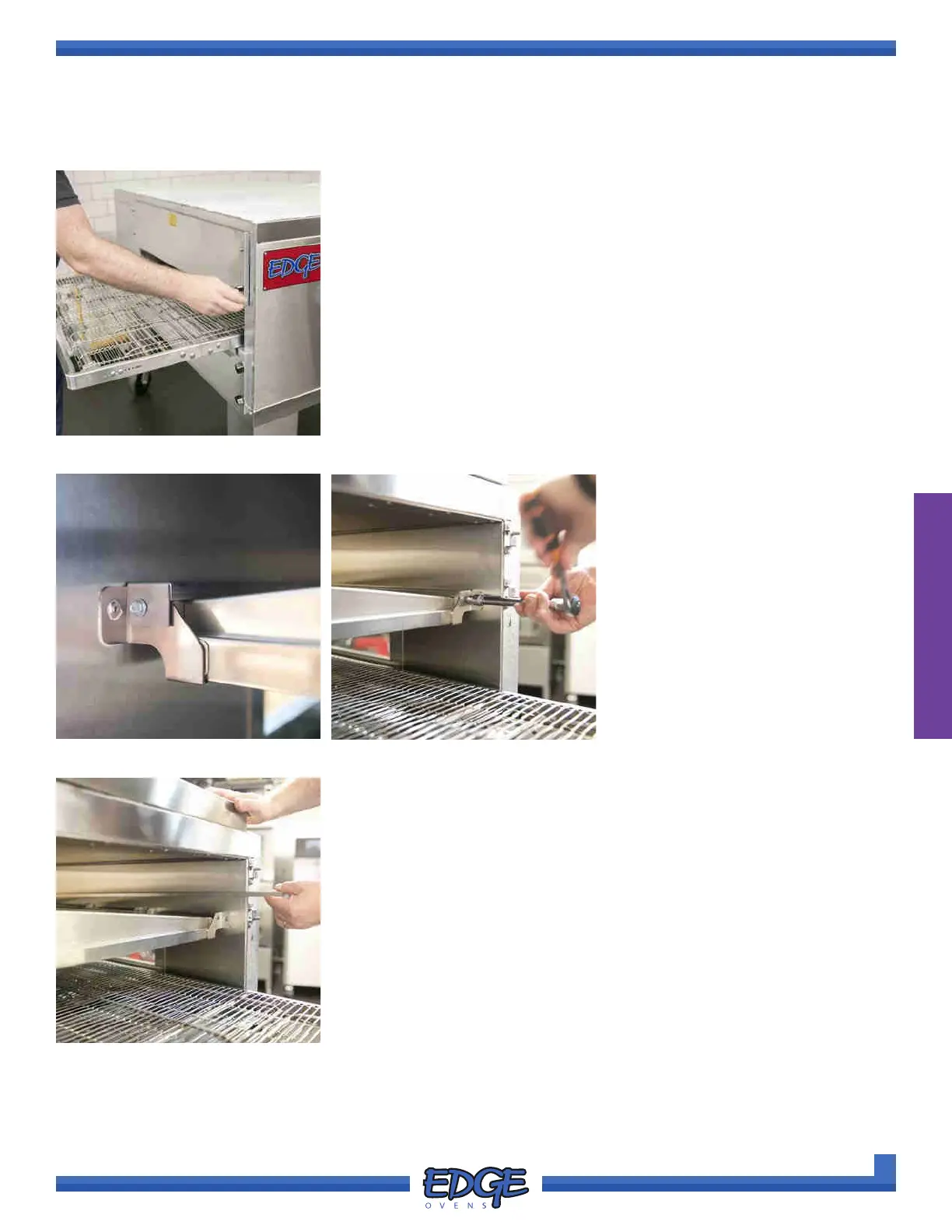
1. Begin by removing all the wingnuts from the TOP end panels and
carefully removing the end panels from the oven mouth (two per oven
deck). (Figure 2-40)
FIGURE 2-40
FIGURE 2-41
2. Locate the nger securing
shipping brackets, found across
the tip (front edge) of the oven
ngers. (Figure 2-41)
3. The shipping brackets are
secured with a 5/16” hex/slot head
sheet metal screw. (Figure 2-42)
FIGURE 2-43
4. Remove from both ends of the bracket and discard both the brackets
and removed screws. (Figure 2-43)
5. It is good practice at this point to verify the oven nger conguration,
see subsequent chapter for details of how to undertake this task.
6. Replace removed TOP end panels and wingnuts. DO NOT over
tighten the black wingnuts.
7. Repeat this process on each on each of the remaining ovens.
FINGER SECURING SHIPPING BRACKET REMOVAL
FIGURE 2-42



 To Next Page