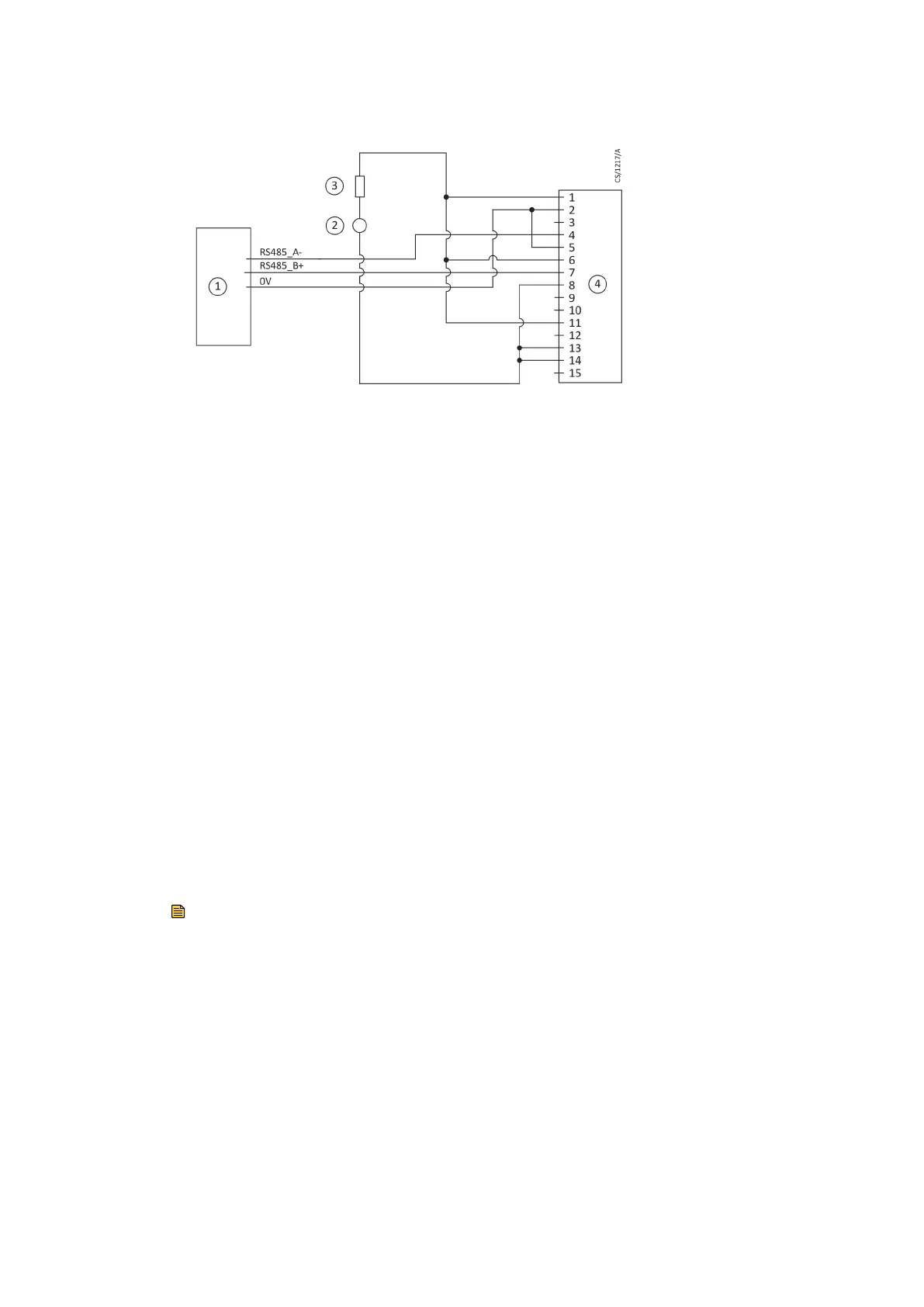
Figure 17 Logic interface connecons - RS485 serial control
1. RS485 interface on control equipment 2. 24 ‑ 48 V d.c. electrical supply
3. Fuse 4. nEXT pump logic interface
1. RS485 interface on control equipment 2. 24 ‑ 48 V d.c. electrical supply
3. Fuse 4. nEXT pump logic interface
4.6.2 Serial enable
To send a serial message over the serial link, acvate the serial enable. To acvate the
serial enable, link the serial enable input signal (pin 5) to pin 2 of the customer logic
interface mang half.
We recommend you to incorporate this link into the serial communicaons cable so that
the serial enable is acvated only when the serial cable is connected. When the cable is
removed, serial enable will become inacve.
Serial enable operates as an interlock for the start commands sent over the serial
interface. If the pump operates in serial control mode (having been sent a serial start
command) and the serial enable becomes inacve, the pump will trigger a fail condion
and will decelerate and stops. To clear the fail condion, acvate the serial enable again
and send a serial stop command.
4.6.3 Serial protocol
The serial interface link is set to 9600 Baud, 8 bits, 1 stop, no parity with no
handshaking. The commands are made from printable ASCII characters. The maximum
message size that can be sent is 80 characters, with start and end characters.
Note:
All alphabecal characters must be sent in upper case format. The response can have
lower case characters.
Each complete command message sent will receive one of the responses: a status code
or a data return. The pump can only process with one message at a me. The nEXT
pump will only accept a new message when the response to the previous message has
been returned.
If the pump receives characters that are not framed in the start and stop characters, the
pump will ignore them. Messages with the missing stop character will be discarded with
no response when a new start character is received. If the pump receives an
unrecognisable message between the start and stop characters, it will return an
applicable error message.
Page 47
B8G000880_D - Installaon



 To Next Page