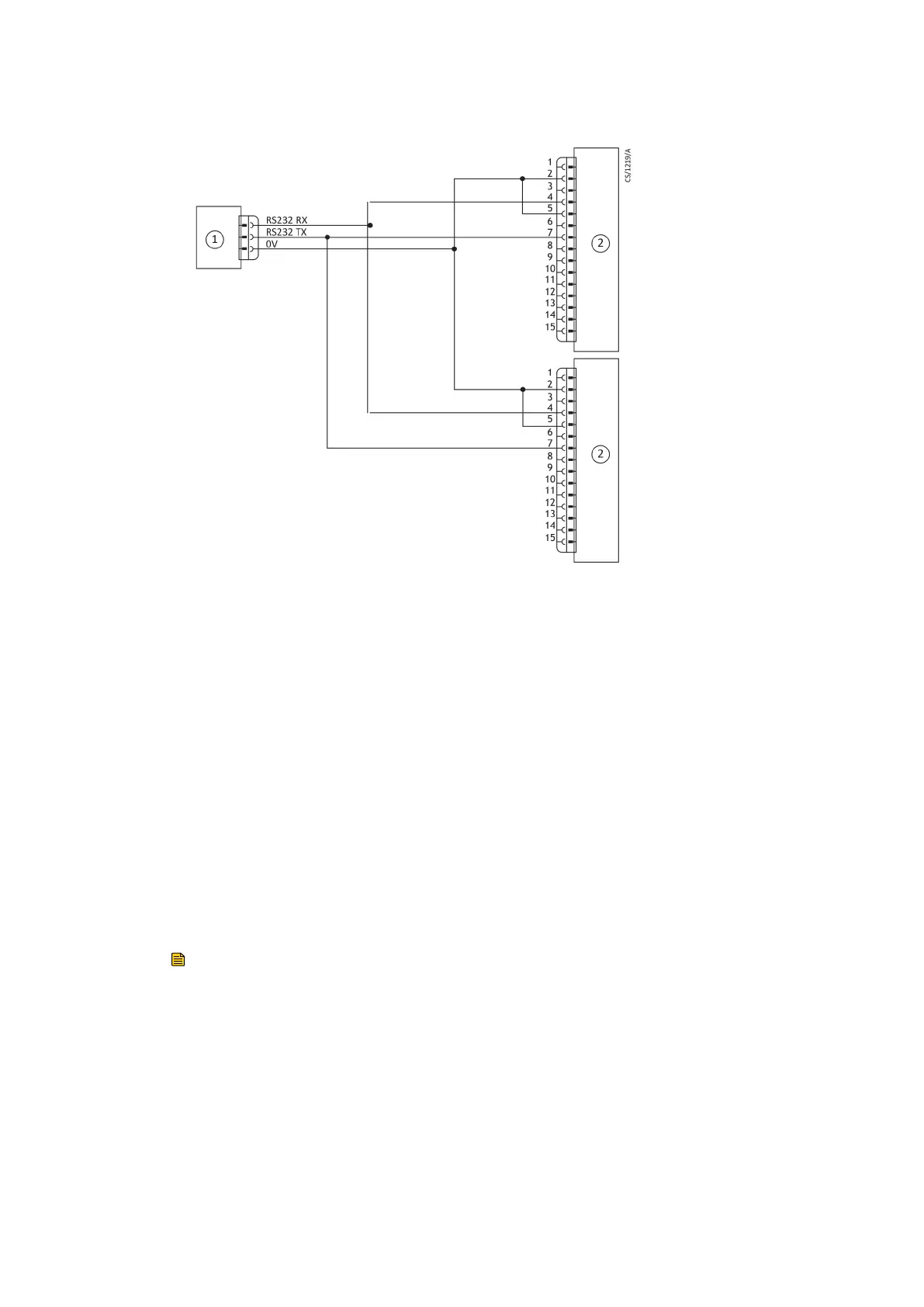
Figure 19 RS485 mul-drop connecon
1. RS485 interface on control equipment 2. nEXT pump logic interface1. RS485 interface on control equipment 2. nEXT pump logic interface
4.7 Connecon for mixed parallel and serial operaon
You can use the parallel interface control inputs to control the pump. At the same me
you can use the serial interface or the USB service port (using the manufacturer's nST PC
soware) to monitor dierent pump parameters.
Alternavely, you can use the commands sent over the serial interface to control the
pump. At the same me, you can monitor the normal signal and analogue output over
the parallel interface.
Refer to Figure: Logic interface connecon - mixed parallel and serial operaon on page
55 for the schemac diagram of a system that demonstrates how to do this. The
connecon is a combinaon of the parallel and serial connecon, given in Connect the
parallel control and monitoring on page 43 and Connecon for serial control and
monitoring on page 45. Opons given in the secons are available in a mixed parallel
and serial operaon.
Note:
While serial enable is acve to enable the serial link, the parallel standby and fail signals
are not available.
The mul‑drop connecon is shown in Figure: Logic interface connecon - mixed parallel
and serial operaon on page 55. You can use the mul‑drop connecon with mixed
parallel and serial operaon.
You cannot use the parallel interfaces and serial interfaces at the same me to control
the pump. For example, if you start the pump by sending a start command over the
serial interface, you cannot stop the pump by using the start or stop switch on the
parallel interface. To stop the pump, send a serial stop command. Only when the serial
Page 54
B8G000880_D - Installaon



 To Next Page