5. Customizing Actuator Settings
TEC 2000 Installation & Operation Manual E2K-405-0902
5-14
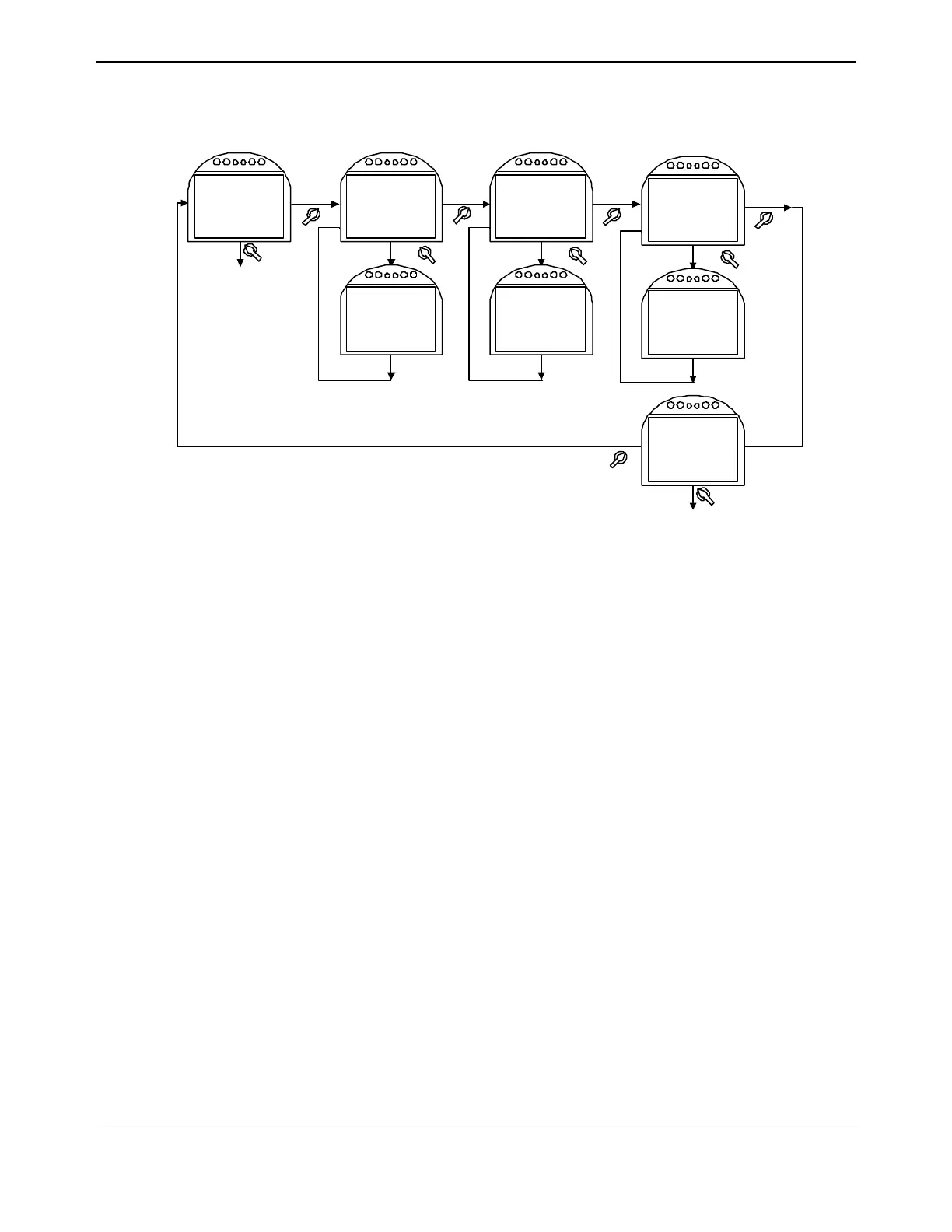
Figure 5-8 Set Valve Travel Limits for Multi-port Valve Control Mode
Goto next display
see Figure 5-4
SET VALVE
TRAVEL
LIMITS??
ACCEPT
VALVE
PORT A
LIMIT?
NO
YES
ACCEPT
VALVE
PORT B
LIMIT?
YES
YES
NO
MOVE VALVE
TO PORT A
POSITION
MOVE VALVE
TO PORT B
POSITION
OFF
Note: Valve may be moved electrically in LOCAL.
OFF
LOCAL NOLOCAL
ACCEPT
VALVE
PORT C
LIMIT?
YES
MOVE VALVE
TO PORT C
POSITION
OFF
NOLOCAL
MULTI-PORT
SYNC OFF?
NO
MULTI-PORT
SYNC ON?
YES
5.6.4. Discrete Input Setup
1. At the “DISCRETE INPUT SETUP” prompt answer “YES.”
2. Use the selector knob (NEXT/BACK) to review the setting for each discrete input.
3. For Input D1 #1, use the control knob (NO) to select either “active on closed contact” or
“active on open contact.” After selection is made, answer “YES.”
4. Repeat Step No. 3 for the remaining 5 inputs.
Discrete inputs are used primarily for remote control operation. Refer to Section 4.6,
Remote/Auto Control Operation, for valve control setup using the discrete inputs.
For connecting a discrete input see Section 3.5, Discrete Controlled Inputs.


 To Next Page