Resistance welder MULTISPOT MI-100control
Operation
48
6.4.2.3 OEM programs
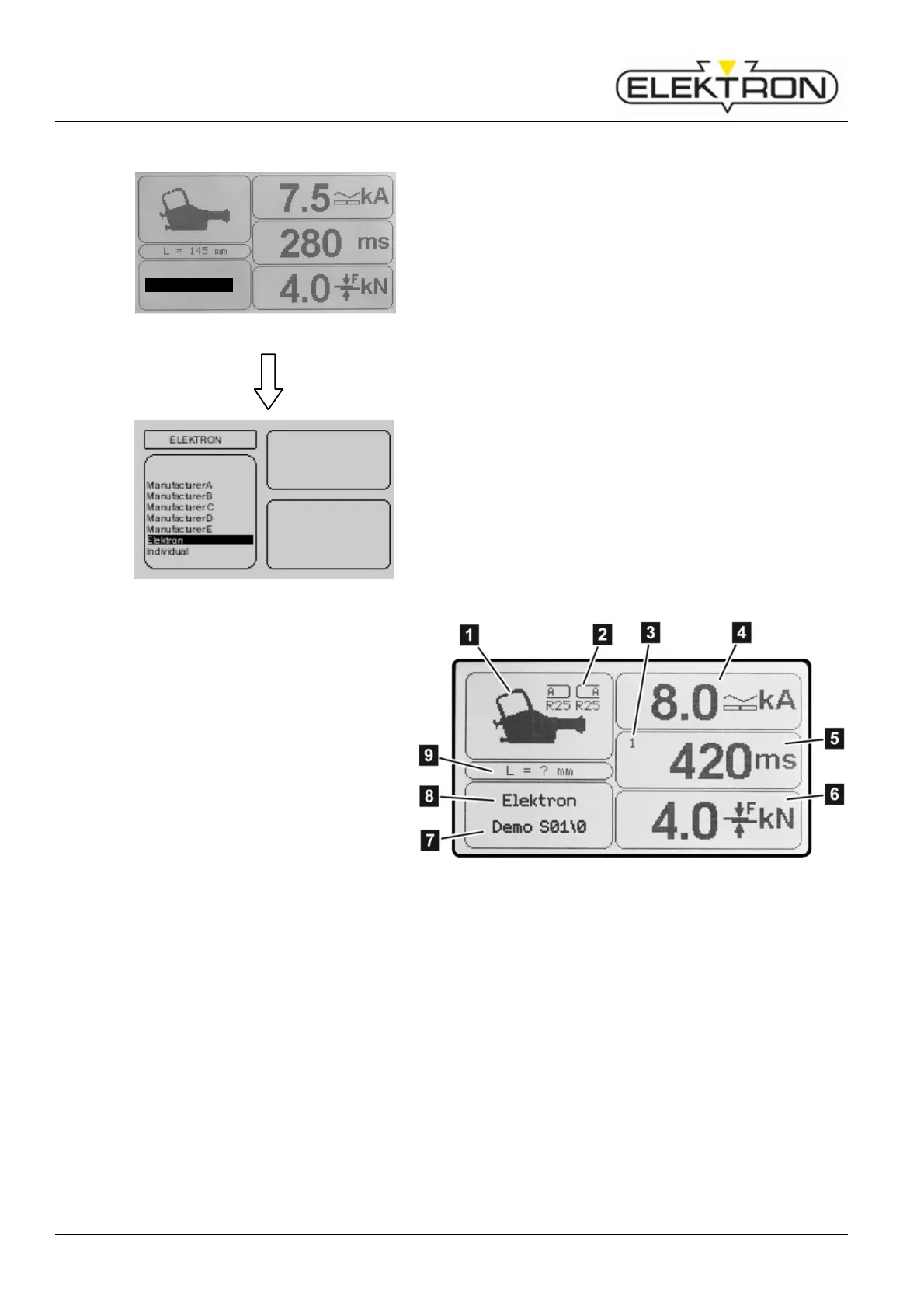
Fig. 54: Selecting the control mode
This mode contains a number of pre-set programs provided
by OEMs.
1. Use the control knob to select mode
“Program selection”. Confirm.
Fig. 55: Overview of OEM programs
Next, the display will show a list of available welding
programs (Fig. 55).
2. Use the control knob to select a program. Confirm.
Next, you will see the parameters of the program selected
(Fig. 56).
Tools required
2 Electrode caps required for welding
program
3 No. of pulses (1 – 36)
4 Weld current required
5 Weld time required
(Total of all current times)
6 Contact force required
7 Program name or
8 Control mode
(depending on selection)
9 Required length of electrodes
Fig. 56: Program parameters
Keyboard
Program selectio
Free mode



 To Next Page