Resistance welder MULTISPOT MI-100control
Operation
52
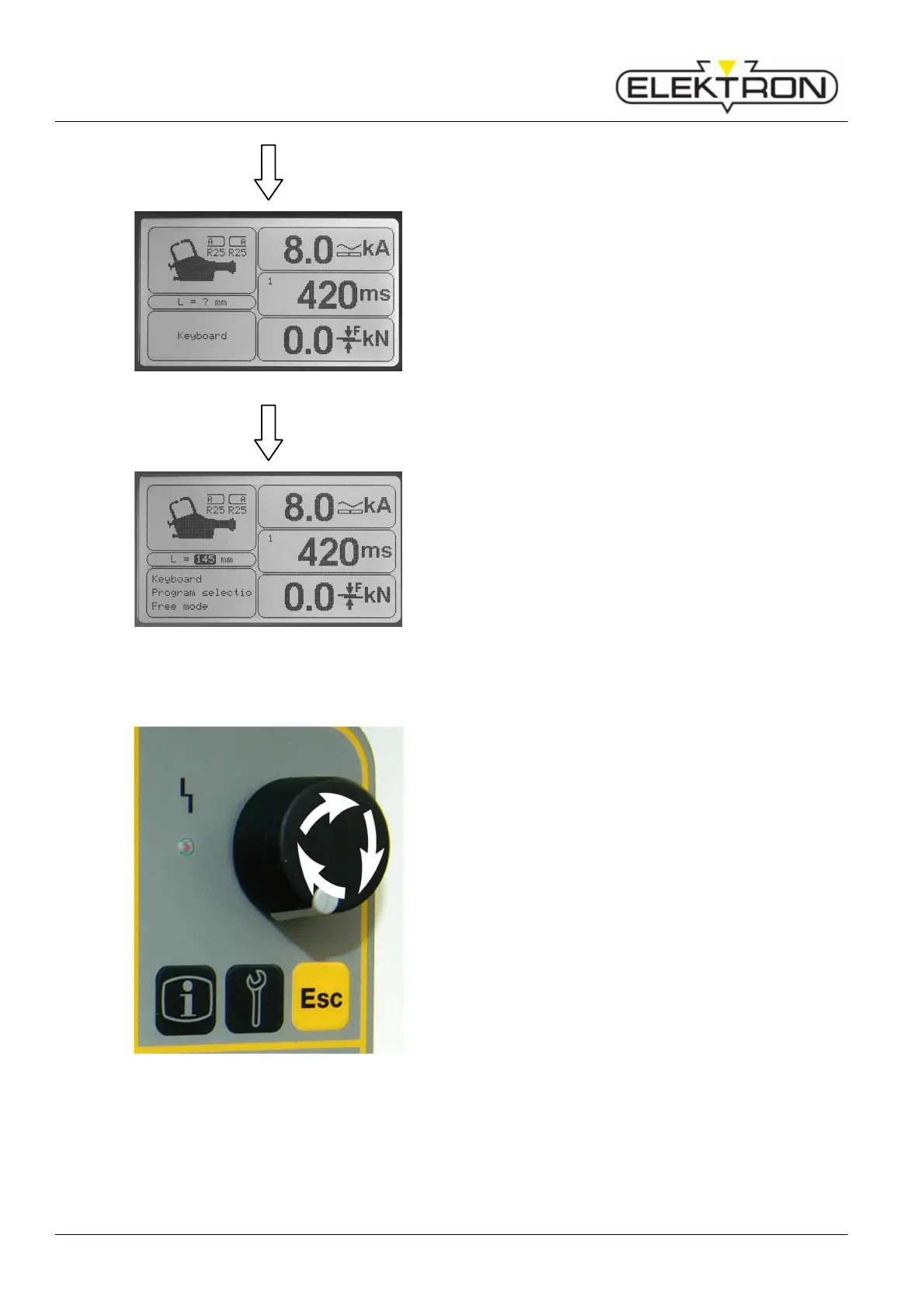
Fig. 68: After acknowledgement
The length of the electrodes will be displayed with a question
mark. The contact force will be “0.0” (Fig. 68).
Fig. 69: Correct display of electrode length
Setting the electrode length manually:
1. Press the control knob to get into the enter mode.
2. Now, turn the knob to select the length.
3. Press control knob to confirm.
The display shows the new value for the electrode length
(Fig. 69).
6.4.4 Manual tool selection
Fig. 70: Control knob
In case of emergency and / or for service purposes, it is
possible to switch off the automatic tool recognition system
and select the tool installed manually on the control panel.
Proceed as follows:
1. Switch off the welder.
2. Install the tool on the welder.
3. When you switch on the welder again, press the start
button of the tool. The tool box of the display will contain a
question mark now.
4. Press the control knob once.
5. Turn the control knob to select the tool box. The tool box
will be highlighted in black.
6. Press control knob.
7. Use the control knob to select the desired tool. Confirm.
There will be a reset whenever you exchange tools and / or
switch off the welder.



 To Next Page