Resistance welder MULTISPOT MI-100control
Operation
49
6.4.2.4 Free mode
Fig. 57: Selecting the control mode
This mode allows the welder to enter weld currents and times
manually, and to store them as own programs.
1. Use the control knob to select the mode “Free mode”.
Confirm.
NOTE!
The “Free mode” is suitable only for welding operators who have detailed knowledge of
welding parameters and their effects and interactions. The “Free mode” entails a high
risk of improper welding jobs.
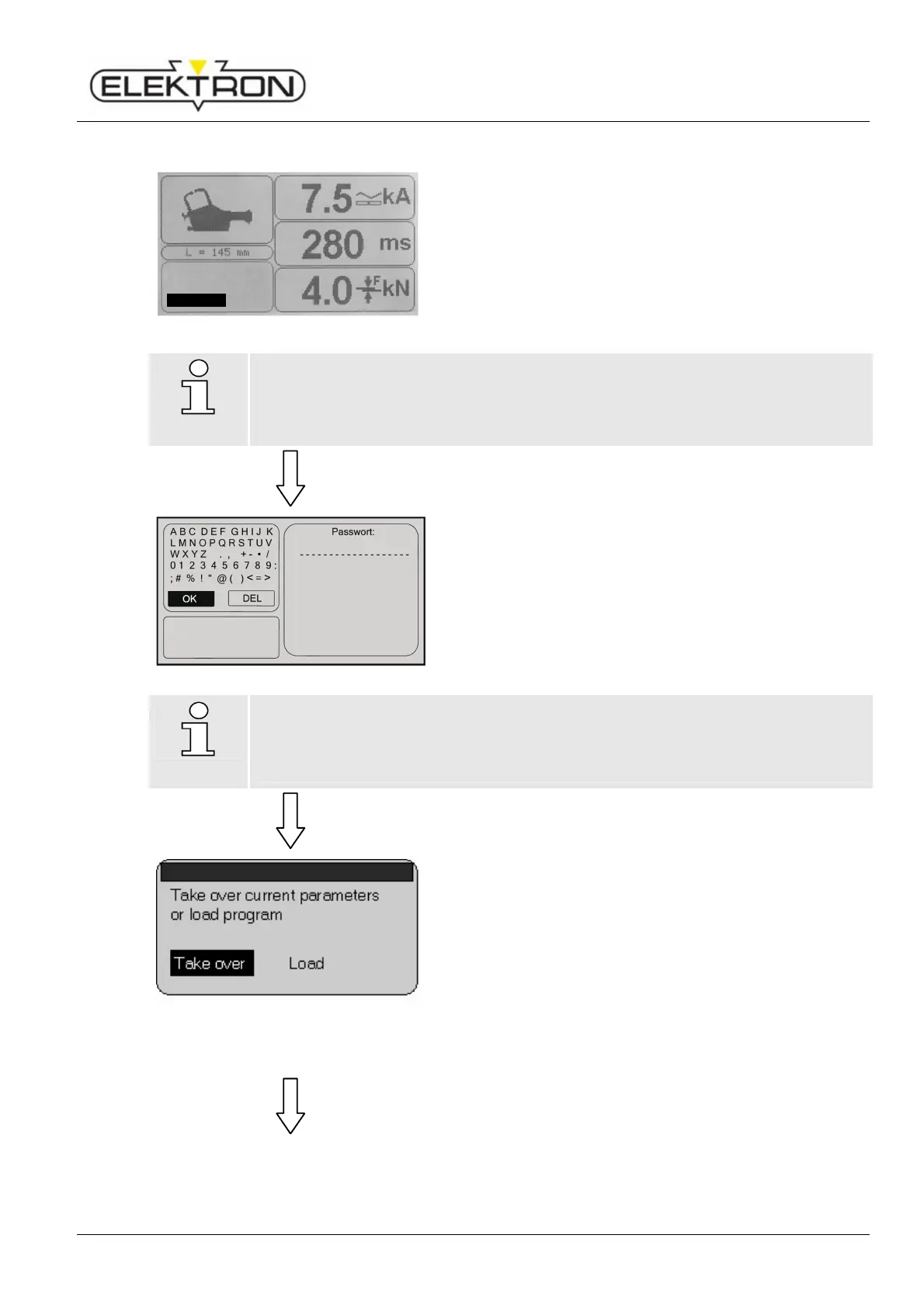
Fig. 58: Prompting for password
The display shows a prompt requiring a password (Fig. 58).
2. Use the control knob to select “OK”. Confirm.
NOTE!
It is incumbent upon the operating company to decide whether passwords should be
used and who should have a password or not.
Make passwords inaccessible to strangers.
Fig. 59: Dialogue box
You will see the following prompt (Fig. 59):
“Take over current parameters or load program”
3. Use the control knob to select “Take over”. Confirm.
or
4. To modify an existing own program, select “Load”.
The display shows a list of all owns programs that have
been generated so far.
5. Use the control knob to select the program you want to
modify.
Keyboard
Program selectio
Free mode



 To Next Page