23
Setting the Embroidery Hoop
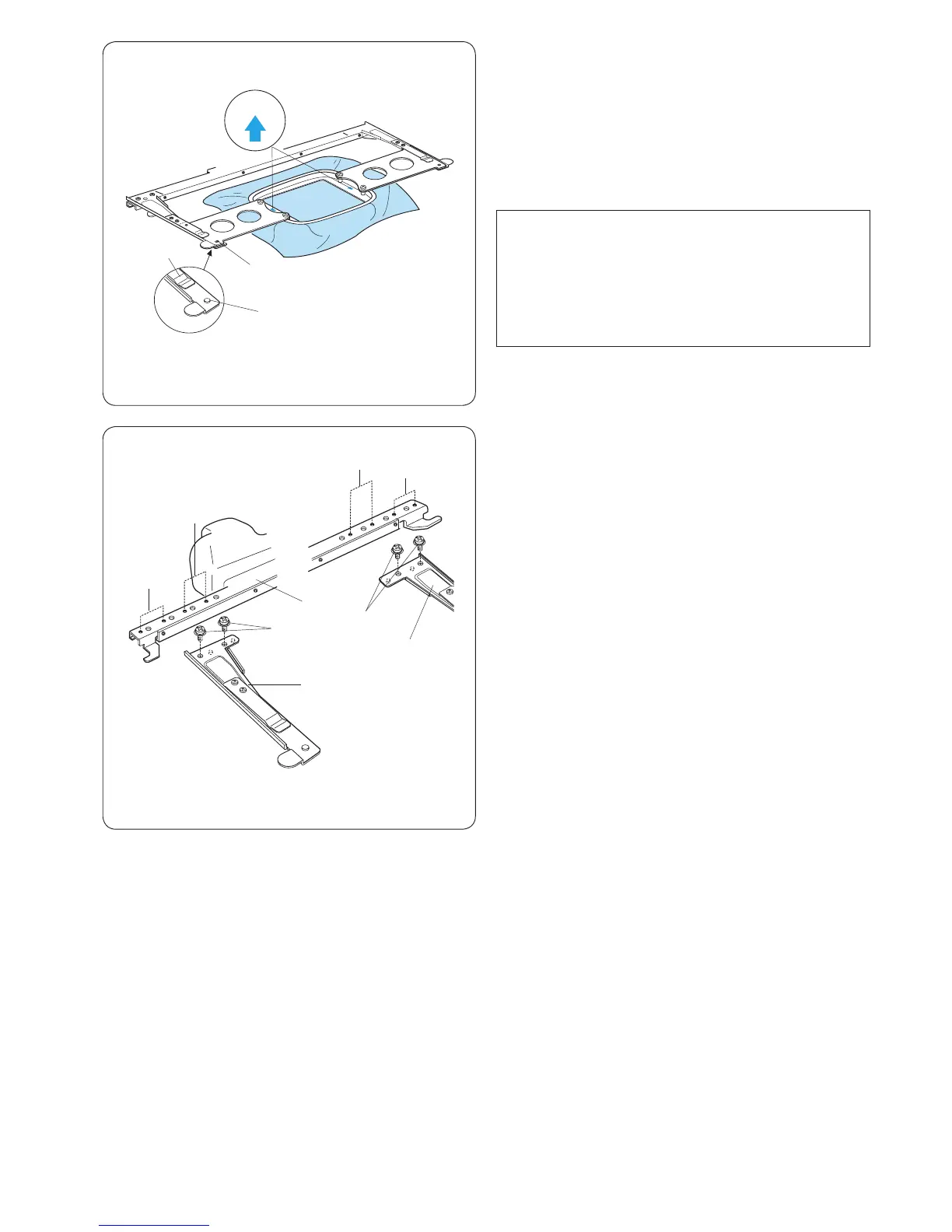
Hold the setting plate with both hands and insert them
under the holder clips.
Slide the hoop on the hoop supporter until the holes
catch the positioning pins on the hoop supporter.
q Holder clip
w Positioning pin
e Hole on the setting plate
NOTE:
• Do not set the hoop front-side back or upside down.
The arrow mark on the inner hoop should face away
from you.
r Arrow mark
• Be careful not to pinch the fabric edge under the
hoop supporter.
q
e
q
w
A
A
B
B
w
q
e
Adjusting the Hoop Supporter for Optional
Hoops
The hoop supporter provides the position to adapt
optional hoops available on the market, such as Tajima’s
hoop.
Position A: M1 hoop (240mm x 200mm)
M2 hoop (126mm x 110mm)
M3 hoop (50mm x 50mm)
Position B: Tajima hoops (optional)
Remove setscrews on both left and right hoop supporter
arms and remove them.
q Setscrew
Attach both hoop supporter arms to the hoop supporter
bar in the position depending on the hoop you wish to
use.
Secure the supporter arms with the setscrews.
w Left hoop supporter arm
e Right hoop supporter arm
r Hoop supporter bar
r
r















 To Next Page