80
Opening a le
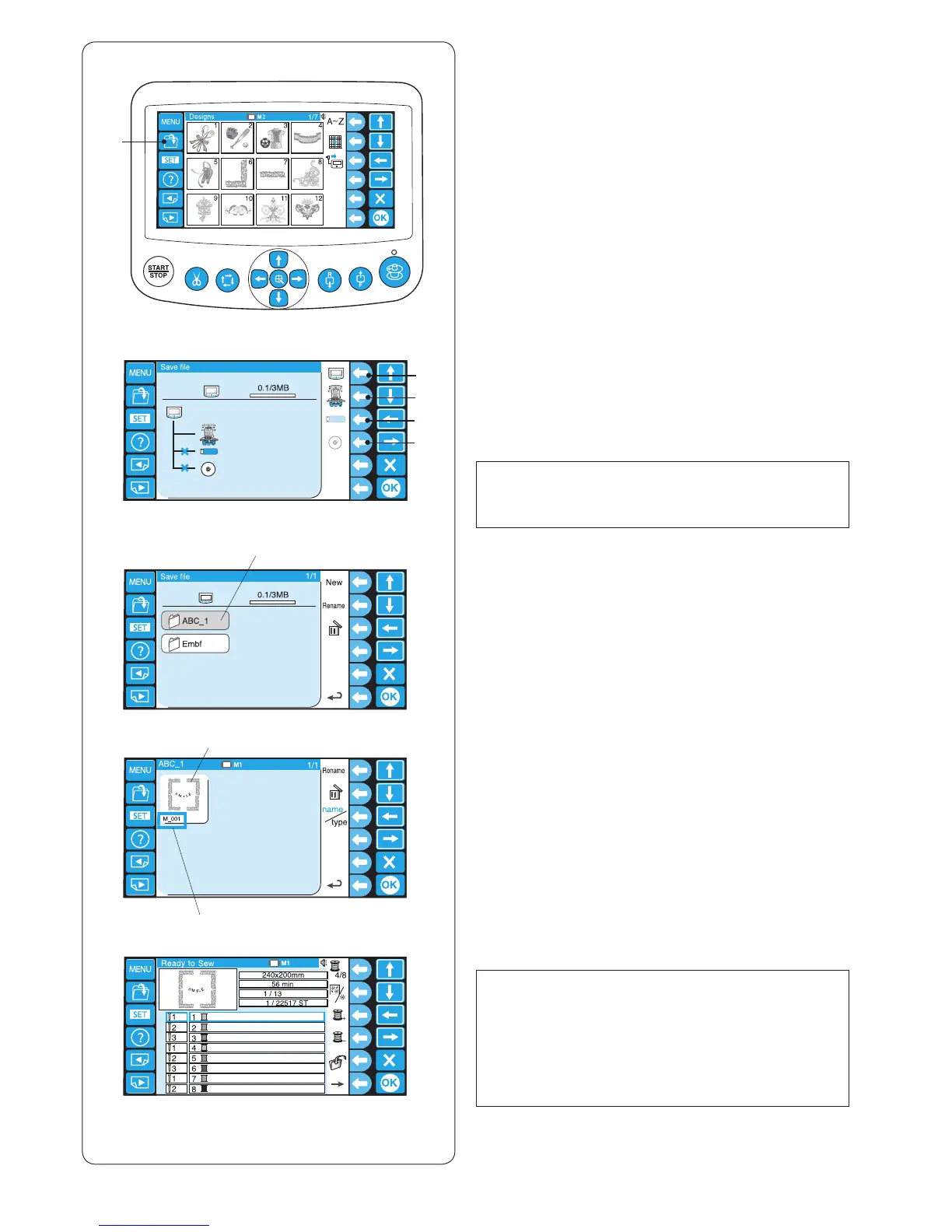
You can open embroidery data les from the internal
memory of the machine, RCS unit and memory devices
such as USB ash drive.
The RCS unit is able to open embroidery data les in
Janome *.jef and Tajima *.dst format.
z Press the open le key to the save le icon in the
Ready to Sew mode.
q Open le key
i
z
x
c
v
b
x Press the function key next to the icon of the memory
location from where you wish to open the le.
w Function key (RCS)
e Function key (machine)
r Function key (USB)
t Function key (CD-ROM)
NOTE:
If the memory devices are not connected to the RCS
unit, the icon of the device will be grayed out.
c The folder list window of the selected memory location
will open.
Press the desired folder icon to open.
y Folder icon
v The le list window of the selected folder will open. If
there is no le saved in the folder, a blank list will be
displayed.
Press the desired le icon to open.
u File icon
i File name
b The screen will display to the Ready to Sew window.
NOTE:
When you open a Tajima *.dst le, you need to assign
the thread colors to each sections (layers) since they
do not have the thread color information.
Refer to page 47 for how to assign the thread color.
A Tajima *.dst le, which has more than 200 sections
cannot be opened.















 To Next Page