33
Basic Operation of the Optional RCS Unit
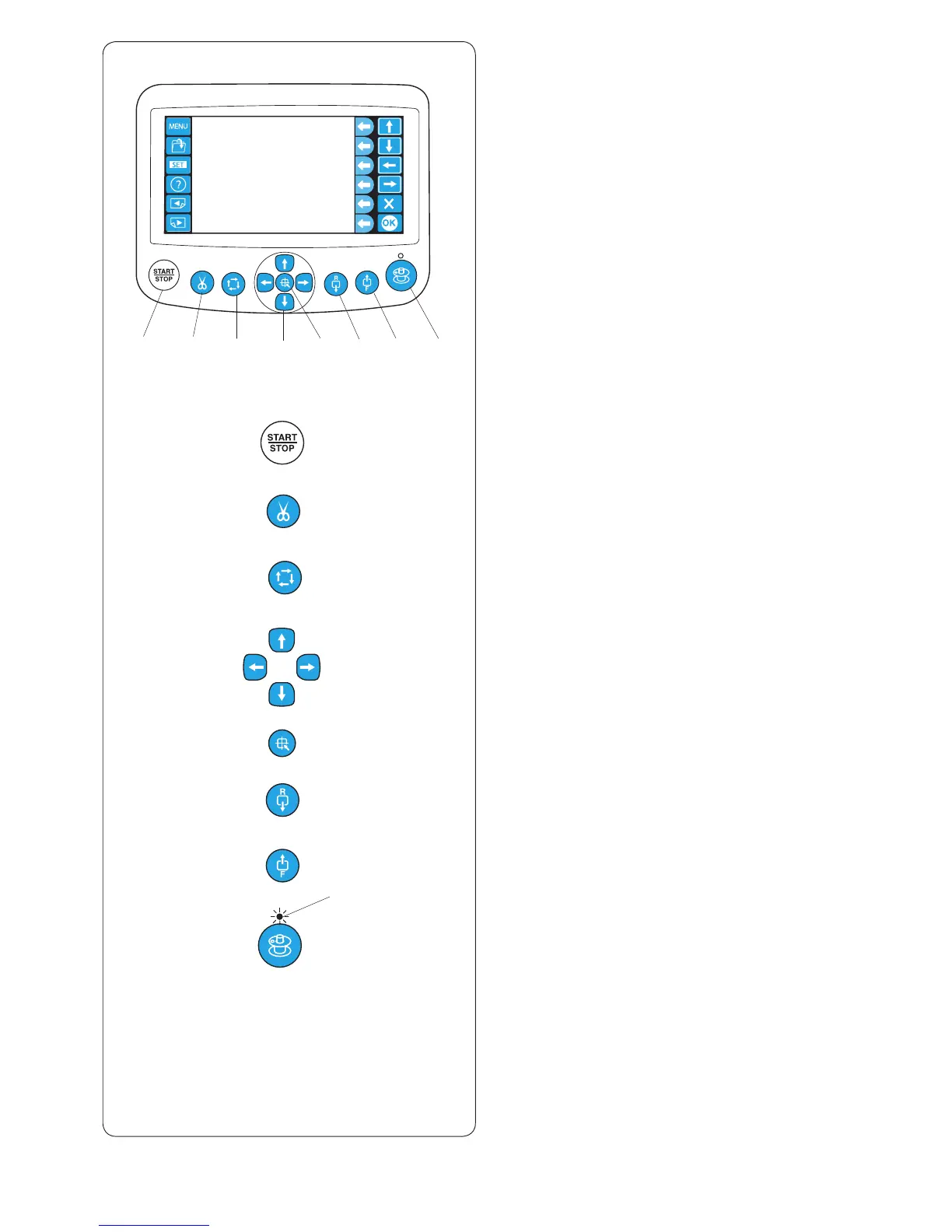
Machine operating buttons
q
w
e
r
t
y
u
i
q
w
e
r
t
y
u
i
o
q
START/STOP button
Press this button to start or stop the machine.
* When you press this button once, the LCD touch panel
will show the message “Machine Starts to Run”. Press
this button again to start sewing.
* The button glows red when the machine is stitching,
and green, when the machine has stopped.
w
Auto thread cutter button
Press this button to trim the threads.
e Trace button (refer to page 60)
Press this button to trace the outline of the embroidery
pattern without stitching.
r
Jog buttons (refer to pages 39 and 60)
Press these buttons to move the hoop for precise
positioning.
t
Carriage centering button
Press this button to move the carriage to the center
position.
y
Stitch back button
Press this button to move the hoop backward.
Press and hold the button to move the hoop faster.
* Provide a sufcient space to allow the hoop to move
freely
u
Stitch forward button
Press this button to move the hoop forward.
Press and hold the button to move the hoop faster.
* Provide a sufcient space to allow the hoop to move
freely.
i
Bobbin winding button
Press this button to wind the bobbin.
The indicator lights up while winding the bobbin.
o
Indicator















 To Next Page