51
q
y
q
q
w
e
r
t
u
Rotating the pattern
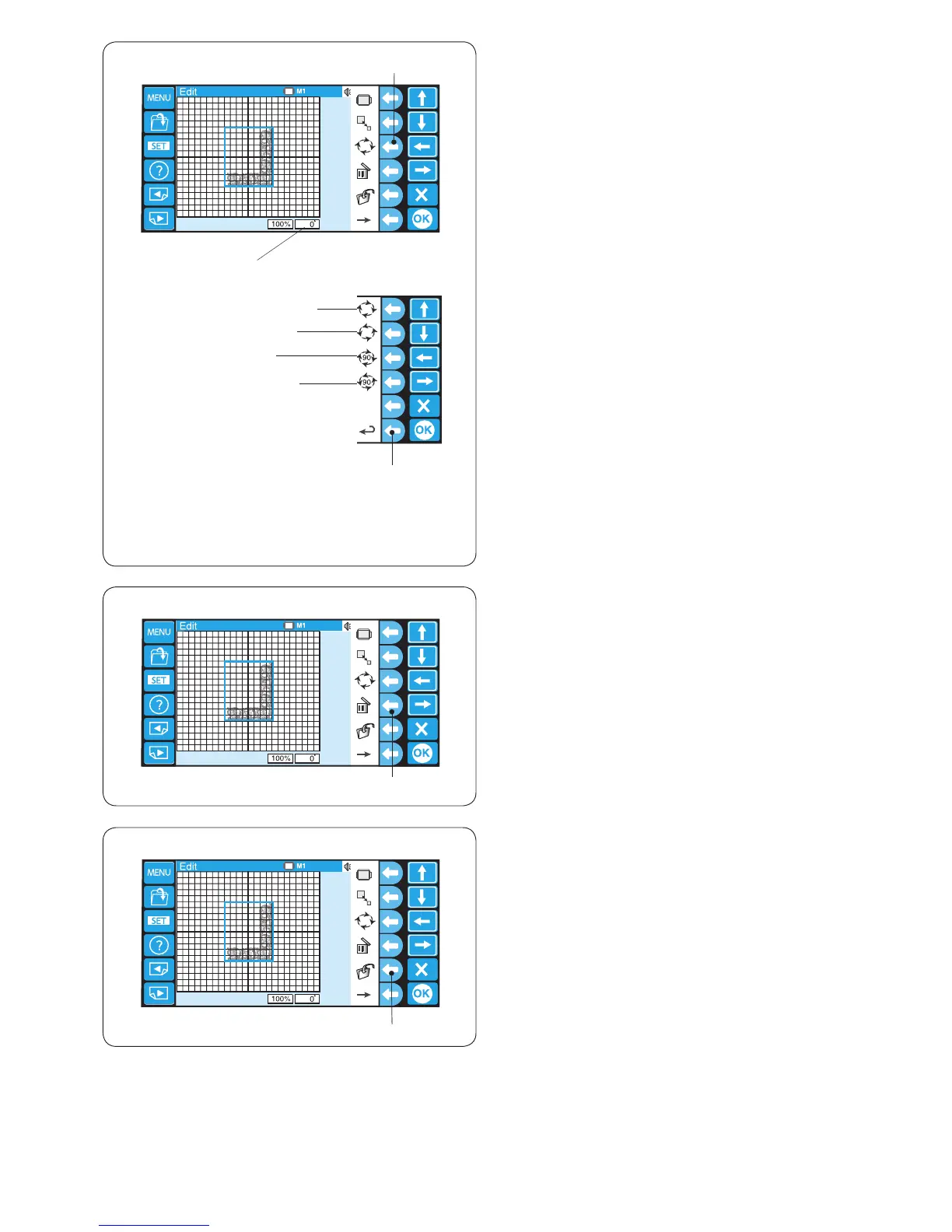
Press the function key next to the rotate icon and the
function key assignment will change to rotation.
The selected pattern is indicated with a green frame.
q Function key (rotate)
Press the function key next to the rotate clockwise icon to
rotate the pattern 1 degree clockwise.
w Function key (rotate CW 1 deg.)
Press the function key next to the rotate counterclockwise
icon to rotate the pattern 1 degree counterclockwise.
e Function key (rotate CCW 1 deg.)
Press the function key next to the rotate clockwise 90
deg. icon to rotate the pattern 90 degrees clockwise.
r Function key (rotate CW 90 deg.)
Press the function key next to the rotate counterclockwise
90 deg. icon to rotate the pattern 90 degrees
counterclockwise.
t Function key (rotate CCW 90 deg.)
Press the function key next to the return icon to go back
to the previous display.
y Function key (return)
The angle of the pattern is indicated in the status box.
u Status box
Deleting the pattern
Select the pattern to delete by pressing the pattern image
in the editing screen.
The selected pattern is indicated with a green frame.
Press the function key next to the delete icon to delete
the selected pattern.
q Function key (delete)
Saving the le
Press the function key next to the le save icon and the
le save window will open.
q Function key (save le)
Refer to page 78 for detailed instructions.















 To Next Page