34
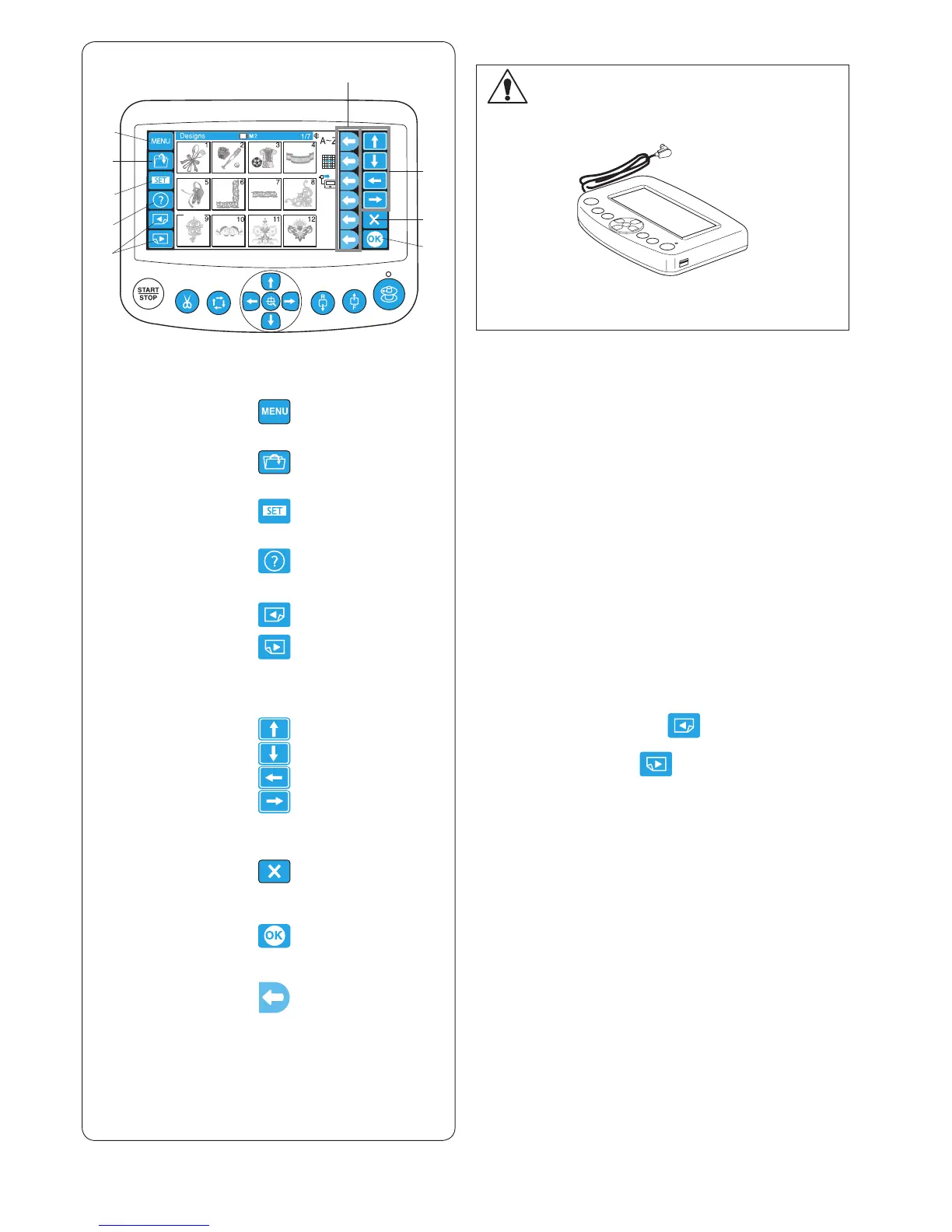
q MENU key
Press this key to assign mode selection to the function keys.
There are 4 modes available.
• Built-in design selection
• Monogramming
• Editing
• Disconnecting the RCS unit
w Open le key
Press this key to open the embroidery data les saved in
the various locations.
e SET key
Press this key to enter the My setting mode.
r Help key
Press this key to open the help movie menu.
t Page keys
Press the previous page key to show the previous
display.
Press the next page key to show the next display.
y Arrow keys
Press these keys to select the next item in the direction
of arrow.
u Exit key
Press this key to close the current window and return to
the previous window.
i OK key
Press this key to conrm your selection or register the
settings you have made.
o Function keys
The icon next to each function key indicates the function
assigned to that key.
These keys carry out different functions in different
situations.
q
w
e
r
t
y
u
i
q
w
e
r
t
y
u
i
o
o
Panel keys
CAUTION:
Do not press the LCD touch panel with hard or sharp
pointed objects like pencils, screwdrivers or the like.
Press the LCD touch panel and buttons gently.
Rough or forceful pressing may damage the unit.















 To Next Page