EasyManua.ls Logo

ELNA eXpressive 970 - Placement of Monogramming

ELNA eXpressive 970
96 pages
Print Icon
To Next Page IconTo Next Page
To Previous Page IconTo Previous Page
Loading...
46
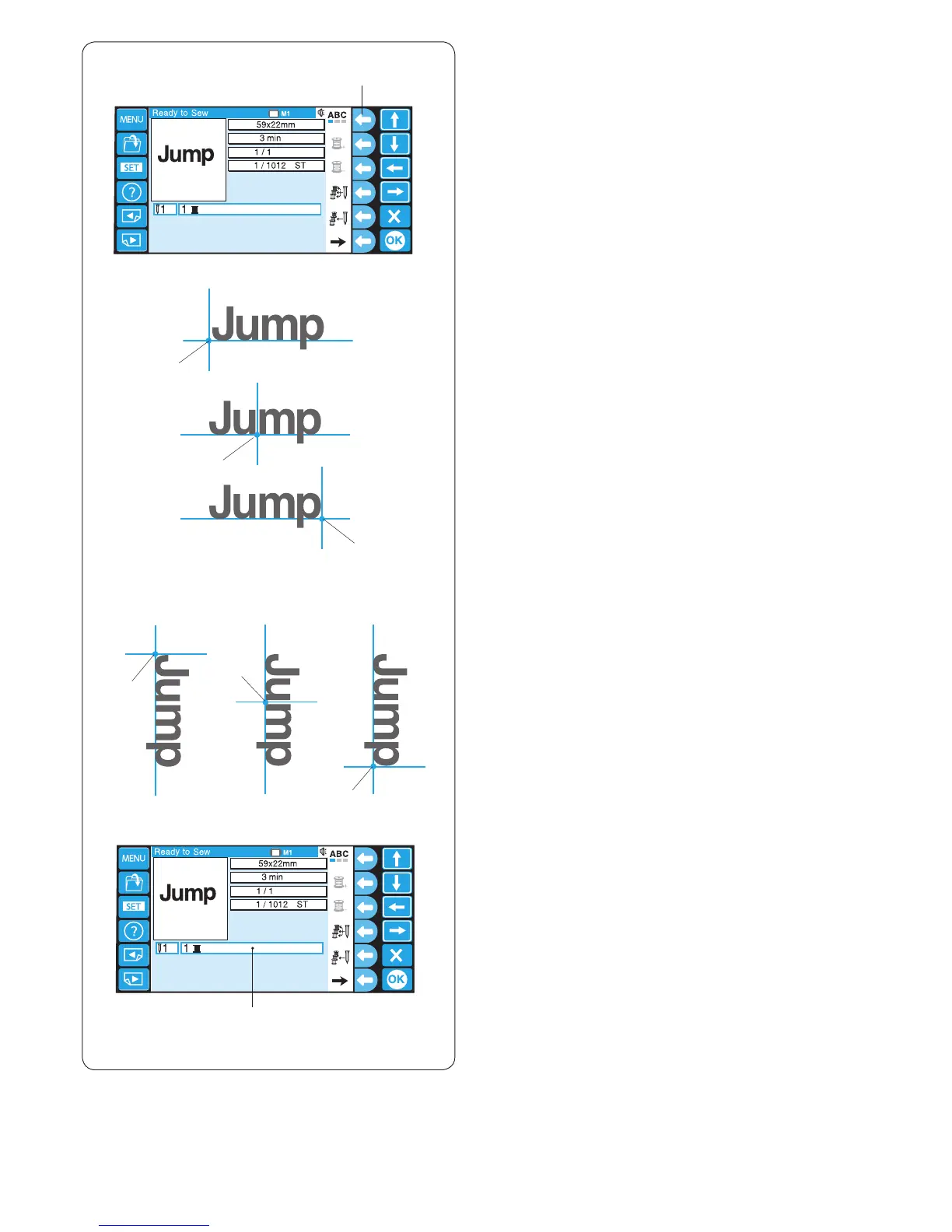
Placement of monogramming
You can select one of the 3 placements for
monogramming.
Press the function key next to the placement icon
to select the left justify, center justify or right justify
alternately.
q Function key (placement)
q
1
w
3
2
w
w
4
5 6
w
w
w
* Thread color “Any” indicates that no color is selected.
e Thread color
* Refer to pages 40 and 41 for information of other
function keys.

e
Horizontal orientation
1. Left justify
2. Center justify
3. Right justify
w Alignment point
Vertical orientation
4. Top justify
5. Center justify
6. Bottom justify
w Alignment point

Table of Contents

Other manuals for ELNA eXpressive 970

Related product manuals