q
Editing Functions
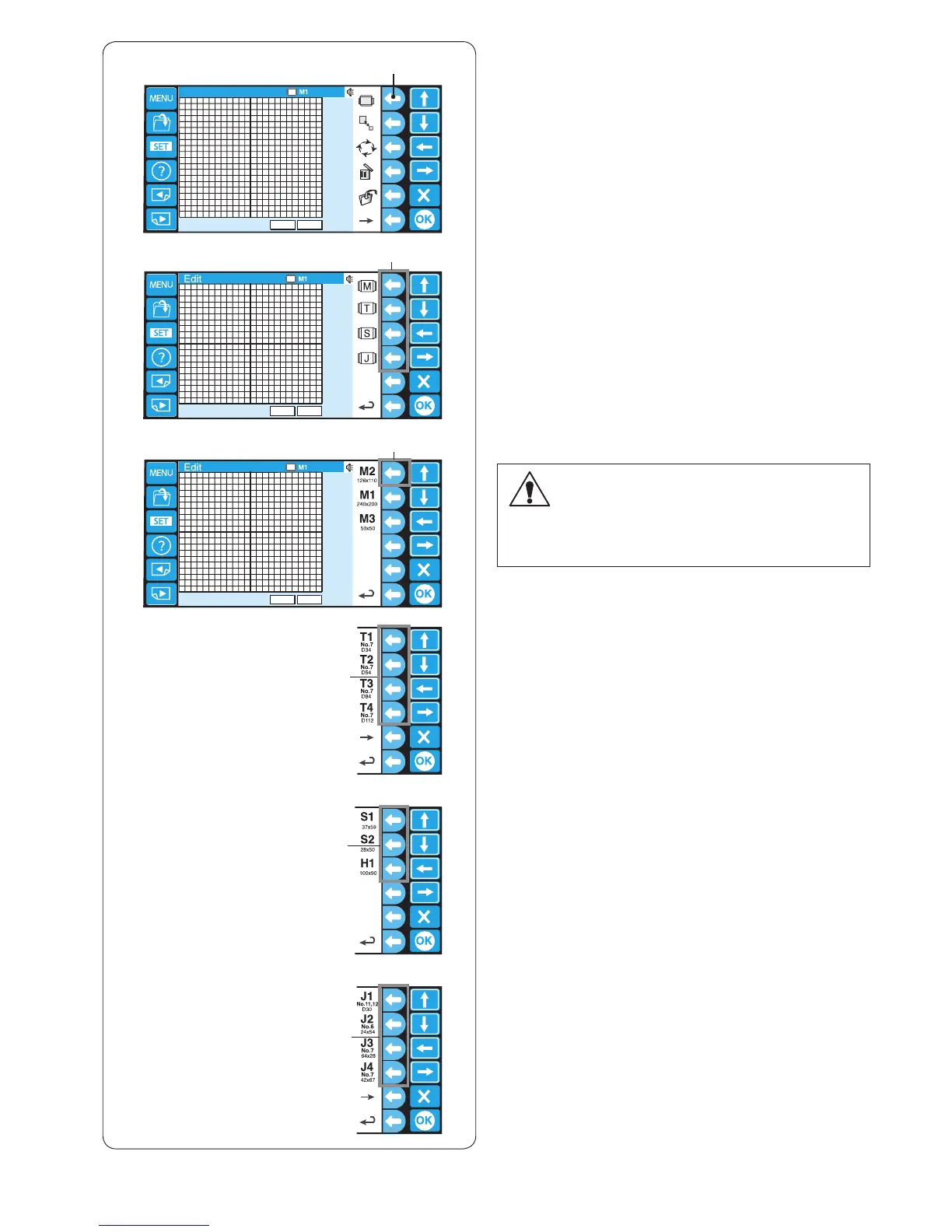
Selecting the hoop
z Press the function key next to the hoop icon.
q Function key (hoop)
The function key assignment will change to the hoop
type selection.
The following hoop types are available:
M: Standard MB hoops
T: Tajima hoops (optional)
S: Socks and Hat hoops (optional)
J : Monogram hoops (optional)
x Press the function key next to the icon of the desired
hoop type.
w Function key (hoop type)
c Then select the desired hoop by pressing the
corresponding function key.
e Function key (hoop type)
The editing screen will change to the selected hoop
size.
CAUTION:
Select the appropriate hoop for the size and purpose
of embroidery pattern.
Using a wrong hoop may result in hitting the foot.
The following hoops can be selected:
Standard hoops
M1: MB Hoop 240 x 200 mm
M2: MB Hoop 126 x 110 mm
M3: MB Hoop 50 x 50 mm
Optional Tajima hoops
T1: Tajima hoop 34 mm dia. (933100239A00*)
T2: Tajima hoop 54 mm dia. (933100439A00*)
T3: Tajima hoop 84mm dia. (933100639A00*)
T4: Tajima hoop 112 mm dia. (933100839A00*)
T5: Tajima hoop 142 mm dia. (933101039A00*)
T6: Tajima hoop 78 x 168 mm. (933200239A00*)
(*Tajima part number)
Optional special hoops
S1: Socks hoop 37 x 59 mm
S2: Socks hoop 28 x 50 mm
H1: Flat hat hoop 100 x 90 mm
Optional monogram hoops (hoop adapter reruired)
J1: No. 11, 12 Monogram hoop 30 mm dia.
J2: No. 6 Monogram hoop 24 x 54 mm
J3: No. 13 Monogram hoop 64 x 28 mm
J4: No. 8 Monogram hoop 42 x 67 mm
J5: No. 3 Monogram hoop 46 x 46 mm
J6: No. 2, 9 Monogram hoop 66 x 66 mm
J7: No. 1 Monogram hoop 110 x 95 mm
J8: No. 7 Monogram hoop 120 x 121 mm
w
e
e
e
e
z
x
c















 To Next Page