q
y
Starting to Embroider
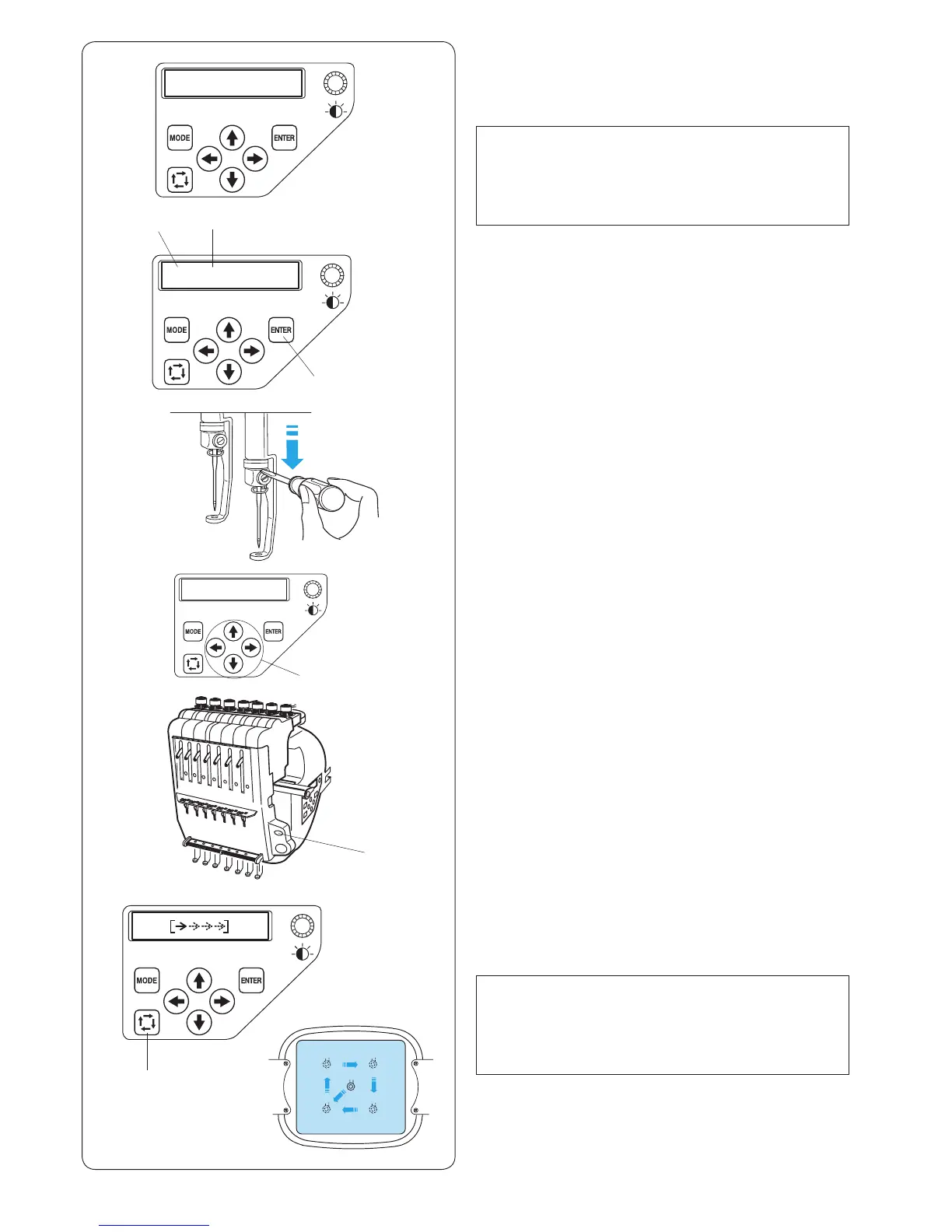
z Select the pattern you wish to sew. The LCD screen
shows the Ready to Sew mode display.
NOTE:
The embroidery result may vary depending on the
fabric and threads used. Make a test embroidery using
the same fabric and threads before sewing on the
actual garment.
w
e
r
t
z
x
c
b
n
x Press the ENTER button to check the thread color
assigned to each needle bar. The screen will show the
needle bar number and the color code.
q ENTER button
w Needle bar number
e Color code
c To check the needle drop position, lower the needle
bar using the screwdriver while pressing it against the
needle clamp (refer to page 60).
The needle bar can be lowered by turning the
handwheel clockwise.
b Press the auto thread cutter button to bring the needle
bar and presser foot to the up position.
t Auto thread cutter button
n Press the trace button to check the size and position
of the selected pattern in the hoop.
y Trace button
NOTE:
If the embroidery area exceeds the hoop, replace the
hoop with a larger one.
Check if the fabric edge will not obstruct the movement
of the hoop.
v v Adjust the hoop position by pressing the arrow buttons
if necessary.
r Arrow buttons















 To Next Page