Home
ELNA
Sewing Machine
eXpressive 970
Page 48 (Entering the Characters)
ELNA eXpressive 970 - Entering the Characters
96 pages
Manual
Save Page as PDF
To Next Page
To Next Page
To Previous Page
To Previous Page
Loading...
44
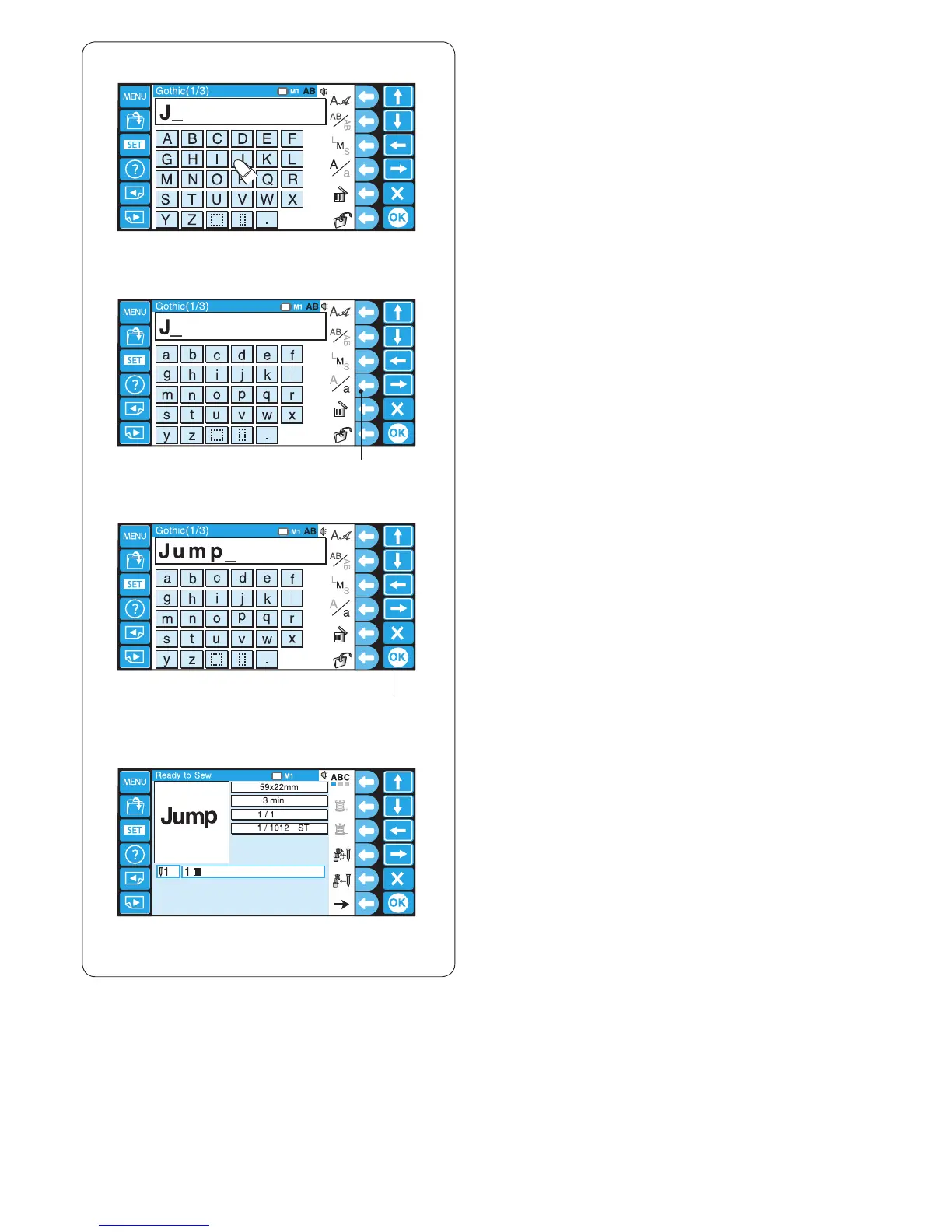
Entering
the characters
Example
:
“Jump”
in Gothic font
z
Select Gothic font.
Enter upper cas
e
“J
”
.
q
w
Any –
Colors
x
z
x
P
res
s the func
tion key next to the let
ter ca
se ic
on to
switch to the l
ower case.
q
F
unc
tion key (letter cas
e
)
c
E
nter lower cas
e “u
”
, “m” an
d “p”
.
Press the OK key to sew the monogra
m.
w
OK key
v
The Ready to Sew window will open.
v
c
47
49
Table of Contents
Main Page
Important Safety Instructions
3
Grounding Instructions
4
Table of Contents
5
SETTING up the MACHINE Installing the Machine
6
Adjusting the Feet
7
Names of Parts
9
Sub Control Panel
10
RCS Unit (Optional for some Models)
10
Standard Accessories
11
Assembling the Spool Stand
13
Setting the Thread Cones or Spools of Thread
14
Setting the Spool of Thread
14
Setting the Thread Cone
14
Installing the Hoop Supporter
15
Installing the RCS Unit (Optional for some Models)
16
Connecting the Power Supply
17
Direct PC-Link
18
Winding the Bobbin
19
Removing the Bobbin Case
20
Removing the Bobbin
20
Inserting the Bobbin
21
Inserting the Bobbin Case
21
Threading the Needle
22
Threading the Needle with the Needle Threader
24
Stabilizers
25
Template
25
Setting the Fabric in the Embroidery Hoop
26
Setting the Embroidery Hoop
27
Adjusting the Hoop Supporter for Optional Hoops
27
Basic Operation
28
Basic Operation with the Sub Control Panel
28
Machine Operating Buttons
28
Function Buttons
28
LCD Screen
29
Machine Setting
30
Starting to Embroider
32
Removing the Hoop
34
Adjusting the Thread Tension
35
Replacing the Needle
36
Basic Operation of the Optional RCS Unit
37
Machine Operating Buttons
37
Panel Keys
38
On-Screen Help Movie
39
Disconnecting the RCS Unit
40
ADVANCED OPERATION with the OPTIONAL RCS UNIT Selecting the Embroidery Patterns
41
Selecting the Built-In Designs
42
Function Keys
44
Function Keys
45
Monogramming
46
Function Keys
47
Entering the Characters
48
Deleting a Character
49
Inserting a Character
49
Saving the Monogram
49
Placement of Monogramming
50
Multi-Color Monogramming
51
Editing
52
Editing Functions
53
Selecting the Hoop
53
Moving the Pattern
54
Resizing the Pattern
54
Rotating the Pattern
55
Deleting the Pattern
55
Saving the File
55
Alternate Function Key Assignment
56
Duplicating the Pattern
56
Flipping the Pattern
56
Monogramming in an Arc
57
Customizing the Color Setting
58
Grouping the Patterns
59
Color Grouping
59
Zooming the Editing Window
60
Combining the Patterns and Lettering
61
Adjusting the Start Position
64
Adjusting the Re-Start Position after Thread Breakage
64
Starting to Embroider
65
Customizing the Settings with the Sub Control Panel
66
Customizing the Settings with the Optional RCS Unit
71
File Management
82
Saving the Pattern as a File
82
Creating a New Folder
83
Changing the Folder Name
83
Opening a File
84
File List Option
85
Deleting the Folder
86
Deleting the File
86
OPTIONAL ITEMS USB Flash Drive
87
CARE and MAINTENANCE Cleaning the Hook
88
Cleaning the Bobbin Case
88
Cleaning the Tension Leaves and Disks
89
Cleaning the Auto Thread Cutter Mechanism
90
Oiling
91
Oiling
92
Error Message
93
Troubleshooting
94
Other manuals for ELNA eXpressive 970
Service Manual
65 pages
Related product manuals
ELNA eXpressive 830
76 pages
ELNA eXpressive 860
138 pages
ELNA EXPRESSIVE 820
116 pages
ELNA eXpressive 830L
84 pages
ELNA eXpressive920
66 pages
ELNA eXplore 340
96 pages
ELNA eXplore 220
90 pages
ELNA eXplore 240
90 pages
ELNA eXperience 520
38 pages
ELNA eXperience 580
84 pages
ELNA eXperience 620
98 pages
ELNA eXperience 450
52 pages















 To Next Page