24
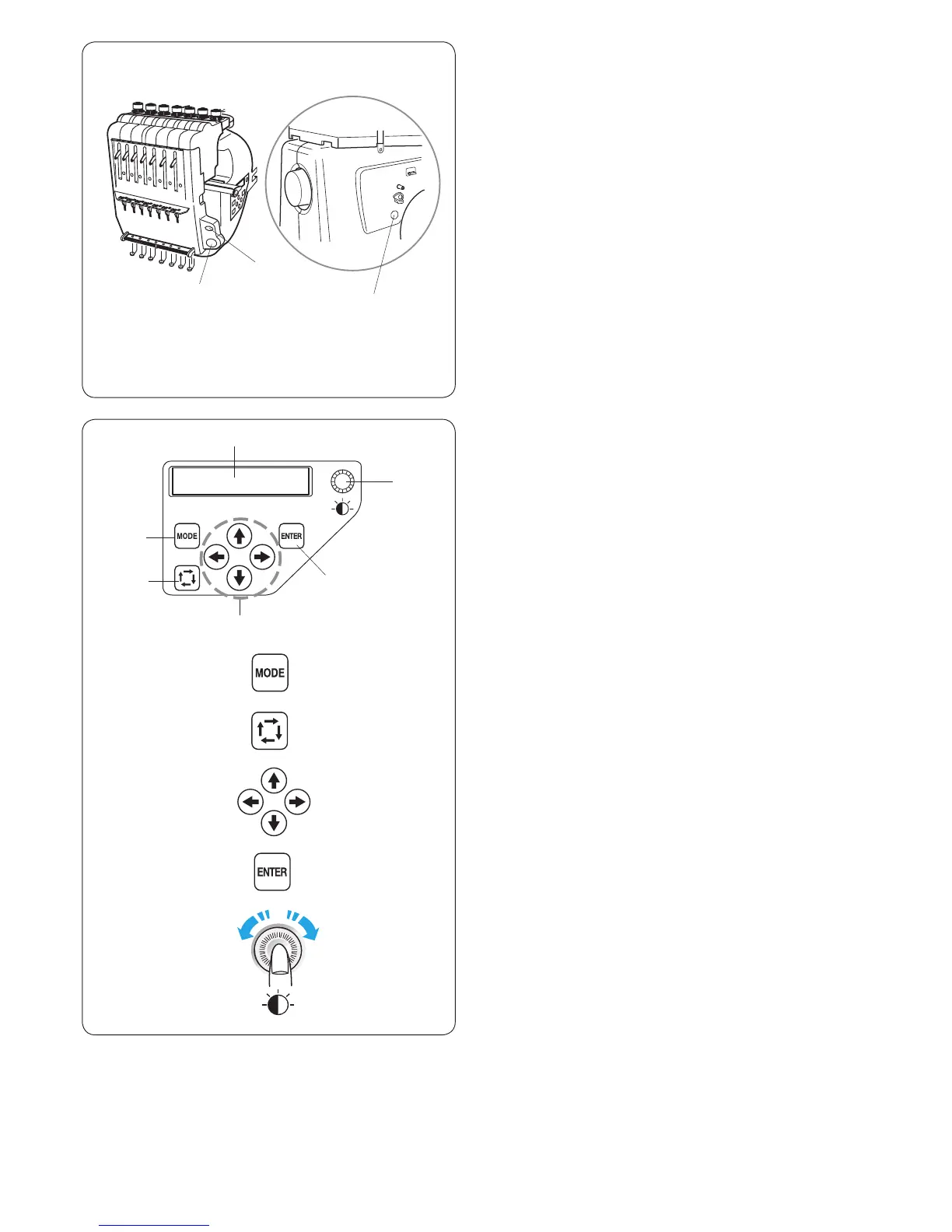
Use the sub control panel to operate the machine without
the RCS unit.
Function buttons
q MODE button
Press this button to select one of the following modes.
1. Ready to Sew
2. Stitch count setting
3. Color section setting
4. Needle bar number setting
5. Pattern selection
6. My setting
w Trace button
Press this button to trace the outline of the embroidery
pattern without stitching.
e Arrow buttons
These buttons can be used as Jog buttons in the Ready
to Sew mode.
In other modes, these buttons are used for selecting the
items.
r ENTER button
Press this button to conrm your selection or register the
settings.
t LCD brightness adjusting dial
Turn this dial with your ngertip to adjust the brightness
of the LCD screen.
y LCD screen
q
w
e
r
q
w
e
r
t
t
y
BASIC OPERATION
Basic Operation with the Sub Control Panel
Machine operating buttons
q START/STOP button
Press this button to start or stop the machine.
* When you press this button once, the LCD screen will
show the reminder [H:M1 ?] asking you to conrm the
hoop type to be used.
After checking the hoop type, press this button again to
start sewing.
* The button glows red when the machine is stitching,
and green, when the machine has stopped.
w Auto thread cutter button
Press this button to trim the threads.
e Bobbin winding button
Press this button to wind the bobbin.
q
w
e















 To Next Page