82
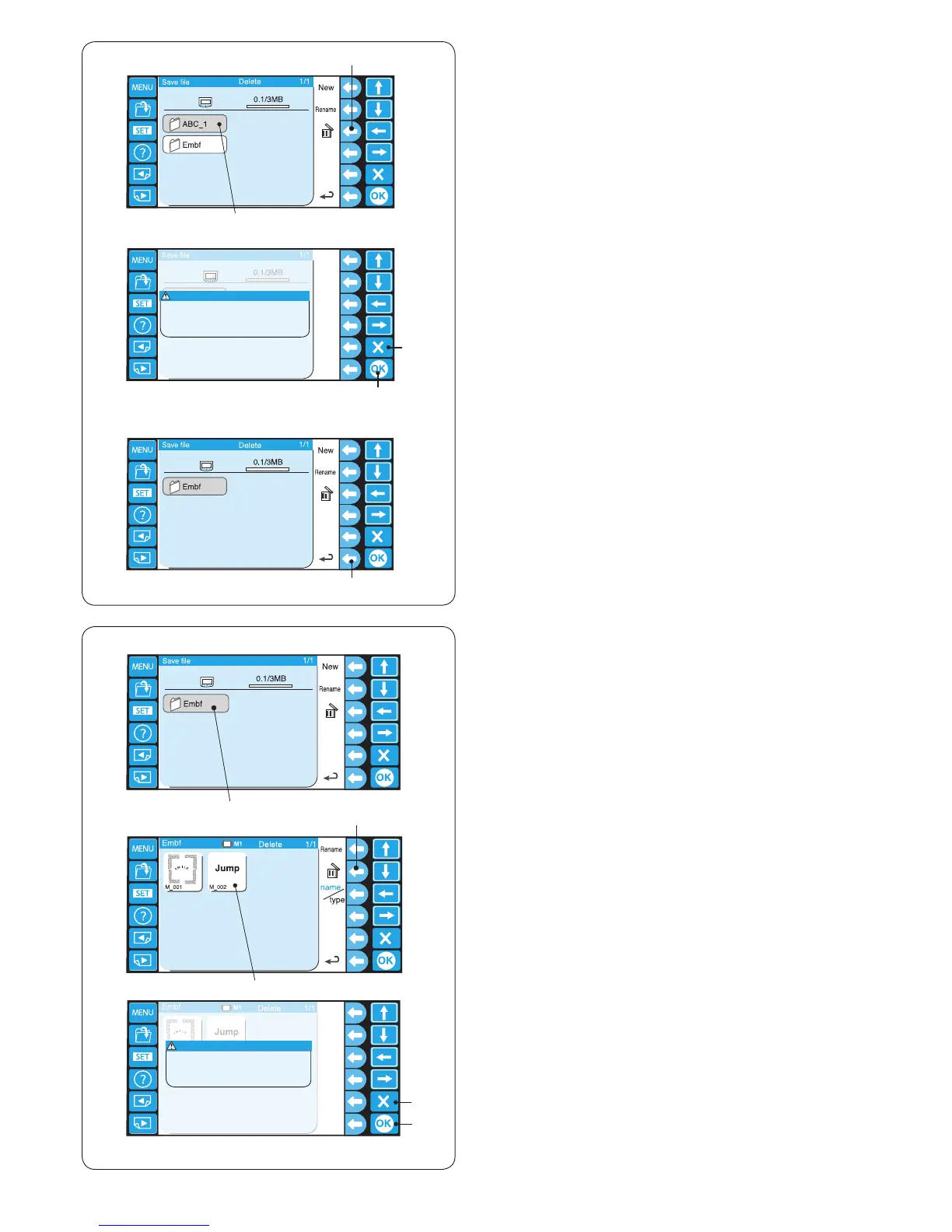
x Press the function key next to the delete icon in the
le list window and press the le icon you wish to
delete.
w Function key (delete)
e File icon
Deleting the folder
z To delete the unnecessary folders, press the function
key next to the delete icon in the folder list window
and press the folder icon you wish to delete.
q Function key (delete)
w Folder icon
* Press the function key next to delete again to return
to the previous display.
Select the folder to delete.
q
e
r
Deleting the le
z To delete the unnecessary les, open the folder that
contains the les to delete.
q Folder icon
q
w
e
t
r
w
z
z
x
x
c
c
x A conrmation dialog box will open.
Press the OK key to delete the folder.
e OK key
If you do not wish to delete the folder, press the Exit
key (X) and the screen will return to the folder list
window without deleting the folder.
r Exit key (X)
c To return to the previous display, press the function
key next to the return icon.
t Function key (return)
c A conrmation dialog box will open.
Press the OK key to delete the folder.
r OK key
If you do not wish to delete the folder, press the Exit
key (X) and the screen will return to the le list window
without deleting the le.
t Exit key (X)















 To Next Page