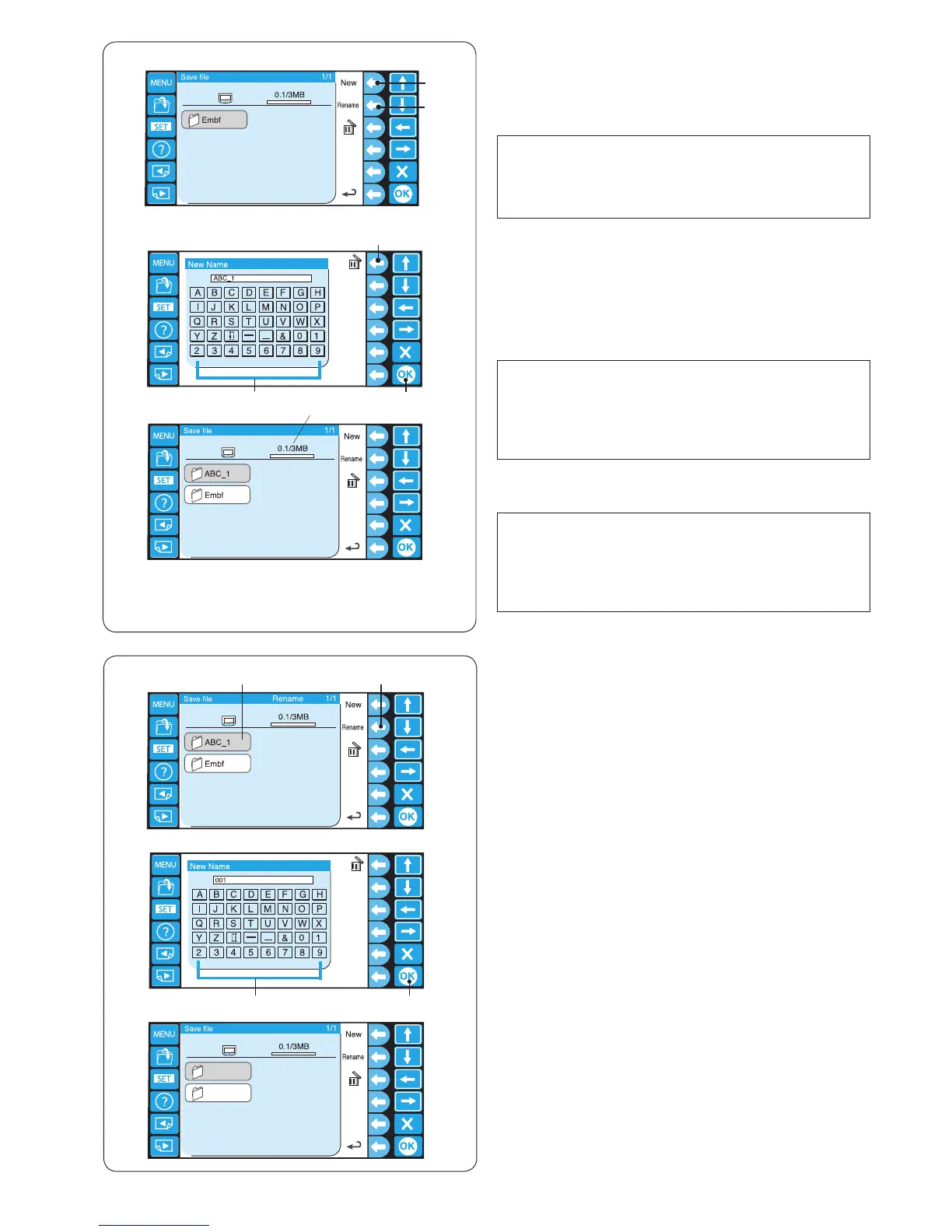
Creating a new folder
z If you wish to create a new folder, press the function
key next to the New.
q Function key (New)
NOTE:
If you wish to change the name of the existing folder
or le, press the function key next to Rename.
w Function key (Rename)
* The machine does not have a folder.
x The keyboard window will open.
Enter the desired name and press the OK key.
Up to 8 characters can be entered.
e Keyboard
r OK key
NOTE:
To delete a wrong entry, press the function key next to
the delete icon.
The last character will be deleted.
t Function key (delete)
c A new folder with the assigned name will be displayed
in the folder list window.
NOTE:
You can save as many folders and les as the
available memory space allows.
The memory size is indicated with the scale bar.
y Scale bar
Changing the folder name
z If you wish to change the name of the existing folder,
press the function key next to Rename.
q Function key (Rename)
* Press the function key next to Rename again to
return to the previous display.
x Select the folder.
w Folder icon
q
w
r
e
z
x
c
z x
c
c The keyboard window will open.
Enter the desired name and press the OK key.
Up to 8 characters can be entered.
e Keyboard
r OK key















 To Next Page