q
w
e
r
t
y
u
i
o
!0
!1
!3
!4
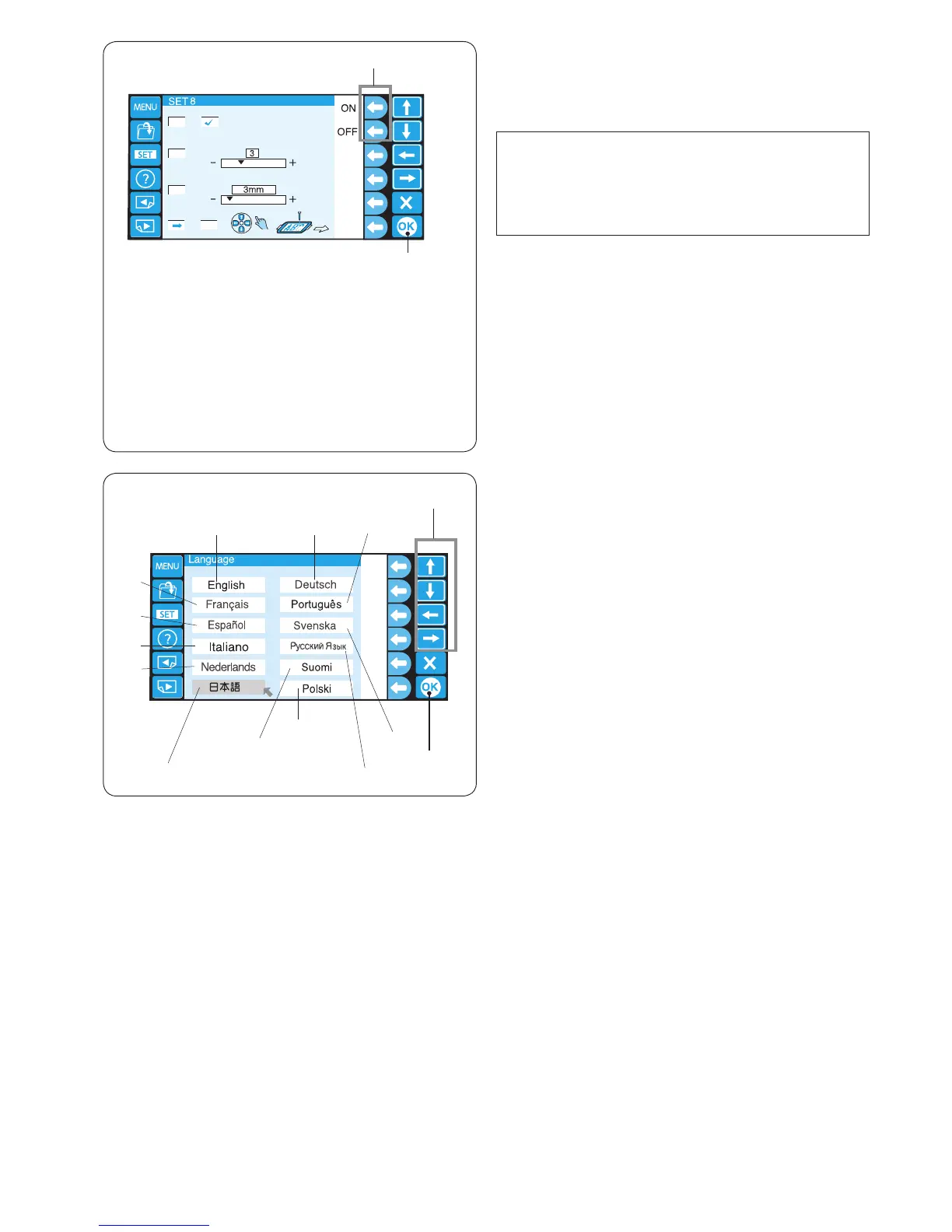
28. Language selection
You can select one of the following languages for screen
message.
q English w French e Spanish
r Italian t Dutch y Japanese
u German i Portuguese o Swedish
!0 Russian !1 Finnish !2 Polish
Press the arrow key to move the cursor (red arrow) to the
language you wish to select.
!3 Arrow keys
Press the OK key.
!4 OK key
27. Hoop position adjustment ON/OFF (after starting
embroidery)
The hoop position can be adjusted before sewing each
layer (section) or even in the middle of embroidering.
NOTE:
• The adjusted hoop position will apply to the
subsequent layers (sections).
• Turn off this function when sewing ordinary
embroidery designs.
Press the function key next to “ON”.
A check mark will appear in the box.
Press the function key next to “OFF” to disable this
function.
q Function keys (ON, OFF)
Press the OK key.
w OK key
Press the OK key to register the new setting.
Jump Thread Trimming
Number of Jumps
Mnimum jump thread length to cut
q
w
!2















 To Next Page