Machine Maintenance Procedures 3-27
Touchpad Removal 0
Prerequisite:
Upper Cover Removal
1. Find touchpad (C) on upper cover. (Figure 3-20)
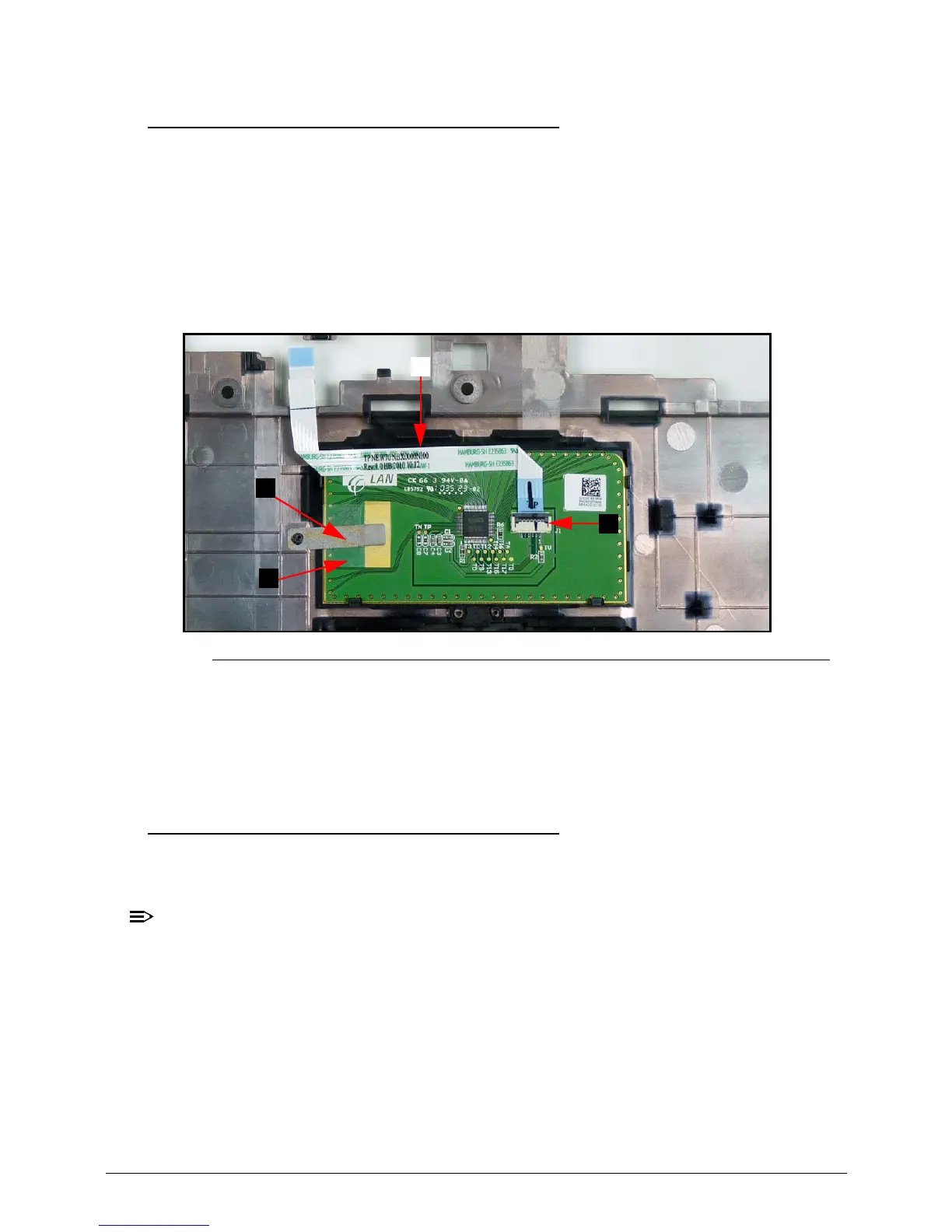
2. Remove touchpad FFC (A) from touchpad. (Figure 3-23)
3. Disconnect and remove touchpad FFC (A) from touchpad connector (B). (Figure 3-23)
Figure 3-23. Touchpad
4. Lift plastic cover (C) securing the grounding tape and remove grounding tape (D) from
touchpad. (Figure 3-23)
5. Remove touchpad from upper cover.
Touchpad Installation 0
1. Install touchpad (C) on upper cover. (Figure 3-20)
2. Lift plastic cover (C) and install grounding tape (D) onto touchpad. (Figure 3-23)
Make sure the grounding tape is touching the connective section of the touchpad as
shown in Figure 3-23.
3. Connect touchpad FFC (A) to touchpad connector (B). (Figure 3-23)
4. Install touchpad FFC to touchpad. (Figure 3-23)
5. Install upper cover.














 To Next Page