Machine Maintenance Procedures 3-5
Machine Maintenance Procedures
Introduction 0
This chapter contains general information about the computer, a list of tools needed to do the
required maintenance and step by step procedures on how to remove and install components
from the computer.
General Information 0
The product previews seen in the following procedures may not represent the final product
color or configuration. Cable paths and positioning may also differ from the actual model.
During the removal and installation of components, make sure all available cable channels
and clips are used and that the cables are installed in the same position.
All prerequisites must be completed prior to starting maintenance.
Recommended Equipment 0
The following equipment are recommended to do the following maintenance procedures:
Wrist grounding strap and conductive mat
Flat screwdriver
Philips screwdriver
Plastic tweezers
Flat plastic pry
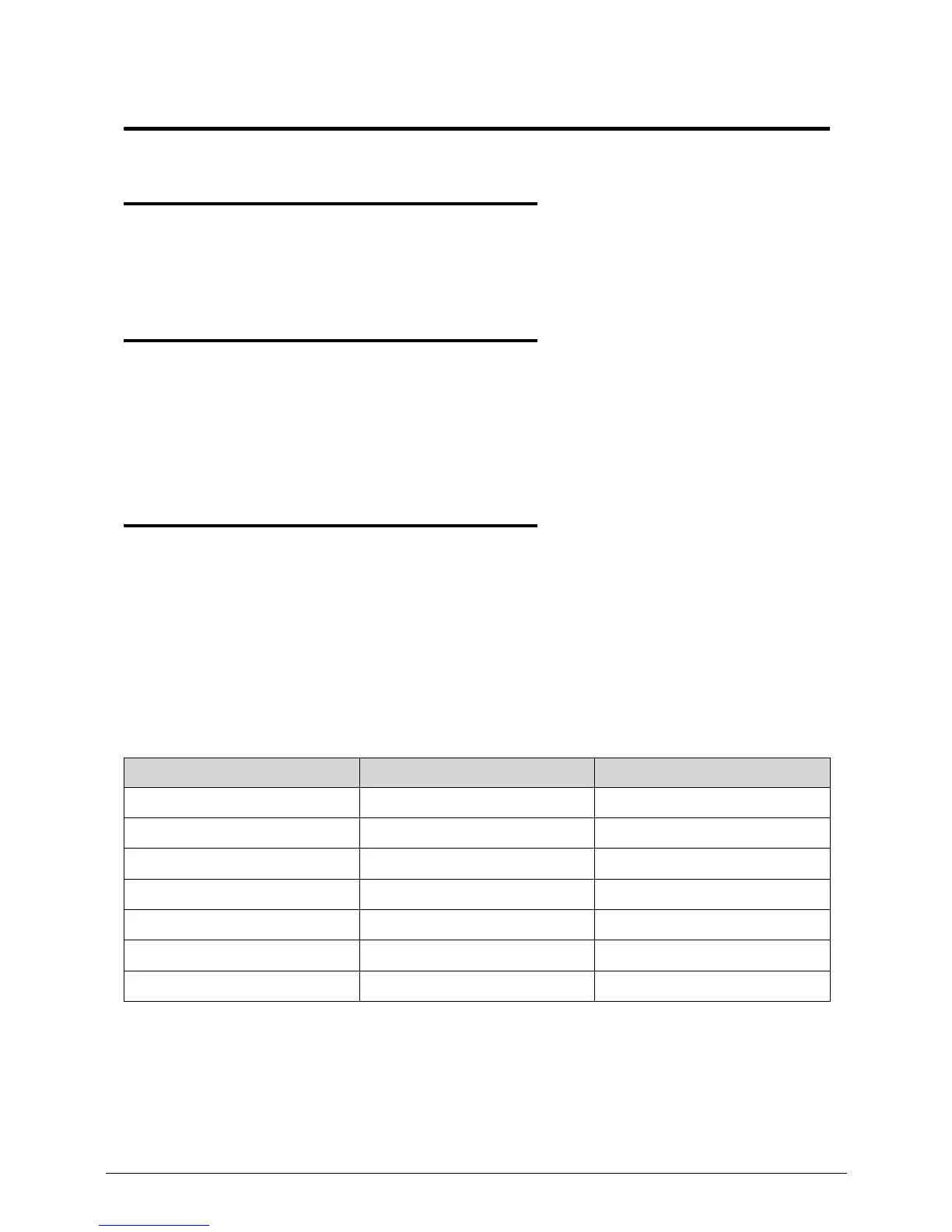
Table 3-1. Screw List
Size Quantity Acer Part No.
M2.5*8.0 14 86.R4F02.002
M2.0*3.0 11 86.R4F02.004
M2.0D*3.0L 3.5D 4 86.R4F02.007
M2.5*6.0 Ni 2 86.R4F02.003
M2.5*5.0 21 86.R4F02.001
M3.0*3.0 Ni 4 86.R4F02.005
ICW50 CPU Thermal Screw 4 86.R4F02.008














 To Next Page