DTP CrossPoint 84 Series Matrix Switchers • Matrix Software 84
Line audio input signal controls
The program audio input signal processor chain makes adjustments to program audio
material before it is tied to specific outputs.
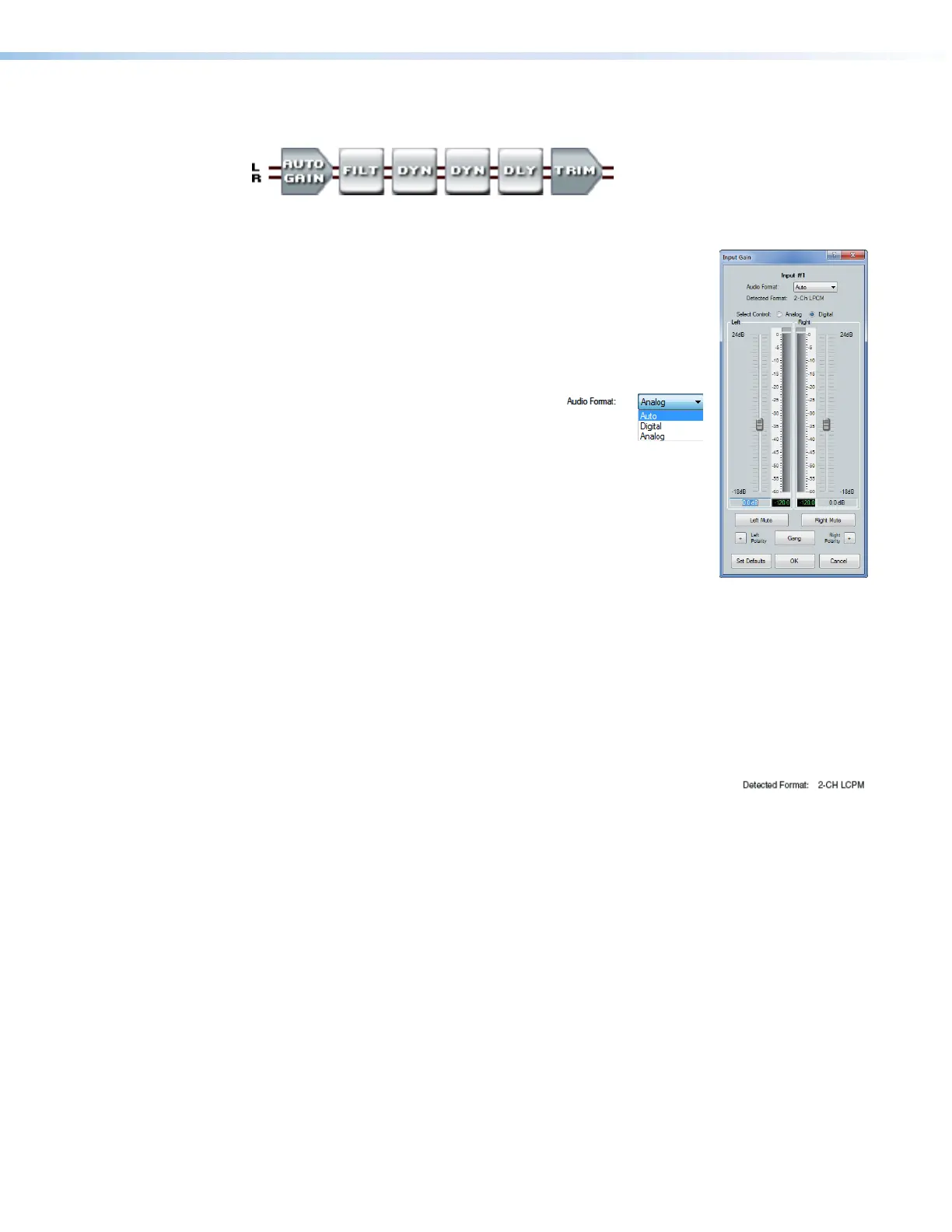
Gain control block — The always-present gain control provides
33
3333
3333
44
4444
4444
55
5555
5555
11
1111
1111
11
1111
1111
22
2222
222222
2222
2222
88
8888
8888
66
6666
6666
77
7777
7777
888888888888888888
666666666666666666
left and right controls to adjust the audio level of each input through
a range of -18 dB to +24 dB to set input gain levels for optimal
signal to noise ratio.
Click and drag the desired fader (
1
) or click in the dB field (
2
) and
type a value. The meter value displayed in green shows the signal
level in dBFS.
3
Audio Format drop-down box — Use
this control to select the audio format:
•
Analog — Audio on the local audio input (captive scr
ew)
connector (see Audio Inputs 1 through 6 on page13 )
is processed within the DSP.
• Digital — Embedded audio on the HDMI or DTP input is
handled as follows:
•
LPCM format
— Audio is de-embedded and
processed within the DSP.
•
Any other format
— The original digital audio is not
de-embedded and is not routed into the DSP. No audio is available on the
analog audio output (captive screw) connector (see Audio Outputs 1 through
4 on page14).
•
Auto — Audio is automatically selected between the digital and analog inputs, with
the digital input having priority
. When the Detected Format field (
4
) displays either
None or Multi-Channel, the analog input is automatically selected.
Based on the selection made in this box, when the dialog box is closed, the Gain block
reports Auto Gain, Dig Gain, or Ang Gain.
4
Detected Format: field — This field displays the detected digital
audio format. The displayed format can be either:
• None — No digital signal format is detected. This may be due to a source device
being switched off or not connected. Some digital audio players may not output a
detectable signal (or no digital audio clock) when paused or stopped.
• Analog input audio passes through the DSP to any output when Audio Format
(
3
) is set to Analog or Auto.
• Digital input audio is not passed to any output.
• 2-Ch LPCM — The detected format is uncompressed digital audio, in stereo or
2-channel format. This does not include Dolby or DTS stereo formats, as these
audio formats are encoded.
• LPCM input audio passes through the DSP to any output when Audio Format
(
3
) is set to Digital or Auto.
• Embedded LPCM input audio passes directly to an HDMI or DTP output,
bypassing the DSP, if the Output Signal Source control in the Volume block
of that output is set to Original (see item
6
in Output signal processor chain,
Volume controls on page97).
• Analog input audio is not passed to any output.
(see figure40,
A
on page80)



 To Next Page