5 Eyecon 9420 & 9430 Instruction Manual
9430 Addendum
4. Funnel Checking Post Accumulate
Enable this to force the user to remove the pills from the funnel after
preforming an [Add to Total] operation. Some users prefer to keep the
pills in the funnel to save time but this can result in count errors if
uncounted pills, from the subsequent pour from the stock bottle, fall into
the funnel.
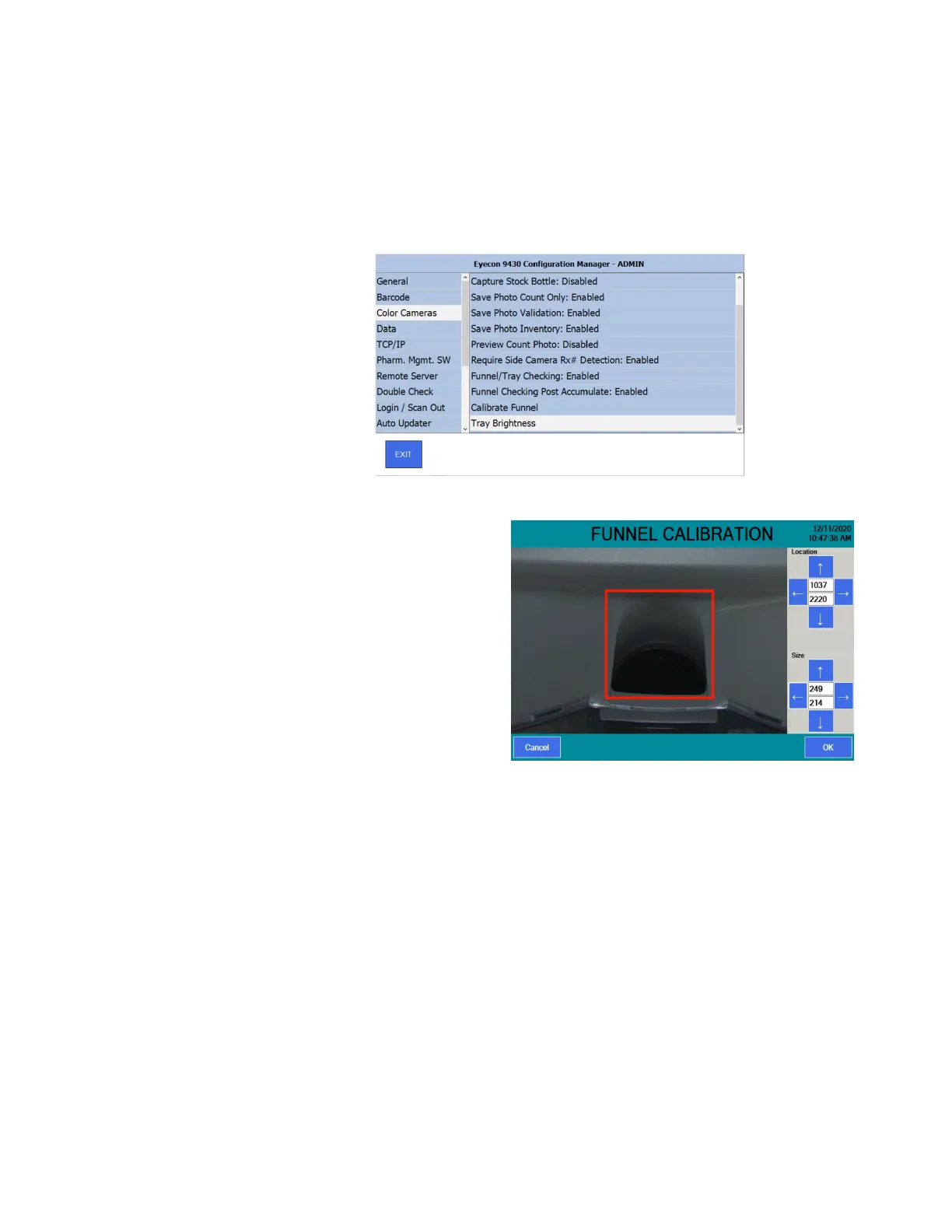
This shows the remaining parameters within the Color Cameras
options.
5. Calibrate Funnel
This menu is used to
define the area in the
photo of the bottom
of the funnel that the
Eyecon analyzes to
verify that the funnel
has been emptied.
a) Touch & slide on
the live view shown
on the screen to pan
around the camera’s
image to bring the
bottom of the funnel
into view.
b) use the arrows (or click on the numeric value) in the top half of the
menu to adjust the location of the red rectangle defining the perimeter of
the funnel opening.
c) use the arrows (or click on the numeric value) in the bottom half of the
menu to adjust the size of the red rectangle defining the perimeter of the
funnel opening.
d) The rectangle should be sized and located similarly as shown at the
right.
e) Press [OK] to save the changes.
- Follow the next prompted instructions “Press OK after ensuring that the
funnel is empty”
- The Eyecon will display “Calibrating Funnel” for up to a minute while it
establishes the appearance of an empty funnel.



 To Next Page