Eyecon 9420 & 9430 Instruction Manual 8
9.5 Operation
3. During the counting
process, once the tray is
becoming quite full, and
you wish to save the
current count, you can
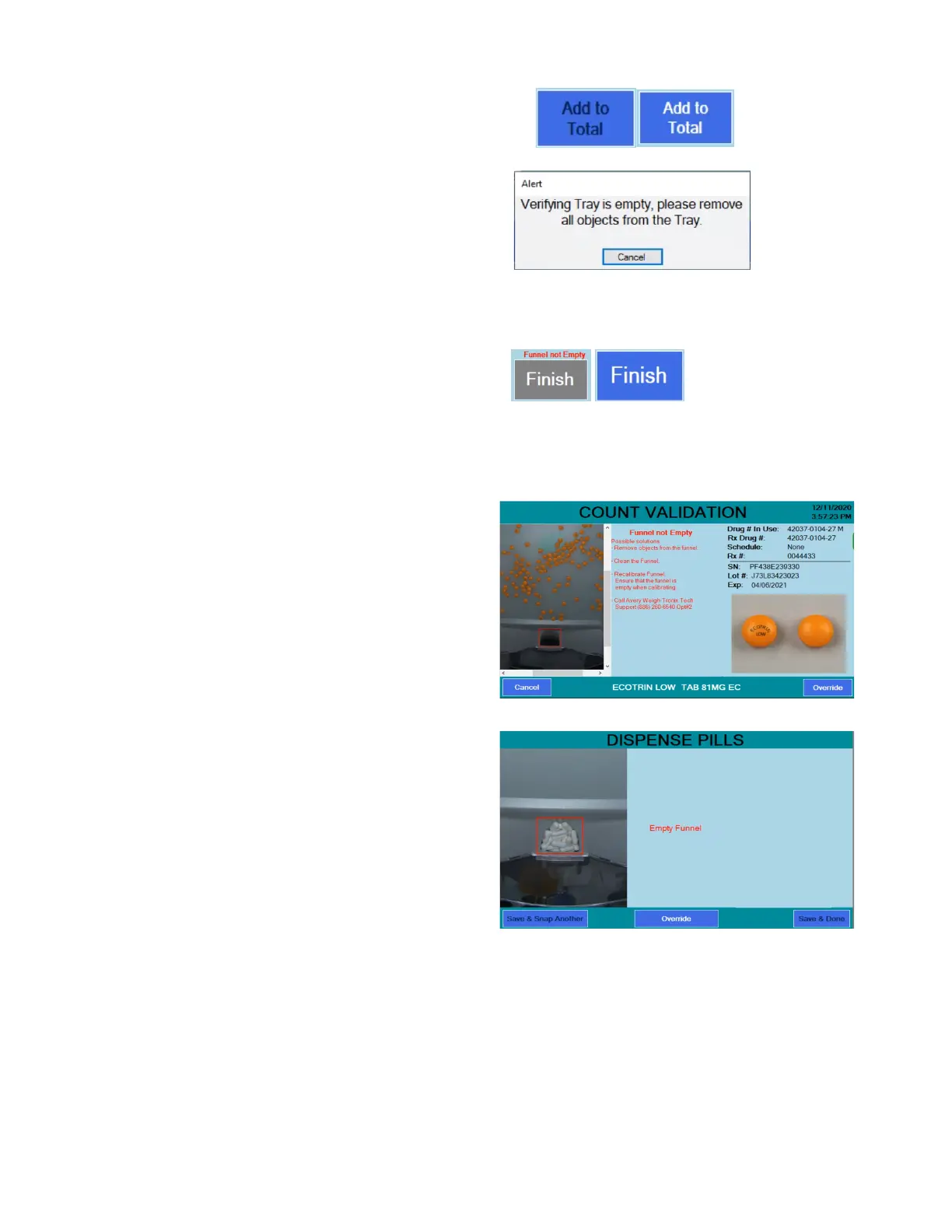
use [Add to Total]
feature to do so.
However, if the funnel is
not detected to be empty,
this button will be
temporarily disabled,
showing black text, until any extra pills have been removed from the funnel.
This prevents the extra uncounted pills from being dispensed.
a) When the
desired count is
achieved, if there
are any excess pills
in the funnel, the
[Finish] will appear
grayed out with
‘Funnel not Empty’ above it, until the pills are removed.
b) if the grayed out
[Finish] button is
clicked, the
camera’s view of
the funnel is shown
to identify what the
camera is seeing
that is preventing
the completion of
the transaction.
4. If funnel/tray checking is
enabled, after the count
has been saved, the user
is prompted to “lift tray to
transfer pills into
funnel.” Otherwise, the
user will not be prompted
to transfer the pills, but
the transfer still should
take place as part of the
standard filling process.
After tranferring pills, skip
to step 6.



 To Next Page