34 Eyecon 9420 & 9430 Instruction Manual
Settings menu
Validation
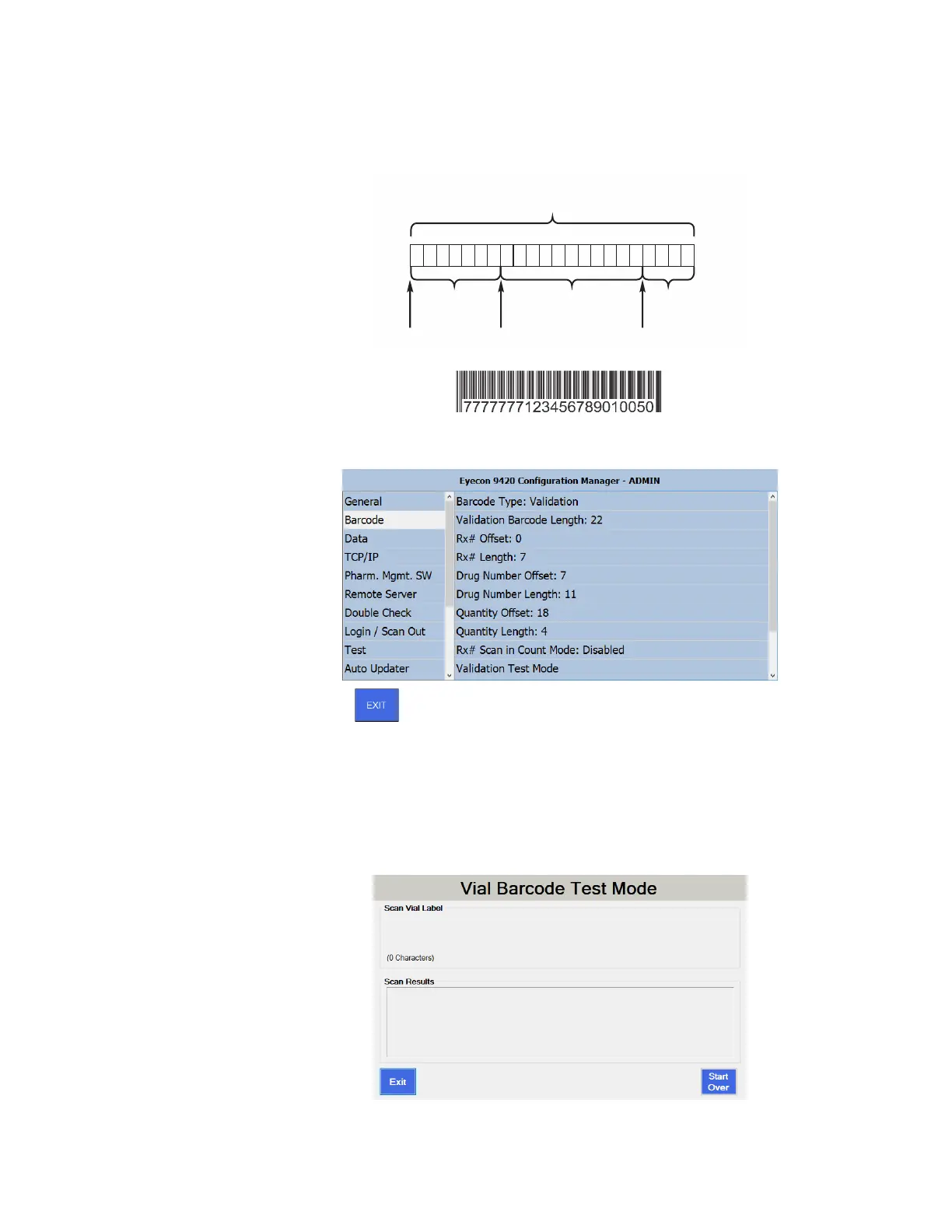
If you select the Validation mode, you can use the choices on the right hand screen to
set the total length of the barcode and then the offsets and lengths of each part of the
barcode: Rx#, Drug Number and Quantity. This is illustrated by the example below
Refer to the screen below as you move through determining and setting the values.
To determine the values for each section, you will need one of the barcodes that will be
used.
1. Tap Validation Test Mode in the right pane.
The Vial Barcode Test Mode Screen appears.
Validation Barcode Length = Overall barcode length
Example = 22
Offset: 0 Offset: 7 Offset: 18
Rx#
Length: 7
Drug Number
Length: 11
Qty.
Length: 4
1 2 3 4 5 6 7 8 9 10 1112 13141516 171819 202122
777 777 71 23 456789010050



 To Next Page