Eyecon 9420 & 9430 Instruction Manual 35
3.3 Barcode menu
2. Scan the barcode.
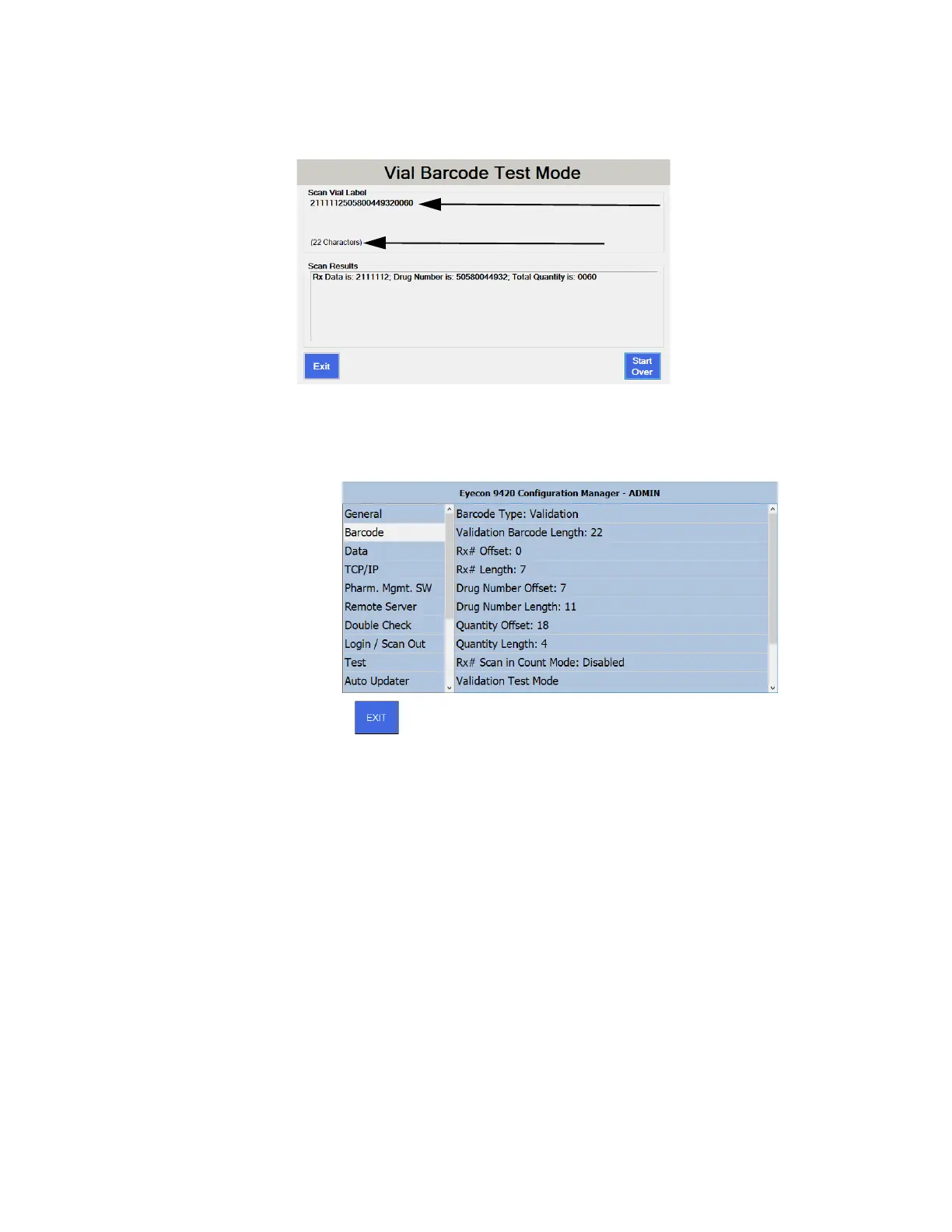
The complete string of data from the barcode will be displayed along
with the total count of characters.
3. Review the breakdown of the Rx Data, Drug Number, and Rx Quantity. If they
appear correct, your barcode configuration is complete. If not, continue with
the following steps and refer to the image below as necessary.
4. Enter the character count shown on the Vial Barcode Test Mode into the
Validation Barcode Length menu item.
5. Determine which position in the text string is the start of the Rx#. The first digit
would constitute an offset of 0.
6. Enter this number as the Rx# Offset.
7. Count the number of digits in the Rx# within the displayed number below,
“Scan Vial Label.” This is the Rx# length.
8. Enter the Rx# length.
9. Determine which position in the string is the start of the Drug Number. The first
digit would constitute an offset of 0.
10. Enter the Drug Number Offset.
11. Count the number of digits in the Drug Number within the displayed number
below “Scan Vial Label. In the US, this MUST be 11 for NDCs. In Canada, this
MUST be 8 for DINs.
Data string from barcode
Character count



 To Next Page