Eyecon 9420 & 9430 Instruction Manual 81
4.2 Count Only mode
The Eyecon can read this information and display it as part of the counting function.
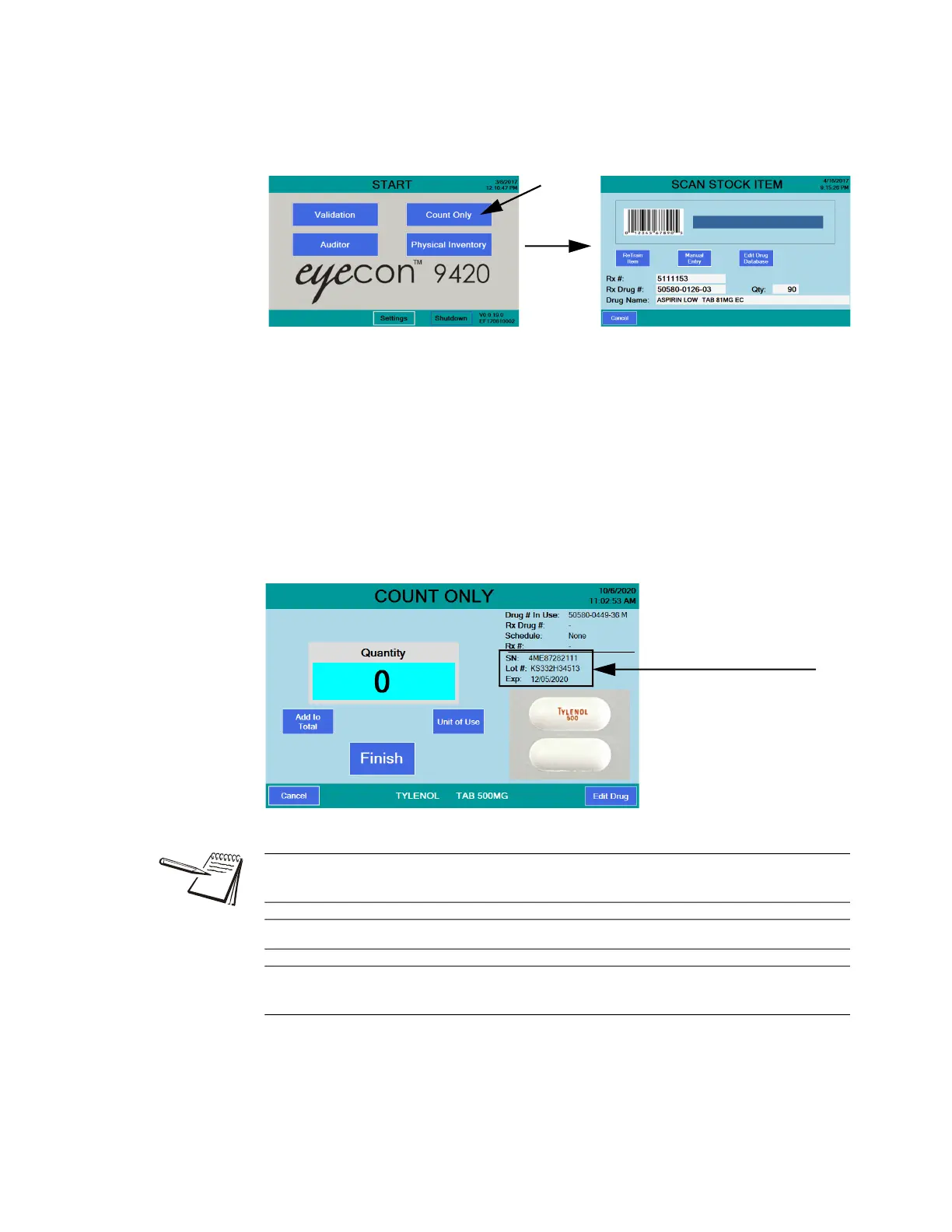
1. From the START screen, press the Count Only button …
The SCAN STOCK ITEM screen is displayed.
2. Scan the stock bottle barcode. If a 2D barcode is available it is recommended
that you scan it instead of the UPC code to capture the extra information it
provides. It can be useful to cover the UPC barcode with your finger, if it is
near the 2D barcode, to make sure it is not accidentally scanned.
The display changes as shown below. A photo of the drug will be shown.
If the drug photo does not exist or it is disabled, a message indicating
that no photo is available will be displayed in place of the photo.
Information such as the serial number, lot number, and expiration date
will appear if a 2D barcode was scanned. If a UPC barcode is scanned,
these values are not populated.
Information from 2D barcode:
l Serial Number
l Lot Number
l Expiration
Information
See Train or Retrain a pill image on page 105 to Re-Train an existing pill image or if
the pill is new to the system.
See Manual NDC entry on page 97 if the barcode does not scan.
If NDC information is not present in the database, NDC not found! screen will
appear. See Drug Number Not Found on page 97 for further information.



 To Next Page