82 Eyecon 9420 & 9430 Instruction Manual
Eyecon operation
3. Pour pills onto counting platter. See
Best counting practice on page 98.
4. Scrape excess pills into the funnel and
return them to the stock bottle.
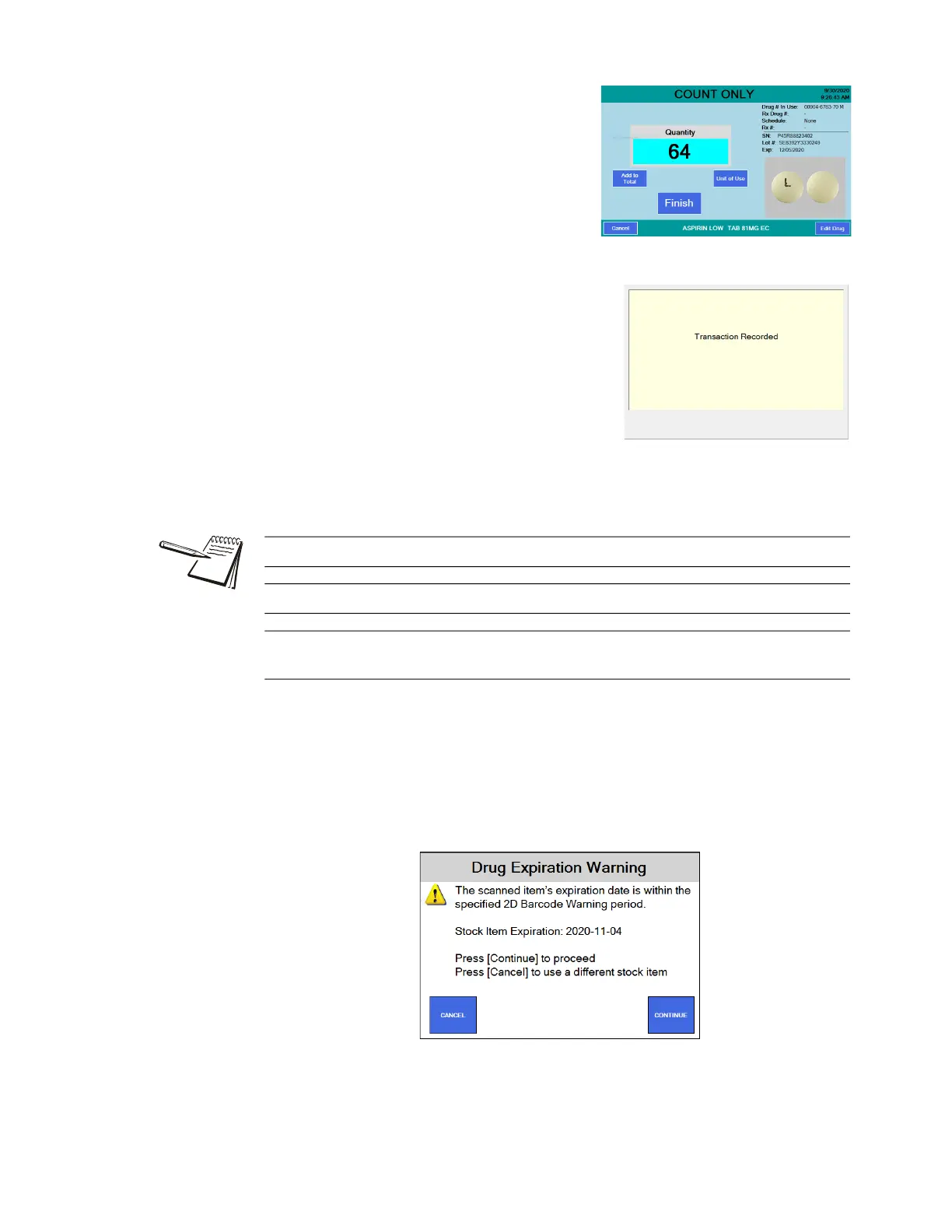
5. With the correct quantity displayed,
press the Finish button.
A beep will sound and a message
will be briefly displayed saying
Transaction Recorded, as shown at
right followed by the SCAN STOCK
ITEM screen.
6. Dispense pills to the patient vial. See Best
filling practice on page 99.
7. Scan another stock bottle or press Cancel
to return to the START menu.
Expiration Messages
Your Eyecon will display warnings or prevent dispensing, if the expiration date obtained
by scanning the 2D barcode on the stock items is within predefined limits. See pg 36.
Expiration Warning
This message indicates that the medicine will expire within a reasonable time after
being dispensed. For example, the medicine may expire within 60 days and the Rx is
for 30 days. Press Continue to fill the Rx with this medication and proceed or press
Cancel to use a different stock item.
See Unit of Use for pill counting on page 100 for details.
See Dispensing large quantities on page 104 for more information.
If any details on the right side of the COUNT ONLY screen are incorrect, press the
Edit Drug button. See Edit drug database on page 98.



 To Next Page