EasyManua.ls Logo

FieldServer LonWorks ProtoNode - Page 17

FieldServer LonWorks ProtoNode
97 pages
Print Icon
To Next Page IconTo Next Page
To Previous Page IconTo Previous Page
Loading...
Page 17 of 97 PN: 106417-05
Universal Gateway
Apex Boiler
(Typical)
EMS
HEADER SENSOR
REMOTE FIRING RATE +
HEADER SENSOR
OUTDOOR SENSOR
OUTDOOR SENSOR
DHW TEMP SWITCH
DHW TEMP SWITCH
REMOTE FIRING RATE +
EXTERNAL LIMIT
EXTERNAL LIMIT
Firing Rate
4-20mAdc
Demand
T-STAT OR EMS CONTACT
Boiler
Enable/Disable
Contact
Boiler to Boiler/ EMS
Communication
Network (Use CAT5 Cable)
Use RJ45 Splitter
PN 103192-01
BACnet or
Lonworks
Apex Boiler
(Typical)
HEADER SENSOR
REMOTE FIRING RATE +
HEADER SENSOR
OUTDOOR SENSOR
OUTDOOR SENSOR
DHW TEMP SWITCH
DHW TEMP SWITCH
REMOTE FIRING RATE +
EXTERNAL LIMIT
EXTERNAL LIMIT
Firing Rate
4-20mAdc
Demand
T-STAT OR EMS CONTACT
Boiler
Enable/Disable
Contact
Boiler to Boiler/ EMS
Communication
Network (Use CAT5 Cable)
Use RJ45 Splitter
PN 103192-01
(Typical for each boiler)
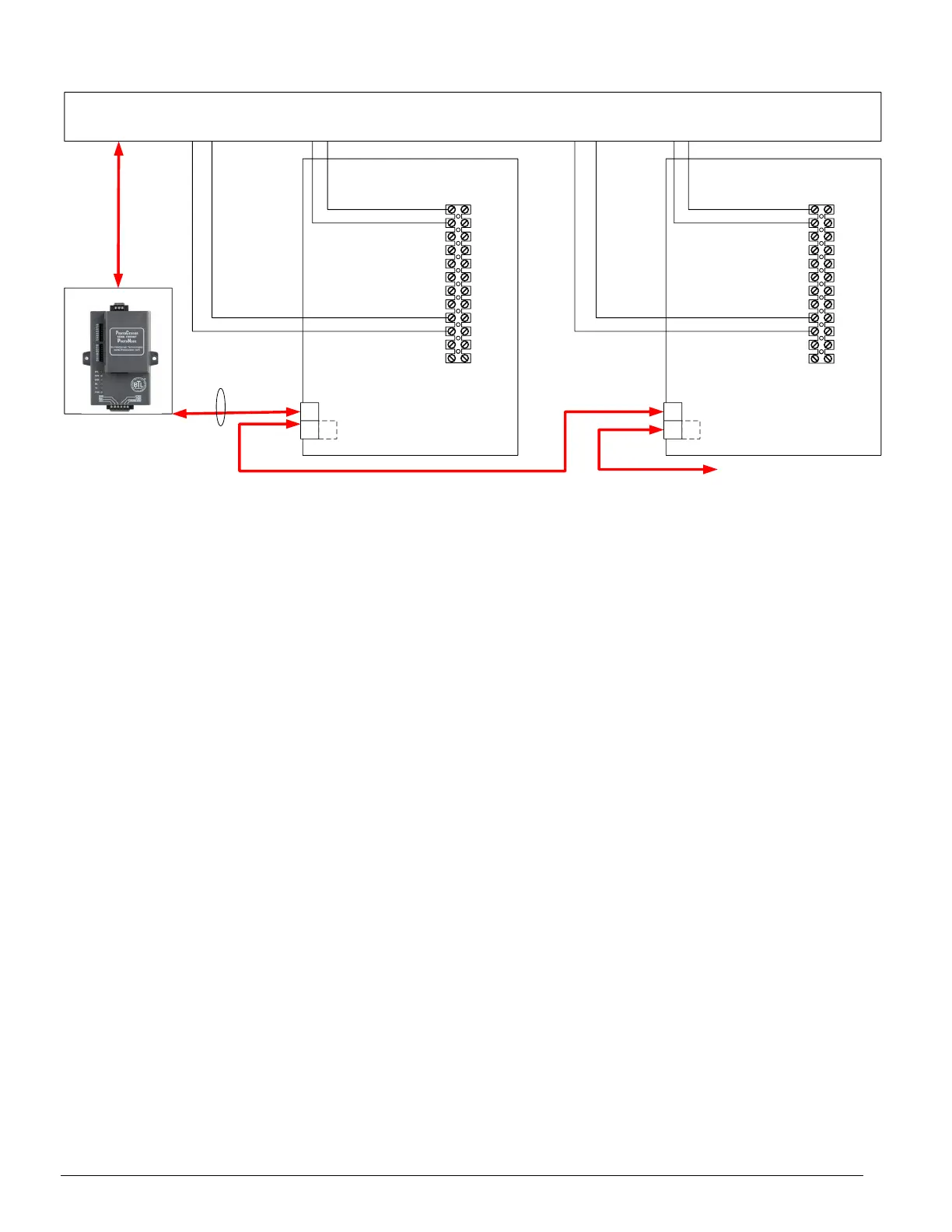
Connect up to 8 boilers
Note: Connect wires to
ProtoNode as shown on
previous page.
RJ45
Ethernet
Cable
Figure 3-9: Apex, Alpine, ASPEN, Phantom-X or Raptor with Panasonic Display Network
Wiring
IMPORTANT NOTES for Apex with Panasonic display Connections:
1. When the Energy Management system is connected, boiler sequencing (multiple boiler lead/lag) must be
done external to the boiler controls, by other means.
2. Both Enable/Disable and Remote Firing Rate must be wired to the boilers to provide boiler sequencing
(multiple boiler lead/lag).
3. If the burner on/off Modbus signal is used instead of the Enable / Disable contact input the boiler will be turned
off, but the system pump may remain running.
4. The Sequencer must be disabled while communicating with EMS (i.e. no Master Boilers).


Table of Contents

Related product manuals