Page 39 of 97 PN: 106417-05
7.2 Routing Settings
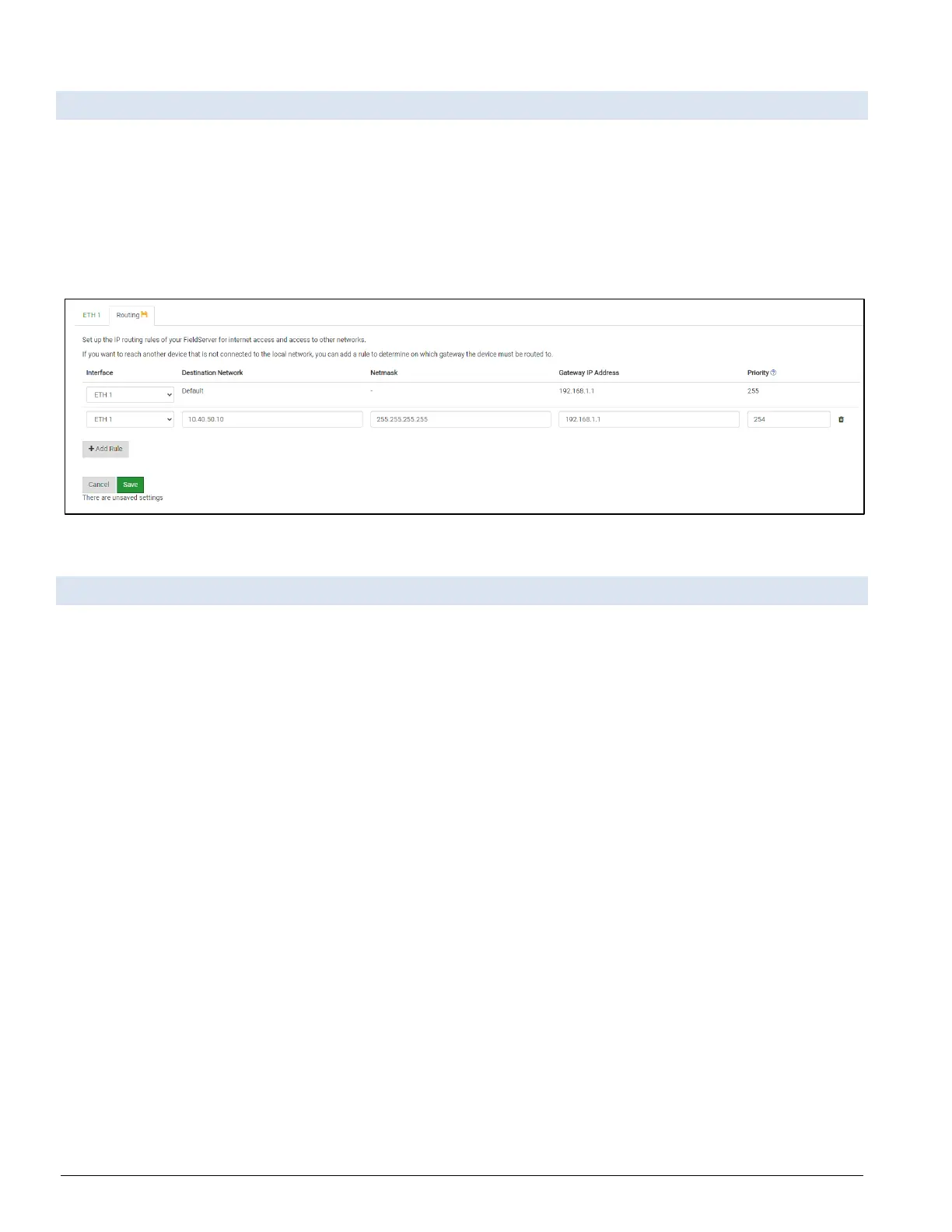
The Routing settings make it possible to set up the IP routing rules for the FieldServer’s internet and
network connections.
• Click the Add Rule button to add a new row and set a new Destination Network, Netmask and
Gateway IP Address as needed.
• Set the Priority for each connection (1-255 with 1 as the highest priority and 255 as the lowest).
• Click the Save button to activate the new settings.
Figure 7-4: Routing Page
7.3 Ethernet 1
The ETH 1 section contains the wired network settings. To change the IP Settings, follow these instructions:
• Enable DHCP to automatically assign IP Settings or modify the IP Settings manually as
needed, via these fields: IP Address, Netmask, Default Gateway, and Domain Name
Server1/2.
NOTICE: If the FieldServer is connected to a router, the IP Gateway of the FieldServer should be
set to the same IP Address of the router.
• Click Save to record and activate the new IP Address.
• Connect the FieldServer to the local network or router.
NOTICE: Write down new IP Settings. Failure to do so will cause lost time.
NOTICE: The browser will need to be pointed to the new IP Address of the FieldServer before the
settings are accessible again.



 To Next Page