Page 27 of 97 PN: 106417-05
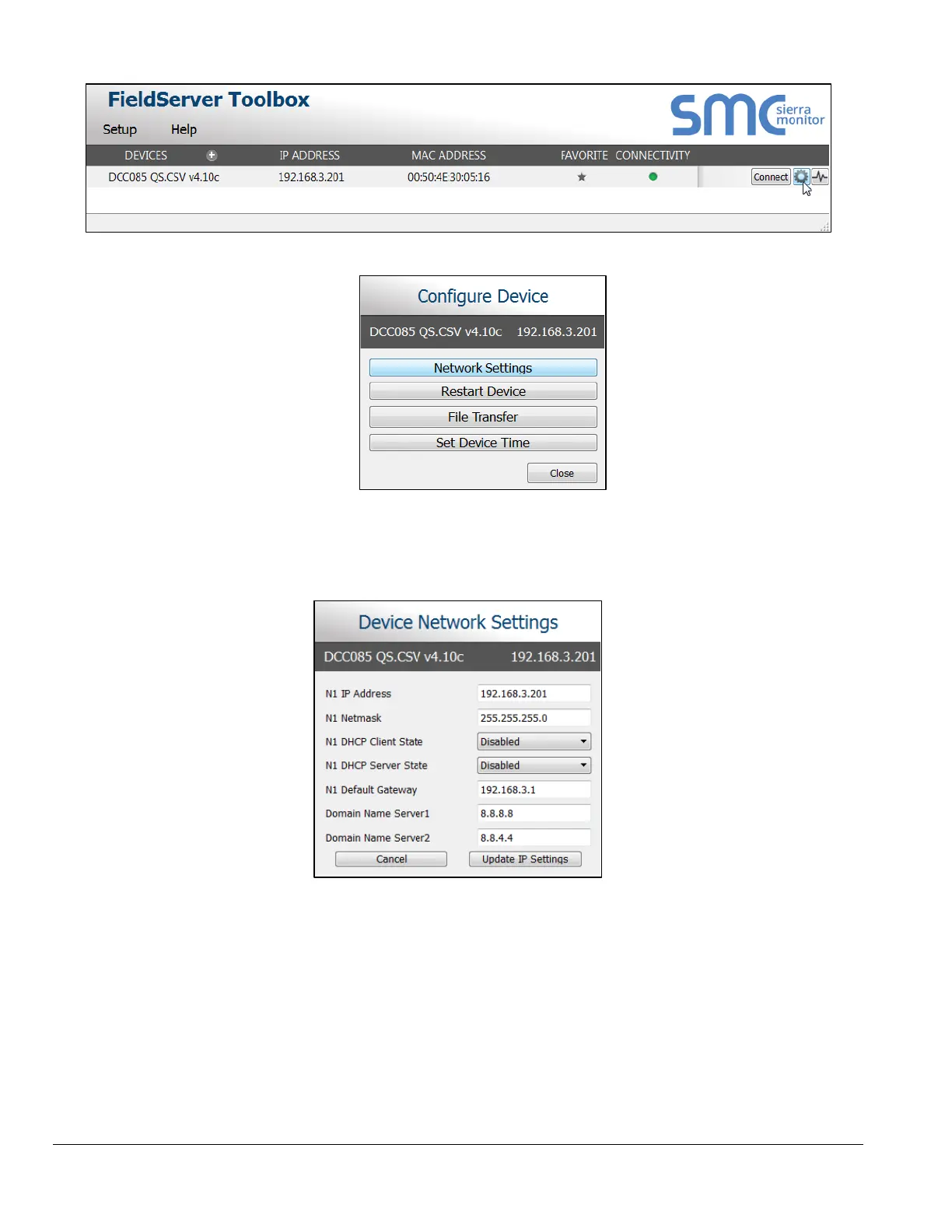
• Select Network Settings in the Configure Device window.
• Modify the IP Address (N1 IP Address field) of the gateway Ethernet port.
o The following fields may also be changed as needed: Netmask (N1 Netmask field), DHCP Client
State (N1 DHCP Client State field), IP Gateway (Default Gateway field) and DNS 1 & 2 (Domain
Name Server fields)
NOTICE: If the gateway is connected to a router, the Default Gateway field of the gateway
should be set to the IP Address of the connected router.
NOTICE: Do not change the DHCP Server State (N1 DHCP Server State field).
NOTICE: If DNS settings are unknown, set DNS1 to “8.8.8.8” and DNS2 to “8.8.4.4”.
• Click Update IP Settings, then click on the Change and Restart to restart the Gateway and activate
the new IP Address.



 To Next Page