FIMER_PVS-175-TL A.1 Version_Product manual_EN_RevC-
F
155
Replacing the internal fan section
WARNING – B Some inverter parts may be subject to hazardous voltages for the operator.
Before performing any work on the inverter, refer to “Inverter total de-energization and
safe access” paragraph on this manual to know all the necessary step to safely operate
on the inverter.
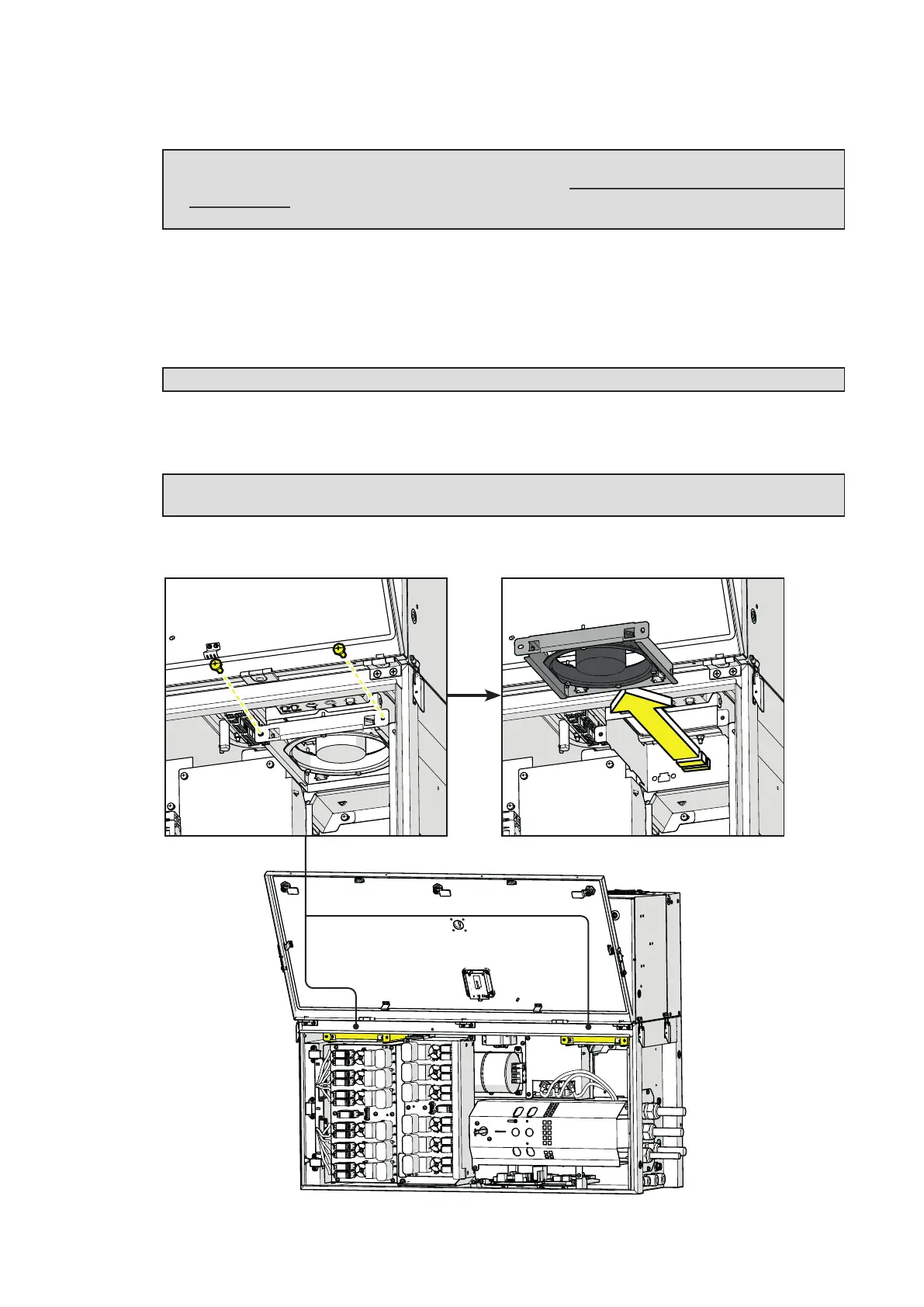
Procedure for replacing one of the two fan sections:
•
Perform the “Inverter total de-energization and safe access” procedure before operate on the
inverter.
• Open the front wiring box cover (07).
WARNING – B Do not open the power module front cover (06).
• Remove the 2 screws located on fan section.
• Pull out the fan section.
ATTENTION – A Pay special attention to don’t damage the cables situated in front of fans
during the replacement operation.
• Place the new fan section following the previous steps in reverse way.



 To Next Page