PostBase Fusion
178
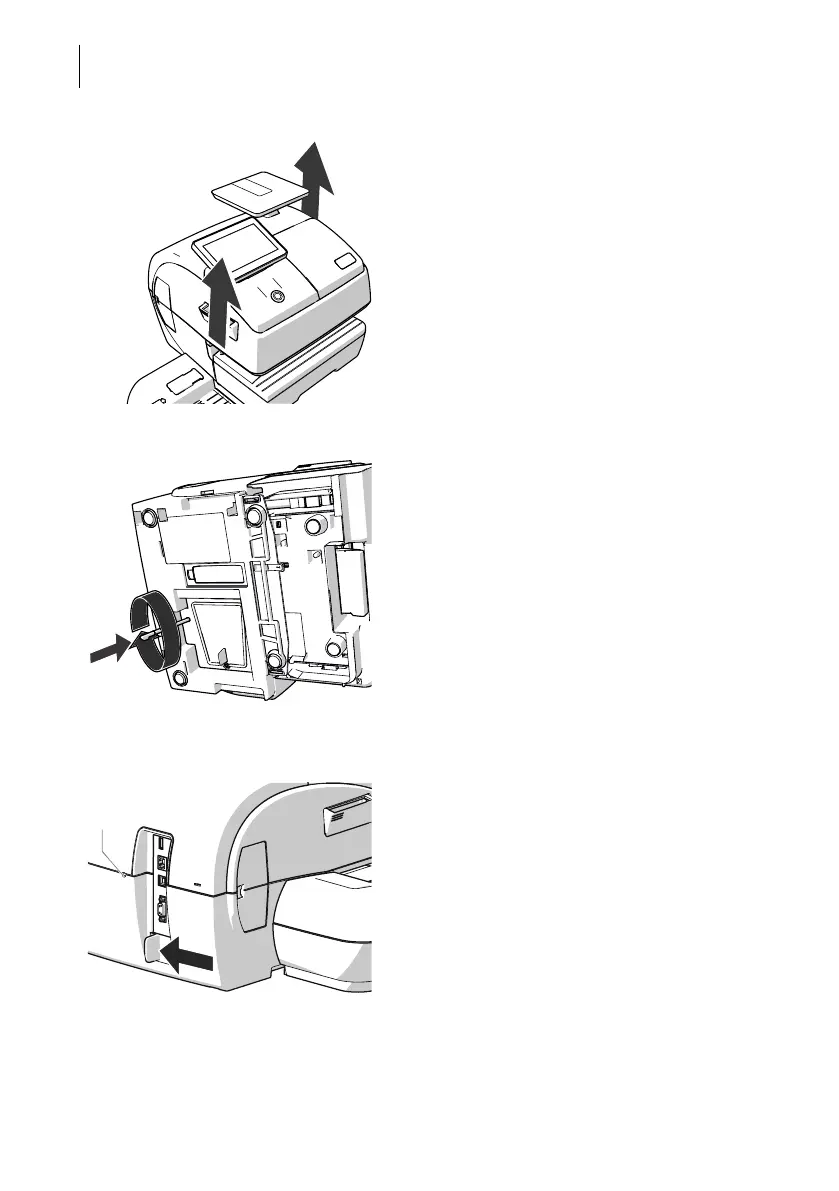
• Carefully lift the postage meter at the hous-
ing and remove it from the feeding device
at hand.
• Place the postage meter on a firm, level
base.
Lift ink cartridge from sealing position • Tilt the postage meter on its right-hand side
and deposit it safely.
• Insert the stylus into the hole in the cover.
• Press the stylus against the resistance
(spring pressure) and rotate it clockwise
until a “snap” indicates that the ink cartridge
has moved from its sealing position and is
ready to be moved to the exchange position.
• Remove the stylus.
• Place postage meter upright again.
Move ink cartridge to exchange position • Push the white slider next to the power
outlet on the PostBase Fusion in the
direction of the arrow and hold it.
Opening for ink
cartridge release



 To Next Page