10.2 NAS Configuration
Adding a Workgroup User or Share Administrator
Add a workgroup user or share administrator to be able to grant that user or administrator
access to CIFS shares.
Windows Workgroup
To add a workgroup user for a Windows workgroup:
1. Click Add.
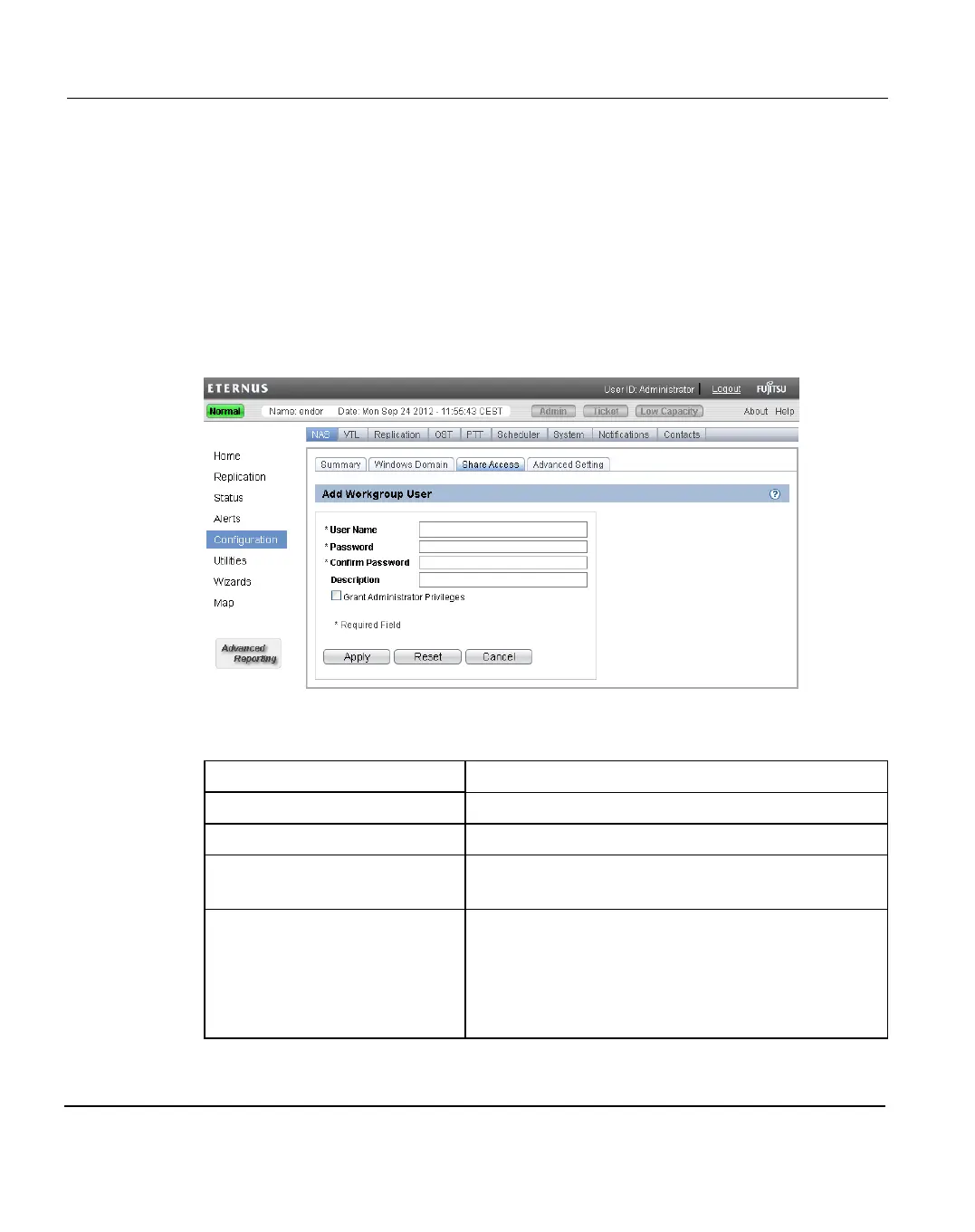
The Add Workgroup User page displays (see "Add Workgroup User Page" on page
212).
Figure 141:
Figure 142: Add Workgroup User Page
2. Enter information about the workgroup user:
User Name Enter the name of the workgroup user.
Password Enter the password for the workgroup user.
Confirm Password Enter the password again to confirm it.
Description (Optional) Enter a brief description of the workgroup
user.
Grant Administrator
Privileges
Select the check box to add the workgroup user to the
Windows Administrators group.
This allows the workgroup user to override certain
permissions settings and prevents the workgroup
user from being locked out of shares or directories.
3. Click Apply.
212 ETERNUS CS800





 To Next Page