14.2 Diagnostics
The Diagnostics page contains the following tabs:
l "System Diag File" on page 442
l "Storage Array Diag File" on page 442
l "Healthchecks" on page 443
System Diag File
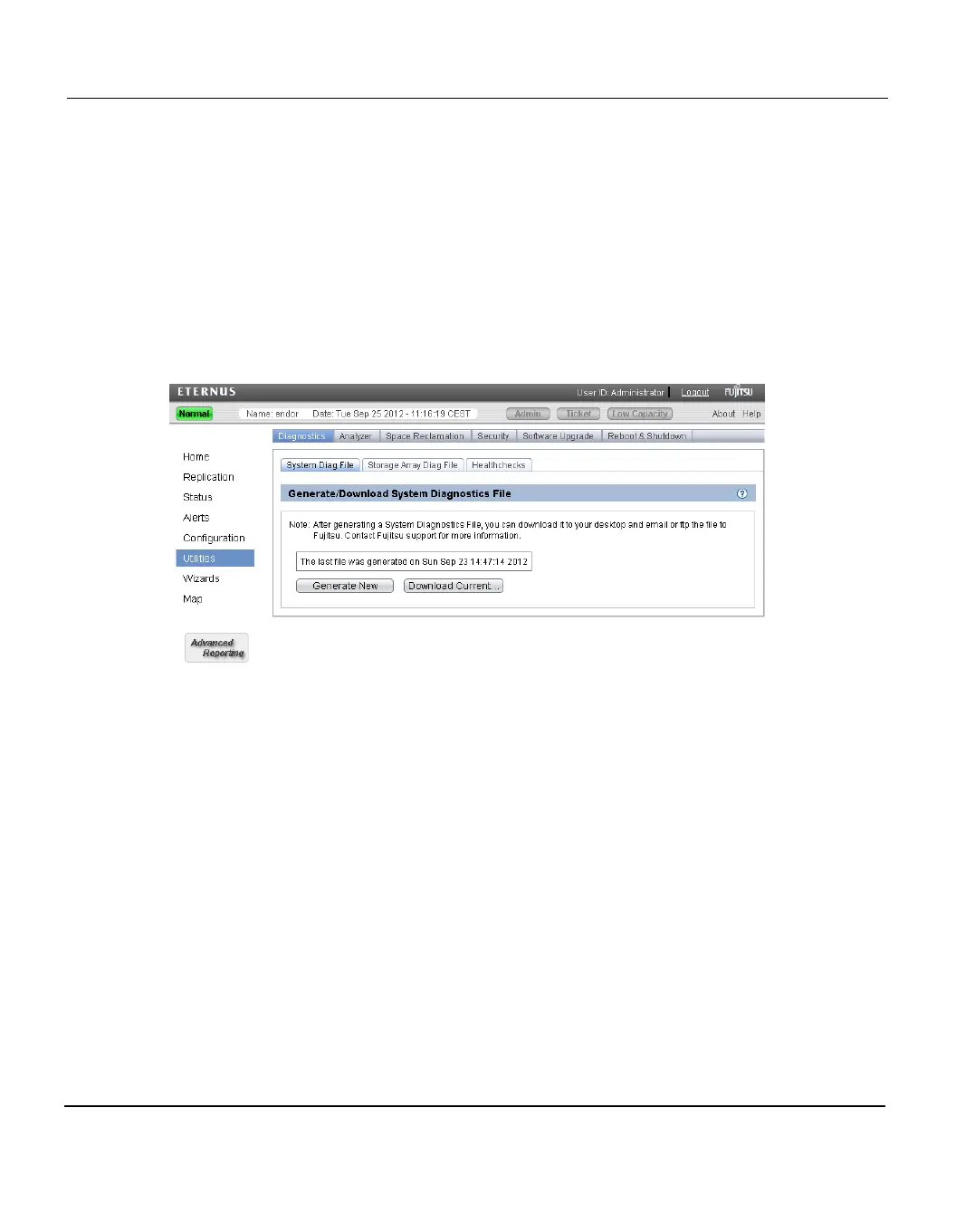
The System Diag File page allows you to generate and download a system diagnostics file.
This file contains the diagnostic logs for all of the system components.
To access the System Diag File page, on the Diagnostics page, click the System Diag
File tab (see "System Diag File Page" on page 442).
Figure 282: System Diag File Page
To generate and download a system diagnostics file:
1. Click Generate New to generate a new system diagnostics file.
The system generates a new diagnostics file. This can take several minutes.
2. After the file finishes generating, click the link to enable the Download Current button.
3. To download the generated diagnostics file, click Download Current.
A dialog box displays asking if you want to open or save the file.
4. Click Save or OK to download the file.
Storage Array Diag File
The Storage Array Diag File page allows you to generate and download a storage array
diagnostics file. This file contains the diagnostic logs for the storage arrays.
To access the Storage Array Diag File page, on the Diagnostics page, click the Storage
Array Diag File tab (see "Storage Array Diag File Page" on page 443).
442 ETERNUS CS800













 To Next Page