44 iRMC S2/S3
Configuring the LAN interface of the iRMC S2/S3
3.1.3 Configuring the LAN interface using the BIOS /
TrustedCore / UEFI setup utility
You can configure the iRMC S2/S3’s LAN interface using the BIOS /
TrustedCore / UEFI setup utility:
– Use the BIOS / TrustedCore setup utility to configure the LAN interface of the
iRMC S2.
– Use the UEFI (Unified Extensible Firmware Interface) setup utility to
configure the LAN interface of the iRMC S3.
3.1.3.1 Configuring the LAN interface of the iRMC S2 by using the BIOS
/ TrustedCore setup utility
I IPv6 addresses are not supported in the BIOS / TrustedCore setup utility.
Ê Call the BIOS / TrustedCore setup utility of the managed server. Do this by
pressing [F2] while the server is booting.
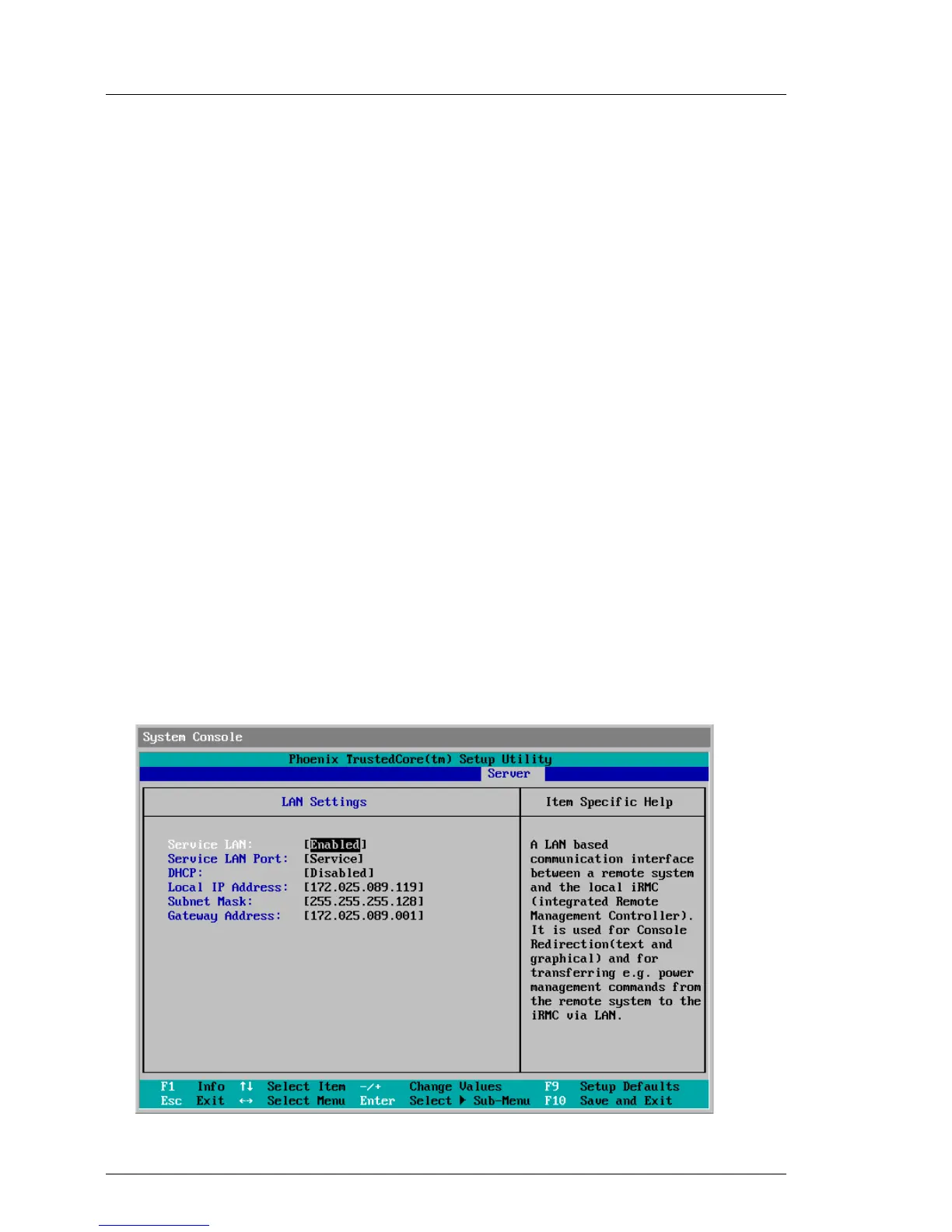
Ê Call the LAN parameter configuration menu:
–BIOS: Advanced – IPMI – LAN Settings
– TrustedCore: Server – IPMI – LAN Settings
Figure 8: LAN Settings menu (shown here for the TrustedCore setup utility)



 To Next Page